GB 10
Pressing"Extra"on the timer display allows you to select the Wi-
Fi menu.In the Wi-Fimenu if youpress the "< >" buttons youcan select:
- Off:Wi-Fi is off;the ovenis notcontrollablevia the app.
- On: Wi-fi is on and the oven is only controllable via the app. It means that it is not possible to select cooking
functions, recipes and temperature from the display. Only the Wi-Fi menu is available by pressing "Extra". You
can switch the oven off using the On/Off button, but you cannot switch it back on again via the display, it can
only be switched on via the app.
- Reset: This setting should be used to enrol the oven the first time it connects to your Wi-Fi network and to
reset the current Wi-Fi connection to allow a new enrolment. Once selected, the appliance gives you 5
minutes to complete the enrolment process. During this process the cooking functions, recipes and
temperature setting are not accessible from the display. Only the Wi-Fi menu is available by pressing "Extra".
You can switch the oven off using the On/Off button, but you cannot switch it back on again via the display, it
can only be switched on via the app. To exit the enrolment/reset procedure via the display, press "Extra" and
then use "< >" buttons to select "Off". After five minutes, the appliance will exit the enrolment/reset
procedure automatically.
- Read: the oven sends its status to the app but it cannot be controlled remotely. The oven must be enrolled
before thisis possible.
If Wi-Fiis not configured it is only possible to choose betweenoffand reset.
When the oven is connectedto Wi-Fi, the default cooking time duration is 5 hours, but this can be modified by
the user.
Wi-Fi Enrolment:
To enroll the appliance for Wi-Fi, press "Extra" on the display until the Wi-Fi icon lights, then select "Reset" by
pressing "< >". The procedure on the app should then be followed. Once selected, the appliance gives you 5
minutesto complete the enrolment process.
Wi-Fi icon
- Iconnot lit:Wi-Fi is off.
- Iconblinks 1 second on an 1second off:the oven is accessible to yourWi-Fi networkand ready to be enrolled.
If theenrolmenthas not beensuccessful, theWi-Fi icon will switch off after5 minutes.
- Iconis permanentlylit: the oven is connected toyour Wi-Firouter.
- Theicon blinks3 secondson and 1second off:the ovenis trying to connectto yourWi-Fi router.
- Theicon blinks1 secondon and 3seconds off: theoven isin readonly mode.
WiFi (depends on the oven model)
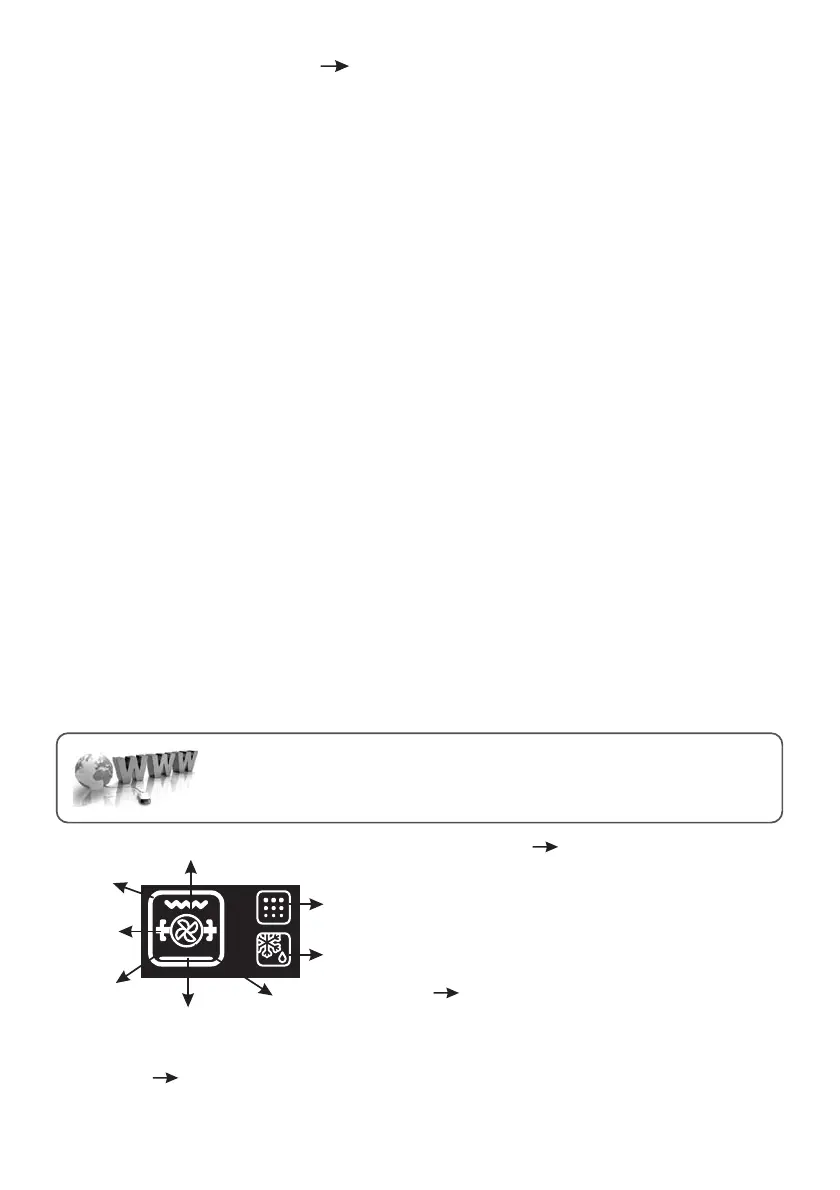
Grill
Oven box
Turnspit
Circular
heating element
Bottom heating element
Fan
Defost
Pyro
LANGUAGE SETTING The language can be set when
the oven is switched off by pressing the Extra and Select
buttonssimultaneously and for 3". The currentlanguage is
shown on the display and can be changed by pressing the
“<” or “>” keys, confirming it by pressing SELECT. Available
languagesare: Italian,English, French and German.
SELECT Any selection must be confirmed. If not
confirmed within 15 seconds, the selection is cancelled.
Bychanging menu, any unconfirmedselection is lost.
“HOT” ICON When a cooking programme finishes or when the oven switches off, if the oven is still
hot, the display showsthecurrent timealternating with the message“HOT” at 3 intervals.
CANDY SIMPLY-FI:
For detailed information about HOW TO CONNECT your simply-Fi appliance and
HOW TO USE it at its best, go to or visit the dedicatedhttp://www.candysimplyfi.com
simply-Fi Customer Service website http://simplyfiservice.candy-hoover.com


 To Next Page