EasyManua.ls Logo

Canon 10x32 IS - User Manual

Canon 10x32 IS
16 pages
Print Icon
To Next Page IconTo Next Page
Loading...
Instructions
ENG
Question and Answer IconNeed help?

Do you have a question about the Canon 10x32 IS and is the answer not in the manual?

Summary

Product Overview and Components

Symbols Guide

Explains warning and hint icons used in the manual for safety and guidance.

Included Accessories

Lists the items provided with the binoculars, such as case, strap, and batteries.

Binocular Safety Precautions

Critical Warnings

Details risks of death or serious injury from improper binocular use, like looking at the sun.

Usage Cautions

Advice to prevent injury during binocular use, such as avoiding unstable surfaces or swinging.

Property and Battery Safety Precautions

Property Damage Warnings

Advice to prevent damage to binoculars, including avoiding water, sunlight, and harsh solvents.

Battery Handling Warnings

Critical safety advice for battery installation and use to prevent overheating or explosions.

Battery and Storage Precautions

Battery Handling Cautions

General advice for battery handling, including removing them when not in use to prevent leakage.

Storage and Environment

Advice on storing binoculars in dry locations and managing condensation from temperature changes.

Binocular Nomenclature

Key Parts Identification

Labels and descriptions identifying major components of the binoculars.

Using Lens Caps and Strap

Attaching Eyepiece Caps

Instructions for securing the eyepiece lens caps over the eyecups.

Installing the Strap

Steps for fastening the strap securely to the binoculars.

Loading the Batteries

Battery Installation Steps

Guide on opening the battery chamber, inserting batteries correctly, and closing the cover.

Battery Life Information

Details on expected battery usage times under different temperature conditions.

Initial Binocular Setup

Adjusting Eyecups

How to set the eyecup position for comfortable viewing, especially with eyeglasses.

Adjusting Interpupillary Distance

Aligning the binoculars to match the distance between your eyes for clear images.

Diopter and Focus Adjustment

Steps to achieve sharp focus for both eyes using the diopter ring and focusing knob.

Image Stabilizer Operation

Five-Minute IS Modes

How to start and stop general IS and POWERD IS for five-minute continuous operation.

Switching Between IS Modes

Methods to toggle between general IS and POWERD IS operation.

Image Stabilizer Operation Details

Holding Down Button for IS

Using buttons to hold IS operation as long as the button is pressed.

IS Limitations and Power Saving

Factors affecting IS performance and automatic power-off features.

Using the Carrying Case

Storing Binoculars in Case

Instructions for placing the binoculars into the carrying case.

Securing the Case

Steps to close and secure the case flap after storing the binoculars.

Troubleshooting Guide

Common Binocular Issues

Solutions for problems like unclear images or improper focus.

Image Stabilizer Problems

Solutions for the Image Stabilizer not operating or making unusual sounds.

Major Product Specifications

Regulatory Compliance

FCC and IC Compliance

Statements regarding FCC rules and Canadian ICES for device operation.

Environmental Disposal

Information on WEEE directive and proper disposal of batteries and electronics.

Summary

Product Overview and Components

Symbols Guide

Explains warning and hint icons used in the manual for safety and guidance.

Included Accessories

Lists the items provided with the binoculars, such as case, strap, and batteries.

Binocular Safety Precautions

Critical Warnings

Details risks of death or serious injury from improper binocular use, like looking at the sun.

Usage Cautions

Advice to prevent injury during binocular use, such as avoiding unstable surfaces or swinging.

Property and Battery Safety Precautions

Property Damage Warnings

Advice to prevent damage to binoculars, including avoiding water, sunlight, and harsh solvents.

Battery Handling Warnings

Critical safety advice for battery installation and use to prevent overheating or explosions.

Battery and Storage Precautions

Battery Handling Cautions

General advice for battery handling, including removing them when not in use to prevent leakage.

Storage and Environment

Advice on storing binoculars in dry locations and managing condensation from temperature changes.

Binocular Nomenclature

Key Parts Identification

Labels and descriptions identifying major components of the binoculars.

Using Lens Caps and Strap

Attaching Eyepiece Caps

Instructions for securing the eyepiece lens caps over the eyecups.

Installing the Strap

Steps for fastening the strap securely to the binoculars.

Loading the Batteries

Battery Installation Steps

Guide on opening the battery chamber, inserting batteries correctly, and closing the cover.

Battery Life Information

Details on expected battery usage times under different temperature conditions.

Initial Binocular Setup

Adjusting Eyecups

How to set the eyecup position for comfortable viewing, especially with eyeglasses.

Adjusting Interpupillary Distance

Aligning the binoculars to match the distance between your eyes for clear images.

Diopter and Focus Adjustment

Steps to achieve sharp focus for both eyes using the diopter ring and focusing knob.

Image Stabilizer Operation

Five-Minute IS Modes

How to start and stop general IS and POWERD IS for five-minute continuous operation.

Switching Between IS Modes

Methods to toggle between general IS and POWERD IS operation.

Image Stabilizer Operation Details

Holding Down Button for IS

Using buttons to hold IS operation as long as the button is pressed.

IS Limitations and Power Saving

Factors affecting IS performance and automatic power-off features.

Using the Carrying Case

Storing Binoculars in Case

Instructions for placing the binoculars into the carrying case.

Securing the Case

Steps to close and secure the case flap after storing the binoculars.

Troubleshooting Guide

Common Binocular Issues

Solutions for problems like unclear images or improper focus.

Image Stabilizer Problems

Solutions for the Image Stabilizer not operating or making unusual sounds.

Major Product Specifications

Regulatory Compliance

FCC and IC Compliance

Statements regarding FCC rules and Canadian ICES for device operation.

Environmental Disposal

Information on WEEE directive and proper disposal of batteries and electronics.

Overview

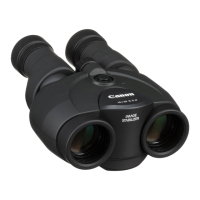
The Canon Binoculars, available in 10x32 IS, 12x32 IS, and 14x32 IS models, are prism binoculars equipped with a lens-shift type Image Stabilizer, designed to provide a steady and clear viewing experience. These binoculars are intended for general observation, offering enhanced stability to counteract hand shake and other vibrations, making distant objects easier to observe.

Function Description

The primary function of these binoculars is to magnify distant objects, bringing them into closer view for detailed observation. The "IS" in the model names signifies the Image Stabilizer feature, which is a crucial component for achieving stable images, especially at higher magnifications or during prolonged use. The Image Stabilizer works by actively compensating for movement, ensuring that the viewed image remains steady even if the user's hands are shaking. This is particularly beneficial for activities such as birdwatching, sporting events, or any scenario where a stable view is paramount.

The binoculars offer two distinct Image Stabilizer modes: a "general IS" and a "POWERD IS." The general IS provides image stabilization for a wide area, suitable for scanning landscapes or following moving subjects. The POWERD IS, on the other hand, is specifically designed for continuous aiming at one point, offering enhanced stabilization for focused observation of a stationary target. This dual-mode functionality allows users to select the most appropriate stabilization for their specific viewing needs.

Usage Features

To ensure optimal performance and user comfort, the binoculars incorporate several adjustable features.

  • Eyecup Position Adjustment: The eyecups can be adjusted to suit individual preferences, particularly for users wearing eyeglasses. This allows for comfortable viewing by setting the appropriate distance between the eyes and the lenses.
  • Binocular Width Adjustment: The width of the binoculars can be adjusted to match the interpupillary distance of the user. This ensures that the left and right images converge into a single, comfortable view, minimizing eye strain. This adjustment is best performed while looking at a distant object.
  • Diopter Adjustment: A diopter correction ring is provided to compensate for differences in vision between the user's left and right eyes. Users are instructed to first adjust the focusing knob while looking through the left eyepiece only until the object is sharp, and then adjust the diopter correction ring while looking through the right eyepiece only at the same object until it also appears sharp. This ensures that both eyes receive a clear, focused image.
  • Focus Adjustment: A central focusing knob allows for fine-tuning the focus of the binoculars, bringing objects into sharp relief. This is the final step in achieving a clear image after adjusting the eyecups, width, and diopter.
  • Image Stabilizer Operation: The Image Stabilizer can be activated and controlled via dedicated buttons. A quick press and release of either the Image Stabilizer button or the POWERD IS button will activate the respective stabilization mode for a continuous five-minute period. Pressing and releasing the button again will stop the operation. For more dynamic control, holding down either button will activate the stabilization only for as long as the button is pressed, stopping once released. Users can also switch between the general IS and POWERD IS modes by pressing and quickly releasing the alternative IS button while one mode is active. This flexibility allows for seamless transitions between different viewing scenarios.
  • Battery Power: The binoculars are powered by two AA-size alkaline batteries. The battery chamber cover is easily accessible for loading and replacing batteries. A lamp indicates when the Image Stabilizer is active, and checking this lamp is part of the battery loading process to ensure proper function. The battery life varies depending on temperature, with longer durations at moderate temperatures. Nickel metal hydride (Ni-MH) batteries can also be used.
  • Accessories: The binoculars come with essential accessories, including a case for protection, a strap for convenient carrying, eyepiece lens caps to protect the lenses, and strings for the eyepiece lens caps to prevent loss. Two AA alkaline batteries are also included to get started immediately.

Maintenance Features

Proper care and maintenance are crucial for the longevity and optimal performance of the Canon Binoculars.

  • Cleaning Lenses and Body: The binoculars are precision instruments and should be handled with care. For cleaning the lenses, a blower brush should first be used to remove dust and debris. Afterwards, a soft, dry cloth can be used to gently wipe the lens surface without scratching. Organic solvents such as alcohol, thinner, or benzene should never be used on the lenses or body, as they can cause damage.
  • Storage: When not in use, especially for extended periods, the binoculars should be stored in a well-ventilated, dry place after thoroughly cleaning the lenses and body. Storing them in humid locations can lead to fungus formation on the lenses or cause them to become cloudy. It is also important to remove the batteries when storing the binoculars for a long time to prevent leakage and potential damage.
  • Temperature and Condensation: Sudden changes in temperature can cause condensation to form on the surface and internal parts of the binoculars. To prevent this, if moving the binoculars from a cold to a warm environment (or vice versa), it is recommended to place them in an airtight plastic bag and allow them to gradually adjust to the new temperature before taking them out.
  • Protection from Elements: The binoculars should not be placed underwater or exposed to rain or water spray. They should also not be stored in direct sunlight, such as inside a car, as high temperatures can cause damage.
  • Battery Handling: When handling batteries, users must adhere to specific precautions to prevent overheating, smoke generation, ignitions, leakage, or explosions. This includes using batteries with the correct nominal voltage (1.5V), avoiding mixing different brands or old and new batteries, ensuring correct polarity, and never attempting to disassemble, charge (unless rechargeable), heat, short-circuit, or dispose of batteries in fire. The use of AA-size lithium batteries is discouraged due to the potential for extremely high temperatures.
  • Physical Protection: To prevent damage, the binoculars should not be dropped or subjected to shock. Disassembly should never be attempted. When carrying, the strap should be securely fastened to prevent accidental drops or injury to others if swung around.
  • Eyecup Irritation: Prolonged or repeated use of the rubber eyecups may irritate the skin around the eyes. If this occurs, it is advised to consult a physician.

By following these instructions for function, usage, and maintenance, users can ensure a reliable and enjoyable experience with their Canon Image Stabilizer Binoculars.

Canon 10x32 IS Specifications

General IconGeneral
FoldableNo
Brightness- cd/m²
Exit pupil3.2 mm
Eye relief14.5 mm
Prism typePorro II
Waterproof-
Lens coatingSuper Spectra Coating (SSC)
Magnification10 x
Product colorBlack
Image stabilizerYes
Objective diameter32 mm
Real field of view6 °
Apparent field of view55.3 °
Closest focusing distance2 m
Diopter compensation (±)3
Field of view (at 1000 m)105 m
Eyepiece lens structure (elements/groups)5/4
Objective lens structure (elements/groups)7/6
Battery typeAA
Operating temperature (T-T)-10 - 45 °C
Weight and Dimensions IconWeight and Dimensions
Depth77 mm
Width142 mm
Height171 mm
Weight780 g

Related product manuals