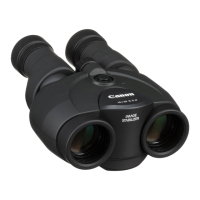
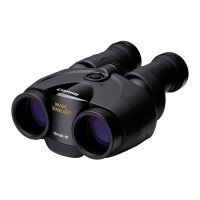
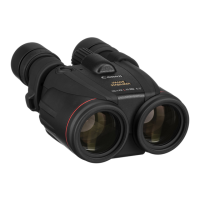
The Canon 10x42L IS WP binoculars are high-performance, waterproof optical instruments designed for a wide range of uses, from bird watching to astronomical observations. These binoculars incorporate an Image Stabilizer with a Canon-developed vari-angle prism, ensuring a steady image even when handheld, which significantly enhances viewing comfort and clarity.
Function Description
The primary function of these binoculars is to provide magnified, stabilized views of distant objects. The 10x magnification brings subjects closer, while the large 42mm objective lenses gather ample light, resulting in bright and clear images. The Image Stabilizer is a key feature, actively counteracting hand shake and other vibrations to deliver a remarkably steady image. This stabilization can be activated in two ways: by continuously holding down the Image Stabilizer button for immediate stabilization, or by pressing and quickly releasing the button to engage the stabilizer for approximately five minutes of continuous operation. The Image Stabilizer lamp illuminates when the feature is active, providing visual confirmation. Even without batteries, the binoculars can still be used as conventional optical instruments, though without the stabilization benefit.
Optical quality is a cornerstone of the 10x42L IS WP binoculars. They feature a total of four Ultra-low Dispersion (UD) lenses—two on each side—which are crucial for minimizing chromatic aberration and ensuring high contrast and color fidelity. The lenses also benefit from a full-surface Multilayer Coating (Super Spectra Coating), which reduces reflections and maximizes light transmission, further contributing to bright, sharp images. A Doublet Field-Flattener system is integrated to deliver sharp, distortion-free images from edge-to-edge, providing a consistent viewing experience across the entire field of view.
The binoculars are designed for user comfort and adaptability. They include freely adjustable eyecups, allowing users to customize the eye relief, which is particularly beneficial for those wearing eyeglasses. The dioptric correction mechanism, coupled with a fixation mechanism, prevents unexpected diopter misalignment, ensuring that the image remains sharp for individual users. The focusing knob allows for precise adjustment to bring objects into sharp focus, with a focusing range from approximately 2.5 meters to infinity.
Usage Features
Before using the binoculars, it's essential to load two size-AA batteries into the battery chamber, ensuring correct polarity. The battery chamber cover is secured with a lock screw, which should be tightened to maintain the waterproof integrity. Once batteries are loaded, pressing the Image Stabilizer button should illuminate the lamp, confirming power. If the lamp does not light or if the Image Stabilizer does not operate properly despite the lamp lighting, it indicates low battery power, and both batteries should be replaced. For cold temperatures, size-AA lithium batteries are recommended for better performance.
Adjusting the binoculars for optimal viewing involves several steps. First, users should adjust the eyecup position by turning them to achieve comfortable eye relief, especially if wearing eyeglasses. Next, the width of the binoculars needs to be adjusted to match the user's interpupillary distance. This is done by looking through the binoculars and adjusting the angle of the eyepieces until the left and right images converge into a single, circular field of view. This adjustment maximizes performance and minimizes eye fatigue.
Diopter adjustment is critical for sharp viewing. Users should first look with their left eye only and adjust the focusing knob until the object appears sharp. Then, the dioptric correction ring should be pushed in until a click is heard. While looking with the right eye only at the same object, the dioptric correction ring is turned until the object looks sharp. Finally, the dioptric correction ring is pulled out until a click is heard to secure the adjustment. After these steps, the focusing knob can be used to bring objects into sharp focus for both eyes.
The binoculars are equipped with rubber protectors on the objective lenses, providing excellent shock resistance. They also come with objective and eyepiece lens caps, which can be attached to protect the lenses when not in use. The eyepiece lens caps can be installed by putting the strap through the strap hole, and the objective lens caps can be connected to the strap using the included string. A 52mm filter (sold separately) can be attached to the filter attachment thread for specialized viewing conditions. The binoculars also feature a tripod socket, allowing them to be mounted on a tripod for extended, stable viewing sessions. If mounted on a tripod, the Image Stabilizer will compensate for small vibrations inherent to tripod use.
Maintenance Features
Maintaining the waterproof property of the binoculars is crucial for their longevity and performance. The binoculars are waterproof but not designed for underwater use. Before and after use, especially in sandy or dusty environments, it is important to check the O-ring in the battery chamber and the contact surface for any dust, sand, or distortion. If present, these should be carefully cleaned with a damp cotton swab or similar material. The O-ring should never be forcefully pulled or extended, nor should grease or oil come into contact with it. If the O-ring is broken, cut, distorted, or if more than two years have passed since purchase, it is recommended to have it replaced at a Canon Service Center. For frequent use in sandy or dusty environments, annual O-ring replacement is advised.
If the binoculars become soiled with sand or dirt, they can be washed with tap water (below 30°C/86°F). During washing, no functions should be operated, and the battery chamber cover must be securely closed. The surface should be rinsed with tap water to remove loose debris. For more thorough cleaning, the binoculars can be soaked in a bucket of water and gently moved back and forth. If exposed to salt water, soaking them for one to two hours is recommended to remove salt residue. After washing, the binoculars should be wiped with a clean, dry, soft cloth and allowed to dry completely in the shade, as moisture can sometimes remain in gaps between components. Lens cleaner or similar materials can be used for cleaning the lenses once the binoculars are dry. Detergents, hot water, or strong running water should be avoided, as these can cause malfunction. The binoculars should not be swung to shake off water, nor should a hair dryer be used for drying. For heavy soiling or large amounts of sand, consulting a Canon Service Center is recommended.
For prolonged storage, especially in humid conditions, the binoculars and lenses should be thoroughly cleaned and stored in a well-ventilated, dry place to prevent fungus growth. Batteries should be removed if the binoculars are not to be used for an extended period to prevent leakage, corrosion, or malfunction. The binoculars should not be stored near heaters, in closed cars on sunny days, or in environments with corrosive chemicals.


 To Next Page

 General