
 Need help?
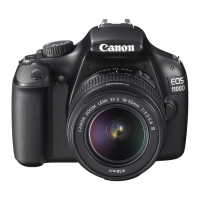
Do you have a question about the Canon 1100D and is the answer not in the manual?
How to use Tv mode (Shutter-priority AE) for freezing or blurring action.
How to use Av mode (Aperture-priority AE) to control depth of field.
Explains how to enable and use the depth-of-field preview function.
How to manually set shutter speed and aperture for exposure control.
Details using bulb exposure for long exposures, like fireworks.
Explains A-DEP mode for automatic depth of field control.
Explains the three metering modes: Evaluative, Partial, and Center-weighted.
How to adjust exposure compensation for brighter or darker images.
Taking multiple shots with varying exposure automatically.
How to lock exposure settings by pressing the AE lock button.
How to lock flash exposure settings using the FE lock function.
Automatically corrects brightness and contrast for better image quality.
Automatically corrects lens light fall-off in image corners.
Adjusting parameters like Sharpness and Contrast for image styles.
Creating and saving custom picture styles.
Adjusting white balance for accurate color reproduction under different light sources.
Manually setting white balance using a white object for accuracy.
Fine-tuning white balance by shifting color tone for light sources.
How to set the camera to enable Live View shooting.
Important warnings and precautions for using Live View shooting.
Setting AF mode, white balance, Picture Style, etc., via Quick Control.
Explains Live View shooting, AF mode, grid display, and metering timer menus.
Selecting and using different AF modes like Live, Face detection, and Quick.
How to use Quick Mode AF, which uses a dedicated AF sensor.
How to magnify and focus images manually.
Warnings about internal temperature, image quality, and light conditions.
Icons indicating camera temperature increases and potential image quality issues.
Cautions regarding brightness, flicker, and noise in Live View images.
Cautions on image quality degradation from prolonged shooting or high ISO.
Warnings about pointing lens at sun, Live View cautions, and image quality.
Setting AF mode, white balance, Picture Style, etc., via Quick Control for movies.
Explains movie shooting menu options: AF mode, shutter/AE lock, highlight tone.
Setting movie recording size, frame rate, and total recording time.
Settings for exposure compensation, Auto Lighting Optimizer, WB, and Picture Style in movies.
Warning about blinking red icon indicating imminent termination of movie shooting.
Cautions regarding Image Stabilizer, battery, microphone noise, and card write speed.
Resetting shooting and menu settings to factory defaults.
Configuring built-in flash and external Speedlite settings.
Setting functions for built-in flash and compatible external Speedlites.
Adjusting flash exposure compensation as described on page 102.
Instructions for cleaning the camera's image sensor.
Important warnings to avoid damaging the sensor during cleaning.
Methods for playing back movies on a TV set.
Connecting the camera to a TV using an HDMI cable for playback.
Steps for playing back movies, including selecting and controlling playback.
Connecting the camera to a TV via HDMI for playback.
 General
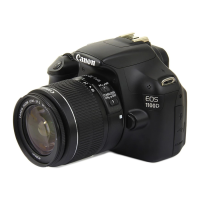
| Model | EOS 1100D |
|---|---|
| Type | Digital SLR |
| Effective Megapixels | 12.2 MP |
| Sensor Type | CMOS |
| Sensor Size | 22.2 x 14.7 mm |
| Processor | DIGIC 4 |
| ISO Range | 100-6400 |
| Autofocus Points | 9 |
| Continuous Shooting | 3 fps |
| LCD Screen Size | 2.7 inches |
| LCD Resolution | 230, 000 dots |
| Lens Mount | Canon EF/EF-S |
| Storage Media | SD/SDHC/SDXC |
| Battery Type | LP-E10 |
| Weight | 495 g (body only) |
| Dimensions | 129.9 x 99.7 x 77.9 mm |
| Max Video Resolution | 1280 x 720 (720p) |








 To Next Page