dvanced Guide
> Printing from a Computer >
Printing with Other Application Software
>
Overview of the Printer Driver
> Canon IJ Status Monitor
Canon IJ Status Monitor
The Canon IJ Status Monitor is an application software that shows the status of the printer and the
progress of printing on the Windows screen. You will know the status of the printer with graphics, icons,
and messages.
Launching the Canon IJ Status Monitor
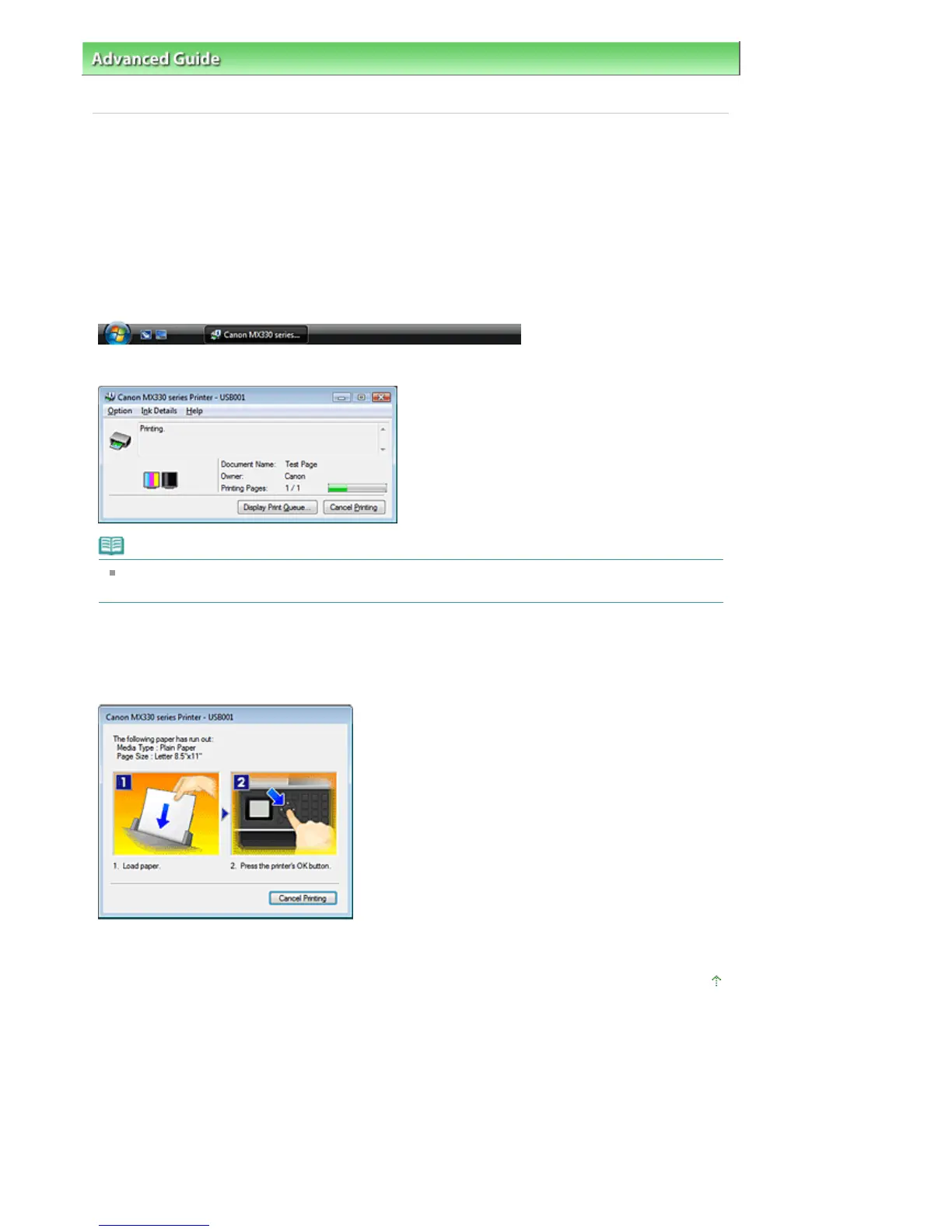
The Canon IJ Status Monitor launches automatically when data is sent to the printer. When launched, the
Canon IJ Status Monitor appears as a button on the Task Bar.
Click the Status Monitor button displayed on the Task Bar. The Canon IJ Status Monitor appears.
Note
To open the Canon IJ Status Monitor when the printer is not printing, open the
printer driver setup
windo
and click View Printer Status... on the Maintenance tab.
When Errors Occur
The Canon IJ Status Monitor is automatically displayed when an error occurs (e.g., if the printer runs out
of paper or if the ink is low).
In such cases, take the appropriate action as described.
Page top
Page 331 of 853 pagesCanon IJ Status Monitor








 To Next Page