7
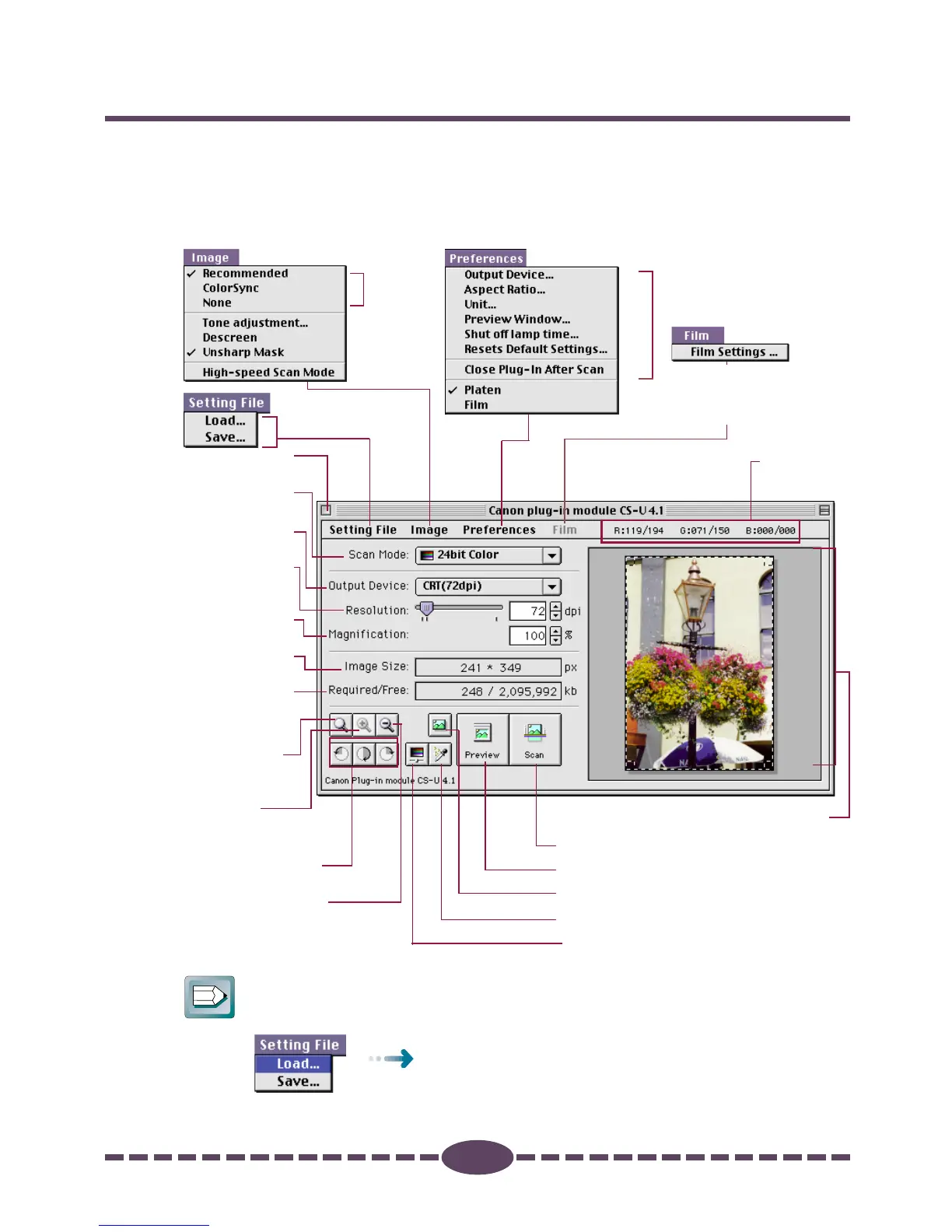
Control Panel Features
When you need more information about a control panel button or menu, refer to
the illustration below and go to the referenced page number for more details.
• The illustration may differ slightly from the version of Plug-in Module CS-U
provided in your package.
➜ p. 53
➜ p. 40-52
➜ p. 55
➜ p. 54
➜ p. 56
➜ pp. 25-28
➜ p. 52
Tone Adjustment Button ➜ pp. 40-52
Close Box
➜ p. 14
Scan Mode
➜ p. 21
Zoom In
Button
➜ p. 31
Zoom Out Button
➜ p. 32
Output Device
➜ p. 18
Resolution
➜ pp. 19-20
Magnification
➜ pp. 19-20
Image Size
➜ pp. 19-20
Required/
Free memory
➜ p. 21
Browser Button ➜ p. 23
Scan Button ➜ p. 33
Preview Button ➜ p. 17
Preview Window ➜ p. 14, 26
RGB values
➜ p. 14
Auto Tone Adjustment Button ➜ p. 40
Rotation Button
➜ p. 24
Zoom Reset
Button
➜ p. 32
Available whin [Film] is
selected in the Preferences
menu.➜ p. 35
Hint
In this guide, menu items are marked in the following manner:
Select [Load] from the [Setting File] menu.





 To Next Page