Additional Information • 61
FUNC. Menu (cont.)
1
Option available only when the mode switch is set to .
2
Option available only in the original index screen with DVD-RW discs in VR mode.
3
Option available only in the playlist index screen with DVD-RW discs in VR mode.
4
Option available only in the index screen with DVD-RW discs in VR mode.
5
Option available only during playback.
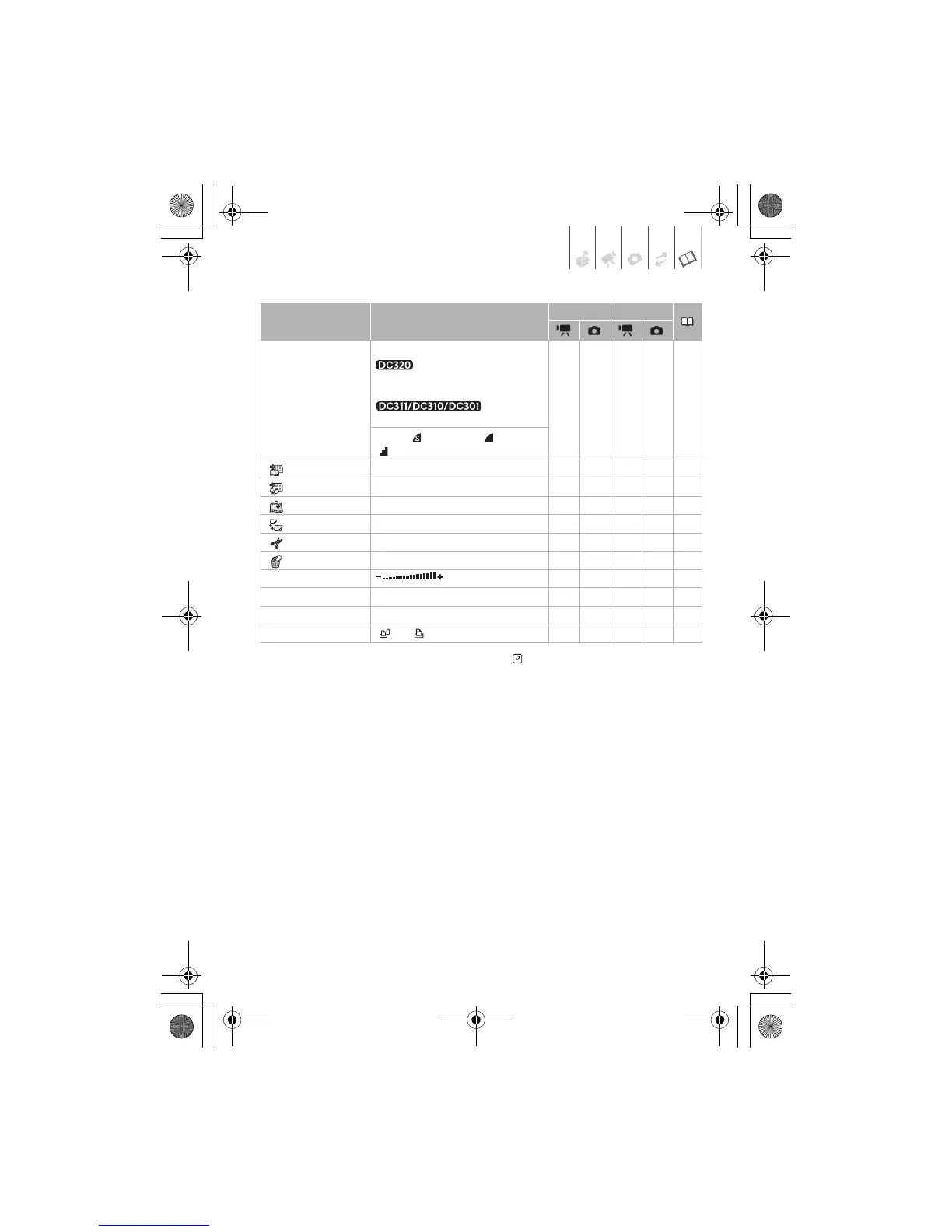
Menu item Setting options
CAMERA PLAY
Still image size/quality Size:
[LW 1152x648], [L 1152x864],
[S 640x480]
[L 1024x768], [S 640x480]
– z ––49
Quality: [ SUPER FINE], [FINE],
[NORMAL]
[ TO PLAYLIST]
2
–––z –43
[ TO ORIGINAL]
3
–––z –43
[ ADD TO PLAYLIST]
2
[ALL SCENES], [ONE SCENE], [CANCEL] – – z –42
[ MOVE]
3
–––z –43
[ DIVIDE]
3
–––z –43
[ DELETE]
4
[NO], [YES] – – z –33
[SPEAKER VOL.]
5
––z –32
[SLIDESHOW] – – – – z 51
[PROTECT] – – – – z 55
[PRINT ORDER] [ 0] - [ 99] COPIES – – – z 57
D126_NTSC_PAL_E.book Page 61 Tuesday, January 15, 2008 12:15 PM



 To Next Page