3
z For camera and printer connection instructions, please refer to
page 6.
Printing Selected Images with DPOF Settings
This option allows you to select images for printing and specify
print settings, such as the number of copies, with the camera
(DPOF* print settings). This is very convenient when you want
to print several images at once or have them printed at a photo
lab.
* Digital Print Order Format
Refer to the Camera User Guide for details on how to select images
and specify the DPOF settings. This guide explains how to print
images that have already been selected and specified with the
DPOF settings.
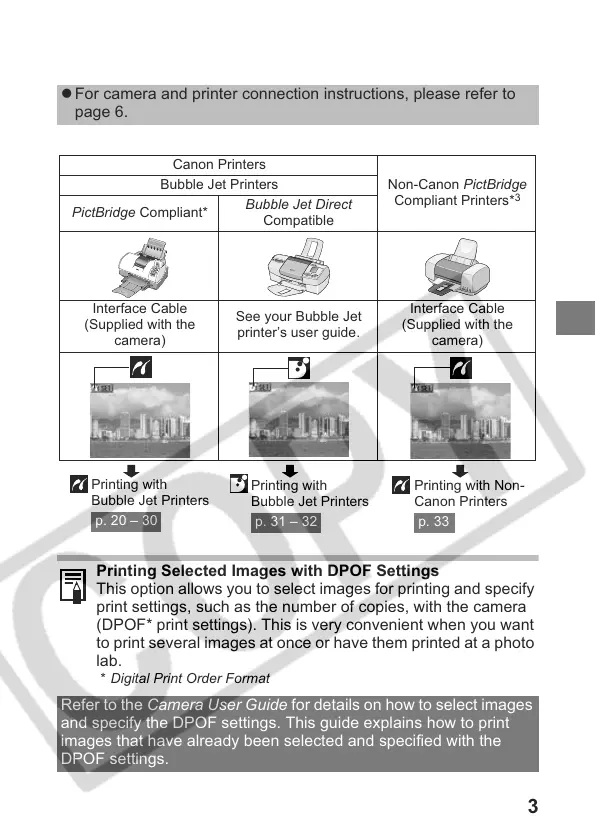
Canon Printers
Non-Canon PictBridge
Compliant Printers*
3
Bubble Jet Printers
PictBridge Compliant*
Bubble Jet Direct
Compatible
Interface Cable
(Supplied with the
camera)
See your Bubble Jet
printer’s user guide.
Interface Cable
(Supplied with the
camera)
Printing with
Bubble Jet Printers
p. 20 – 30
Printing with
Bubble Jet Printers
p. 31 – 32
Printing with Non-
Canon Printers
p. 33











 To Next Page