43
1
2
3
4
Introduction
Contents at
a Glance
Downloading
Images
Camera
Settings
Remote
Shooting
Reference
Preferences
Index
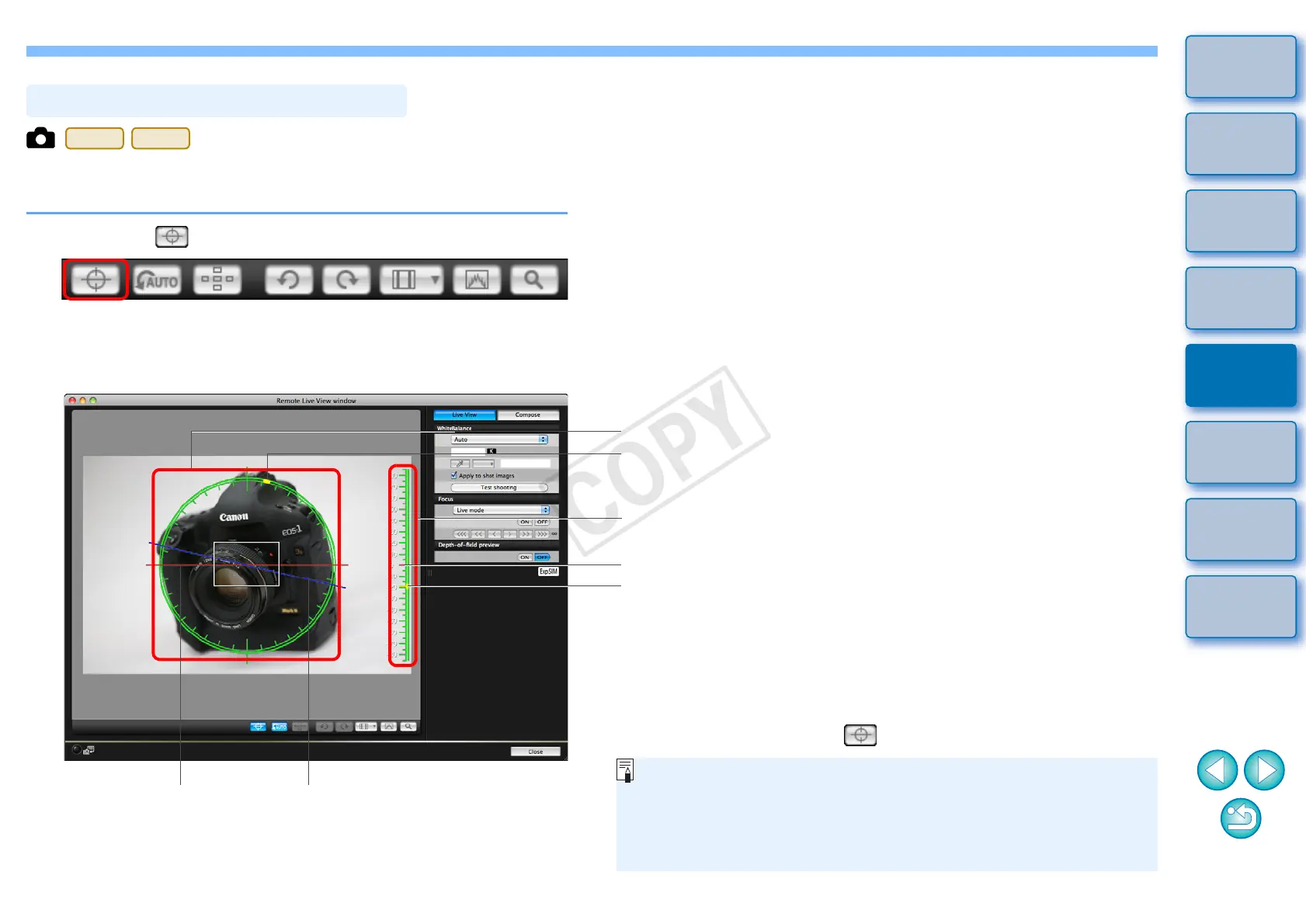
You can display an electronic level in the [Remote Live View window] to
check the tilt of the camera.
1
Click the [ ] button in the [Remote Live View window].
¿
An electronic level is displayed in the [Remote Live View window].
2
Check the tilt of the camera.
Camera’s horizontal
position
Horizontal
reference
Position of camera top
Horizontal level
Vertical reference
Camera’s vertical position
Vertical level
*One horizontal increment is equal to 10
°
, and one vertical increment is
equal to 5
°
.
O To ad j u st h o rizo n tal tilt , move t he c a m era s o th e came r a’s hori z o nta l
position and the horizontal reference match.
O To ad j u st v e rtic a l til t , mov e the c amera so t h e cam e r a’s ver t i cal
position and the vertical reference match.
O To hid e the l e vel, c l ick t h e [ ] but t o n aga i n .
O During movie shooting, the electronic level will not be displayed.
O Even when tilt is corrected, there may be a margin of error of
approx. ±1°.
O If the camera is very tilted, the electronic level’s margin of error
will be bigger.










 To Next Page