EasyManua.ls Logo

Canon EOS 500D - Page 9

Canon EOS 500D
101 pages
Print Icon
To Next Page IconTo Next Page
To Previous Page IconTo Previous Page
Loading...
88
1
2
3
4
Introduction
Contents at
a Glance
Downloading
Images
Camera
Settings
Remote
Shooting
Reference
Preferences
Index
2
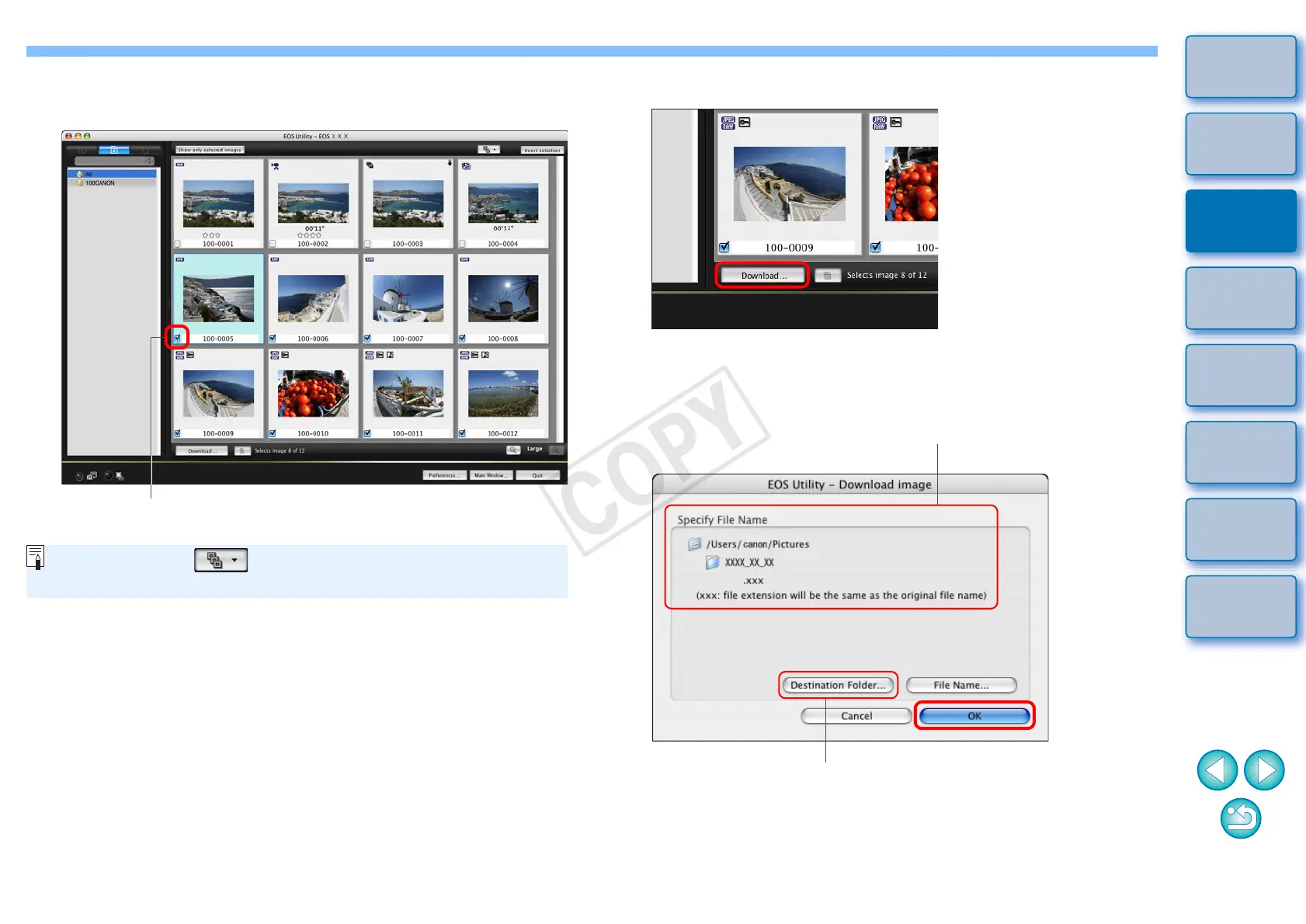
View the images and checkmark images to download.
Viewer window
Add check mark
You can click the [ ] button and extract images by a variety of
criteria to select images to download.
3
Click the [Download] button.
¿ The [Download image] dialog box appears.
4
Specify the save destination and then click the [OK]
button.
¿ The [Save File] dialog box appears and image downloading to
your computer begins.
Download image dialog box
Specify the save destination
Displays the save destination on the computer
COPY

Table of Contents