(f)
c:
o
-
'"
...
'"
c-
O)
...
c..
1.
Lens Attachment
6
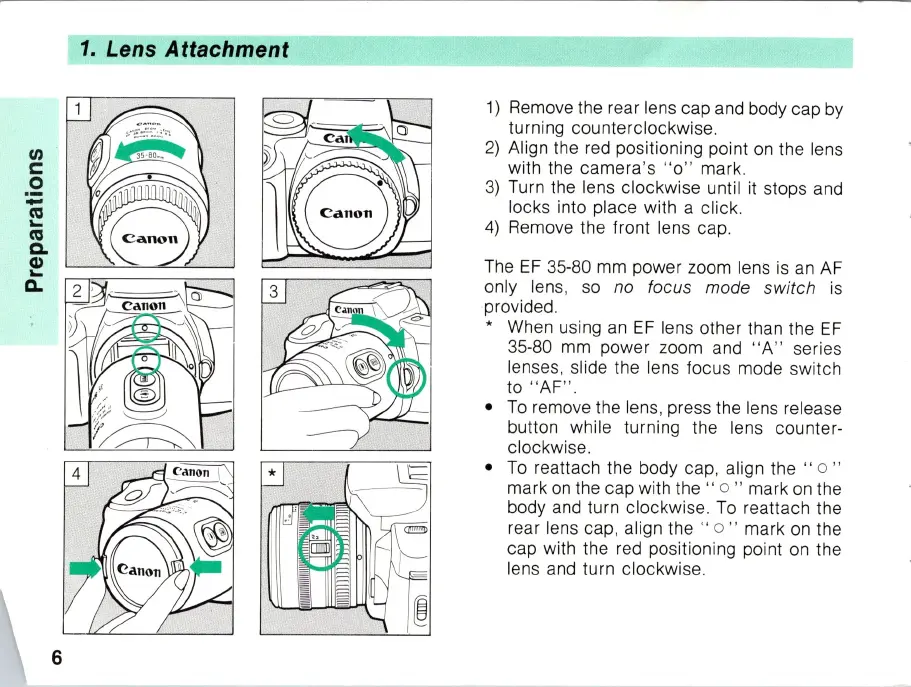
1)
Remove the rear lens cap and body cap
by
turning counterclockwise.
2) Align the red positioning point
on
the lens
with the camera's
" 0 " mark.
3)
Turn the lens clockwise until it stops and
locks into place with a click.
4)
Remove the front lens cap .
The
EF
35-80 mm power zoom lens
is
an
AF
only lens,
so
no focus mode switch
is
provided.
* When using
an
EF
lens other than the
EF
35-80
mm
power zoom and
"A
"
se
ries
lenses, slide the lens focus mode switch
to "
AF
" .
•
To
remove the lens, press the lens release
button while turning the lens counter-
clockwise.
•
To
reattach the body cap, align the " 0 "
mark
on
the cap with the " 0 " mark on the
body and turn clockwise.
To
reattach the
rear lens cap, align the "
0 " mark
on
the
cap with the red positioning point
on
the
lens and turn clockwise.



 To Next Page