143
Advanced Guide
Basic Guide
Camera Basics
Auto Mode /
Hybrid Auto Mode
Other Shooting Modes
Playback Mode
Wireless Features
Setting Menu
Accessories
Appendix
Index
P Mode
Tv, Av, M, C1, and C2 Mode
Before Use
4
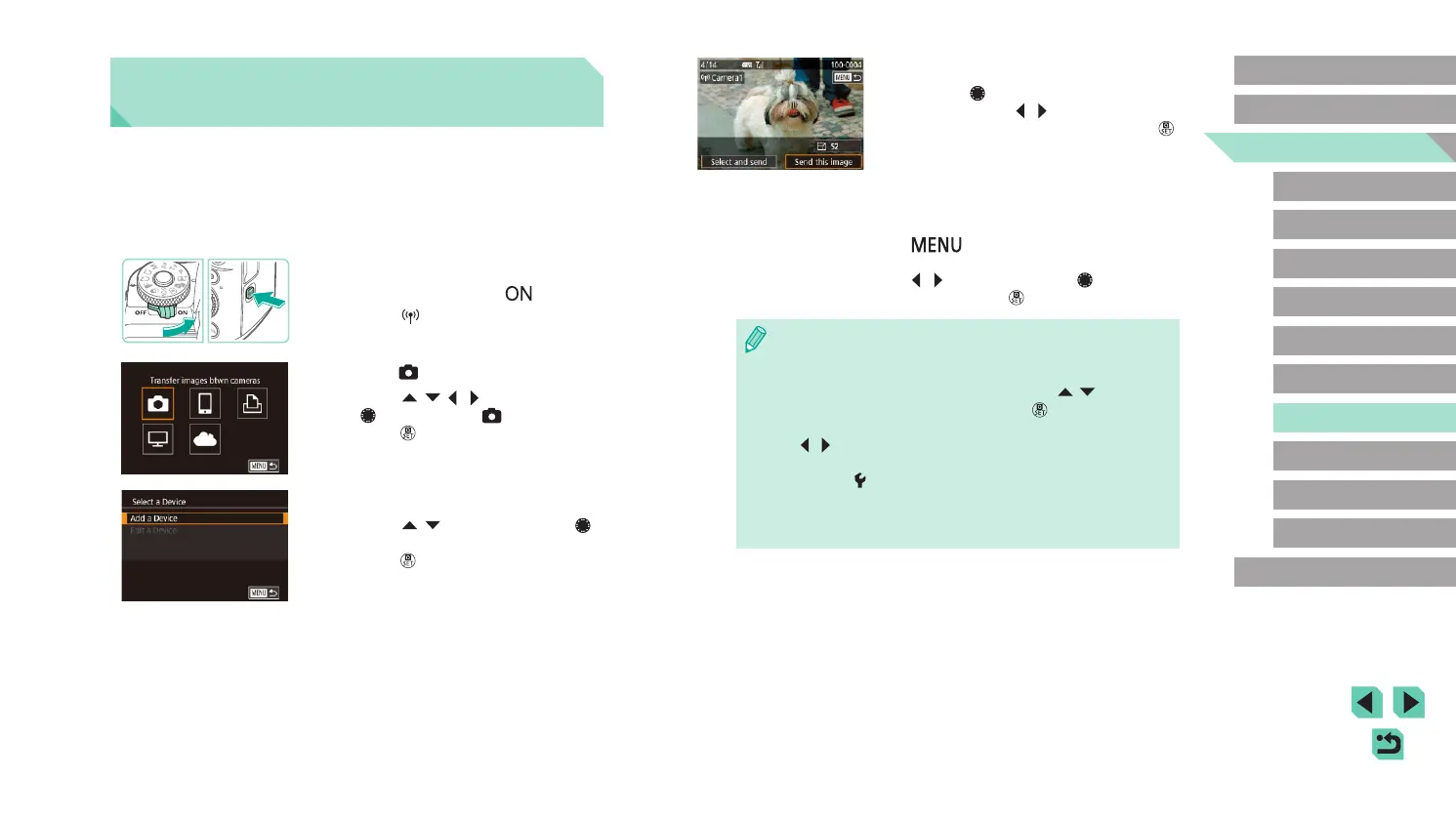
Send an image.
● Turn the [ ] dial to choose an image to
send, press the [ ][ ] buttons to choose
[Send this image], and then press the [ ]
button.
● [Transfer completed] is displayed after
the image is sent, and the image transfer
screen is displayed again.
● To end the connection, press the
[
] button, choose [OK] on the
conrmation screen (either press the
[ ][ ] buttons or turn the [ ] dial), and
then press the [ ] button.
● Connections require that a memory card be in the camera.
● Once you have connected to devices via the Wi-Fi menu, recent
destinations will be listed rst when you access the Wi-Fi menu.
You can easily connect again by pressing the [
][ ] buttons to
choose the device and then pressing the [
] button. To add a
new device, display the device selection screen by pressing the
[
][ ] buttons, and then congure the setting.
● If you prefer not to display recent target devices, choose MENU
(=
35) > [ 4] tab > [Wireless settings] > [Wi-Fi Settings] >
[Target History] > [Off].
● You can also send multiple images at once and change the image
size before sending (=
144).
Sending Images to Another
Camera
Connect two cameras via Wi-Fi and send images between them as
follows.
● Only Wi-Fi compatible Canon cameras can be connected via Wi-Fi.
You cannot connect to a Canon camera unless it is Wi-Fi compatible,
even if it supports FlashAir/Eye-Fi cards.
1
Access the Wi-Fi menu.
● Move the power switch to [ ].
● Press the [
] button.
2
Choose [ ].
● Press the [ ][ ][ ][ ] buttons or turn
the [ ] dial to choose [ ], and then
press the [ ] button.
3
Choose [Add a Device].
● Press the [ ][ ] buttons or turn the [ ]
dial to choose [Add a Device], and then
press the [ ] button.
● Follow steps 1 – 3 on the target camera
too.
● Camera connection information will be
added when [Start connection on target
camera] is displayed on both camera
screens.













 To Next Page