Keeping Your
Galculator
Healthy/ Maintien en bon
6tat de la calculatrice
.
Nevqr
expose this unit to extremes
in
temperature.
Ne
jamais
exposer cet appareil d des conditions extr6mes.
.
Never
place
heavy
objects on this unit.
Ne
jamais
poser
d'objets lourds sur cet appareil.
.
Do not apply
pressure
to the
glass
display.
Ne
pas
appliquer
de
pression
sur
l'affichage.
'
Do not dismantle this unit under any circumstances.
Ne
jamais
d6monter cet appareil sous aucun
pr6texte.
.
Use
only a soft, dry cloth to clean the unit.
Pour le nettoyage,
utiliser
un chiffon doux et sec.
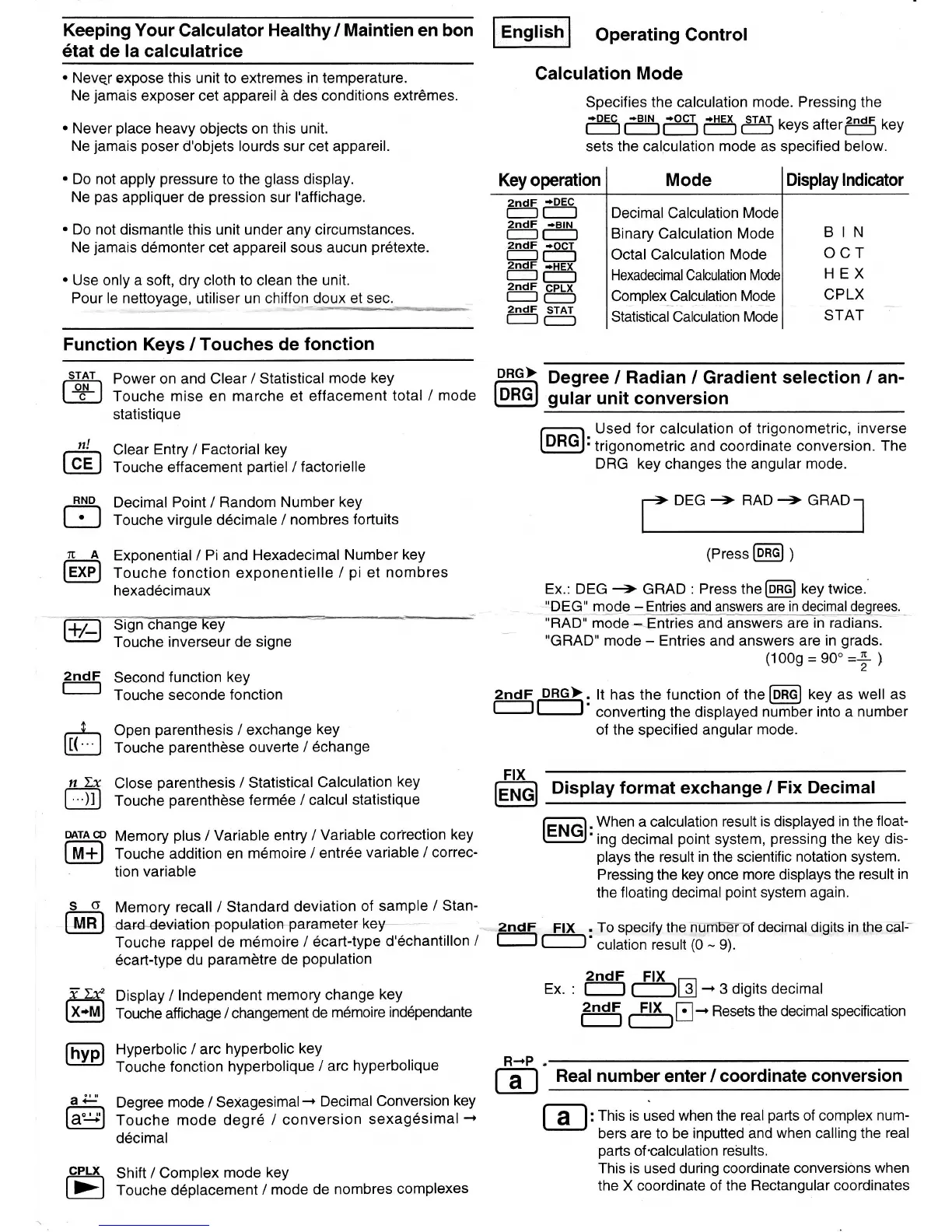
Function Keys /
Touches de fonction
-9I+I-\
Power on and Clear lStatistical
mode key
I
+ I
Touche mise en marche et
effacement
total / mode
statistique
Clear Entry /
Factorial key
Touche effacement
partiel
/
factorielle
Decimal Point / Random
Number key
Touche virgule d6cimale /
nombres
fortuits
Exponential/ Pi and
Hexadecimal Number
key
Touche fonction exponentielle
/
pi
et nombres
hexad6cimaux
Operating Control
Calculation
Mode
Specifies the calculation mode. Pressing the
ffiSi5
5g
kevs
arterffi
kev
sets the calculation mode as specified below.
Key operation Mode
e5ffi
2ndF
+BlN
Display lndicator
BIN
ocr
HEX
CPLX
STAT
2ndF
+OCT
2ndF
;H-EI'
r
tl-l
zndF
cPLx
I
|
(-'l
Decimal Calculation
Mode
Binary Calculation Mode
Octal Calculation
Mode
Hexadecimal Calculation
Complex Calculation
Mode
Statistical Calculation Mode
2ndF
STAT
DRG>
@
Degree
/
Radian
/ Gradient
selection
/
an-
gular
unit conversion
Used for calculation of trigonometric,
inverse
:
trigonometric and coordinate conversion.
The
DRG key changes the angular
mode.
r-> DEG
+
RAD
+
GRAD r
tt
(Press
@ I
Ex.: DEG
-->
GRAD
: Press tne
[6EEl
key twice.
tlDEGl
mgqe_-
Entrieq
lrnd
answers
are in_{ec]rrlql
Qggqes.
'RAD"
mode
--Entries
and answers are
in radians.
"GRAD'
mode
-
Entries and answers
are in
grads.
(1009
=
90'=+
)
ffiey
Touche
inverseur de signe
+E
Second
function
key
Touche seconde
fonction
n!
@
RND
trl
ltA
@
6
nLx
D
DATA CD
@
so
@
72f
@
@
al'
@
Open
parenthesis
/ exchange
key
Touche
parenthdse
ouverte /
6change
Close
parenthesis
/ Statistical
Calculation
key
Touche
parenthdse
ferm6e / calcul
statistique
Memory
plus
/ Variable
entry /
Variable
cor'rection
key
Touche
addition en
m6moire / entr6e
variable / correc-
tion
variable
Memory
recall
lstandard
deviation
of sample
/ Stan-
ion
popCatie+Parameter keY-*
-
Touche
rappel de
m6moire / 6cart-type
d'6chantillon
/
6cart-type
du
paramdtre
de
population
Display /
lndependent
memory
change
key
Touche affichage / changement
de
m6moire
ind6pendante
Hyperbolic / arc
hyperbolic
key
Touche fonction
hyperbolique
I arc
hyperbolique
Degree
mode
/
Sexagesimal-
Decimal
Conversion
key
Touche mode degr6
/ conversion
sexag6simal
-r
d6cimal
Shift /
Complex
mode key
Touche d6placernent
/ mode
de
nombres
complexes
g
PBG-|,.
lt has
the
function of the
@
t
"y
as
well as
converting the displayed
number into a number
of
the specified
angular mode.
Display format exchange /
Fix Decimal
.
When a calculation result
is displayed in the
float-
'ing
decimal
point
system,
pressing
the key
dis-
plays
the result
in
the scientific
notation system.
Pressing
the
key once more displays the
result in
the floating decimal
point
system again.
To specify the numrerof
decimal digits in the ca[--
culation result
(0
-
9).
Ftx
@
Ftx
2ndF
2ndF
FIX
Ex. :
Fl
r-tr
-
3
digits decimal
ftl:5
-F\tr.
Resets the decimat specification
Real number
enter / coordinate
conversion
:
This is
used
when the real
parts
of complex
num-
bers are
to be
inputted and
when
calling the
real
pafis
of
'calculation
results.
This is used during coordinate conversions
when
the X coordinate of the
Rectangular coordinates
CPLX
E
R+P
E


 To Next Page
 Loading...