For performing function indicated above the keys.
Example: sin
-1
0.5 (30.)
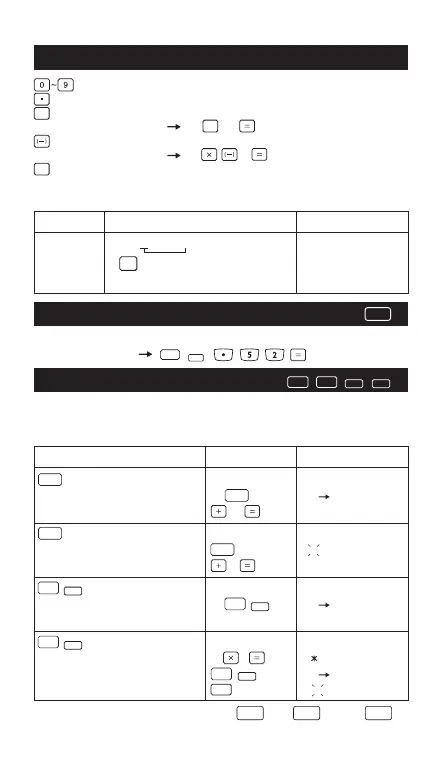
Numeric Entry Keys
2nd Functions Keys
The calculator has 3 memories. When a memory contains a number
other than 0,
M1, M2, or M3 displays.
**To clear a single memory, press 0 STO 1, 0 STO 2, or 0 STO 3.
Memory Keys
(Numeric): Enter numbers.
(Decimal Point): Enters a decimal point.
(Exponential): Used to enter exponents.
Example: 35x10
43
= 35 43 (3.5x10
44
)
(Negative): Used to obtain negative value.
Example: 12x(–3) = 12 3 (–36.)
(Back Space): Clears the last digit entered from the upper
(formula) line.
Example:
Operation Display
STO
Stores displayed value in memory 45 STO 1 Ans STO M1.
M1, M2 or M3, replacing current value. 27 Ans+27
RCL (continued)
Recalls value in memory M1, M2 or M3 RCL 1 45
3 45+3
48.
2nd (continued)
Adds displayed value to memory 12 2nd 1 Ans sum M1
M1, M2 or M3
2nd (continued)
Exchanges displayed and memory 24 8 24 8
192
values. 2nd 1 Ans EXC M1
1 192
Example:
Value Operation Display
12345 1 2 4 incorrect entry "124"
"12"
3 4 5 "12345"
2nd
EE
EE
BS
BS
2nd
EXC
RCLSTO
RCL
SUM
SUM
SUM
EXC
EXC
45.
72
12
57
SIN
-1
- 4 -



 To Next Page