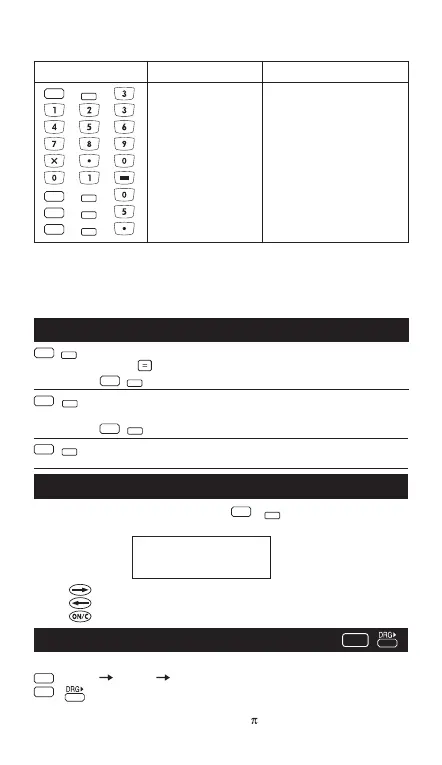
To adjust the display contrast, Press and one of the
following means appear:
Press to make the display contrast darken.
Press to make the display contrast lighten.
Press to confirm.
Selects scientific notation.
12345 12345.
SCI 1.2345x10
04
*1 The displayed value is round off within the specified range, but the actual
calculation result is retained in the register.
*2 The number is displayed with left justification. In this case, 5 decimal
places are specified, but only the 10 most significant digits are displayed.
The 5th decimal place is not displayed.
Used to change the angle values to different unit.
(DEG) (RAD) (GRAD)
Cycles (converts) angle-unit setting between degrees,
radians, and grads for display, entry and calculation.
• Relationship of units: 200
GRAD
= 180 =
RAD
Angle Unit Conversion Keys
Display Contrast Adjustment
Notation Keys
Example:
Operation Display Explanation
FIX 3 decimal places
123456.789
123456
(*1)
0 decimal places
123456.7890
(*2)
5 decimal places
123456.789 Reset decimal places
FIX
FIX
FIX
FIX
2nd
2nd
2nd
2nd
2nd
SCI
2nd
SCI
Selects engineering notation (exponent. is a multiple of 3).
(continued)
ENG 12.345x10
03
2nd
2nd
ENG
CONTRAST
ENG
Restores standard notation (floating-decimal)
format.
2nd
2nd
DRG
2nd
FLO
[ ]
– CONTRAST +
IIIIII
2nd
- 6 -



 To Next Page