EasyManua.ls Logo

Canon FS20 - Screen Displays

Canon FS20
196 pages
Print Icon
To Next Page IconTo Next Page
To Previous Page IconTo Previous Page
Loading...
I
ntrod
uction
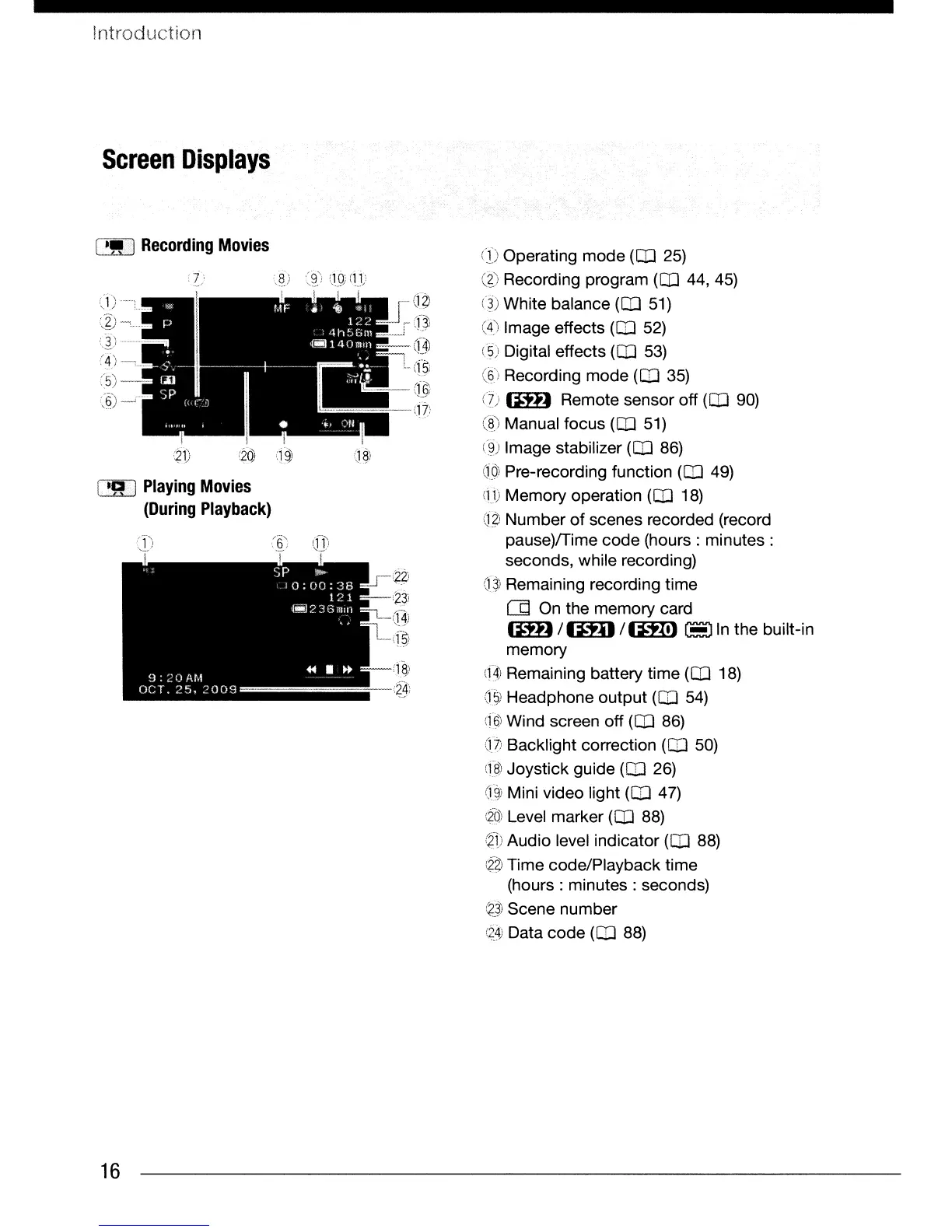
Screen
Displays
[!,,]
Recording
Movies
i
~1)
(20
1
q$
[.
-R
1
Playing
Movies
(During
Playback)
16
..
(j~
l~
()) Operating mode
(CD
25)
@ Recording program
(CD
44,45)
(3) White balance
(CD
51)
(4) Image effects
(CO
52)
(5) Digital effects
(CD
53)
((3')
Recording mode
(CD
35)
(1)
G:%D
Remote sensor off
(CD
90)
(8) Manual focus
(CD
51)
(~)
Image stabilizer
(CD
86)
Q())
Pre-recording function
(CD
49)
(11)
Memory operation
(CD
18)
(1
~
Number
of
scenes recorded (record
~._-
pause)/Time code (hours:
minutes:
seconds, while recording)
(1~)
Remaining recording time
(Jd
On
the memory card
G:%D
/Im)
/
1m)
~
In
the built-in
memory
(4)
Remaining battery time
(CD
18)
d$)
Headphone output
(CO
54)
(16)
Wind screen off
(CD
86)
dt Backlight correction
(CO
50)
(f8-)
Joystick guide
(CD
26)
djj)
Mini video light
(CO
47)
~<»
Level marker (OJ 88)
G:Ti
Audio level indicator
(CD
88)
~~
Time code/Playback time
. (hours:
minutes:
seconds)
i~_~)
Scene number
(2_4)
Data code
(CO
88)

Table of Contents

Other manuals for Canon FS20

Related product manuals