Mercury
Battery loading
and
Ghecking
The built-in
exposure meter
of
the
Canon FTb
functions
only when
the
mercury battery
is
properly
loaded.
I
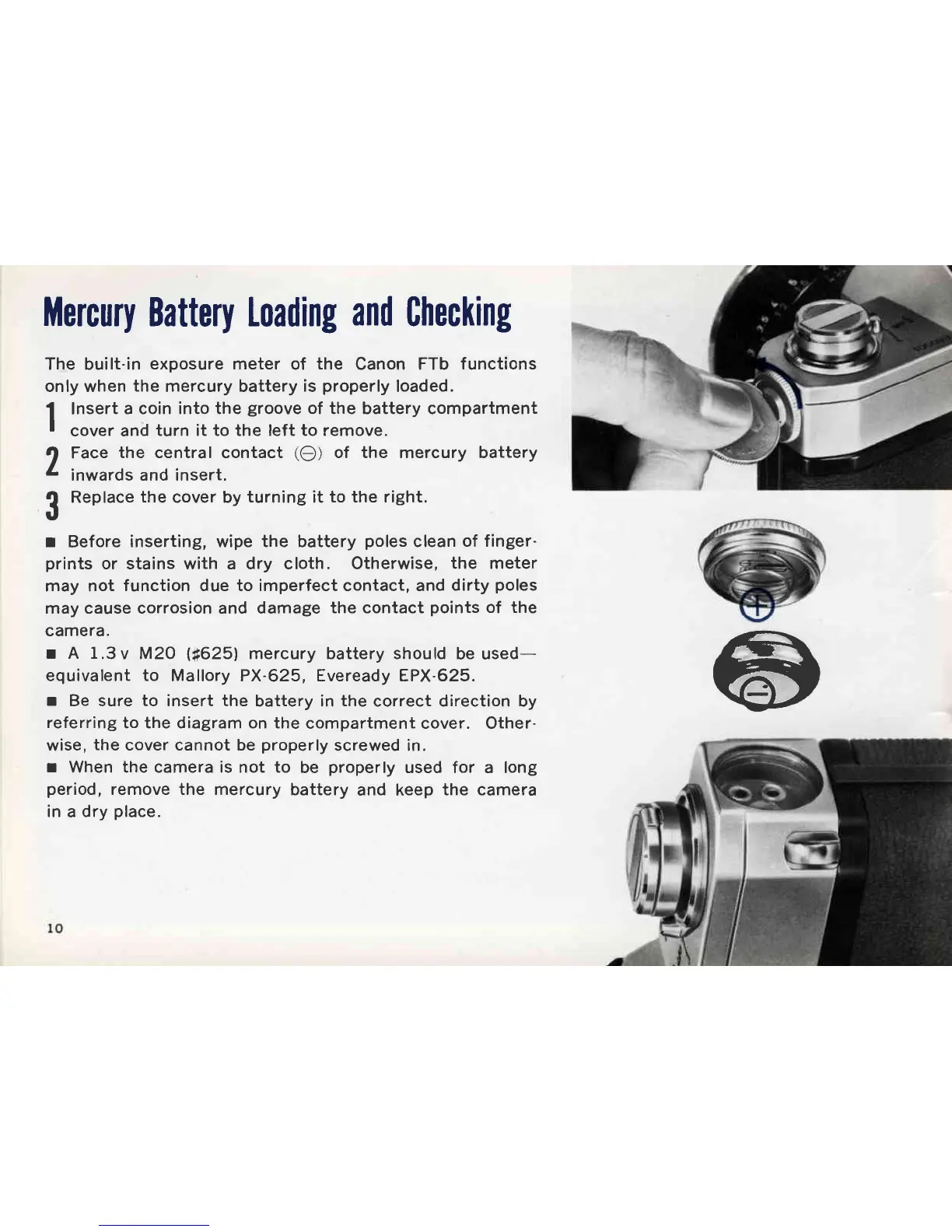
Insert
a coin into the
groove
of the battery compartment
I
cover and turn it to the left to remove.
lf
Face
the central contact
(O)
of the mercury battery
4
inwards and insert.
{
Replace
the
cover by
turning
it
to the right.
r,
r
Before
inserting, wipe the battery
poles
clean
of finger-
prints
or stains with a dry cloth. Otherwise,
the meter
may not
function due to imperfect contact, and
dirty
poles
may cause corrosion and damage
the contact
points
of the
camera.
r A 1.3v
M20
lt625l
mercury battery should
be used-
equivalent
to
Mallory PX-625, Eveready EPX-625.
r
Be sure to insert the
battery in
the
correct direction by
referring
to the diagram on the
compartment cover. Other-
wise,
the
cover cannot be
properly
screwed in.
r
When the camera is not to
be
properly
used for a long
period,
remove the mercury
battery
and keep
the camera
in
a
dry
place.



 To Next Page