EasyManua.ls Logo

Canon FTb - Exposure Settings; Full Aperture Metering

Canon FTb
49 pages
Print Icon
To Next Page IconTo Next Page
To Previous Page IconTo Previous Page
Loading...
Exposure
Settings
Full
Aperture Metering
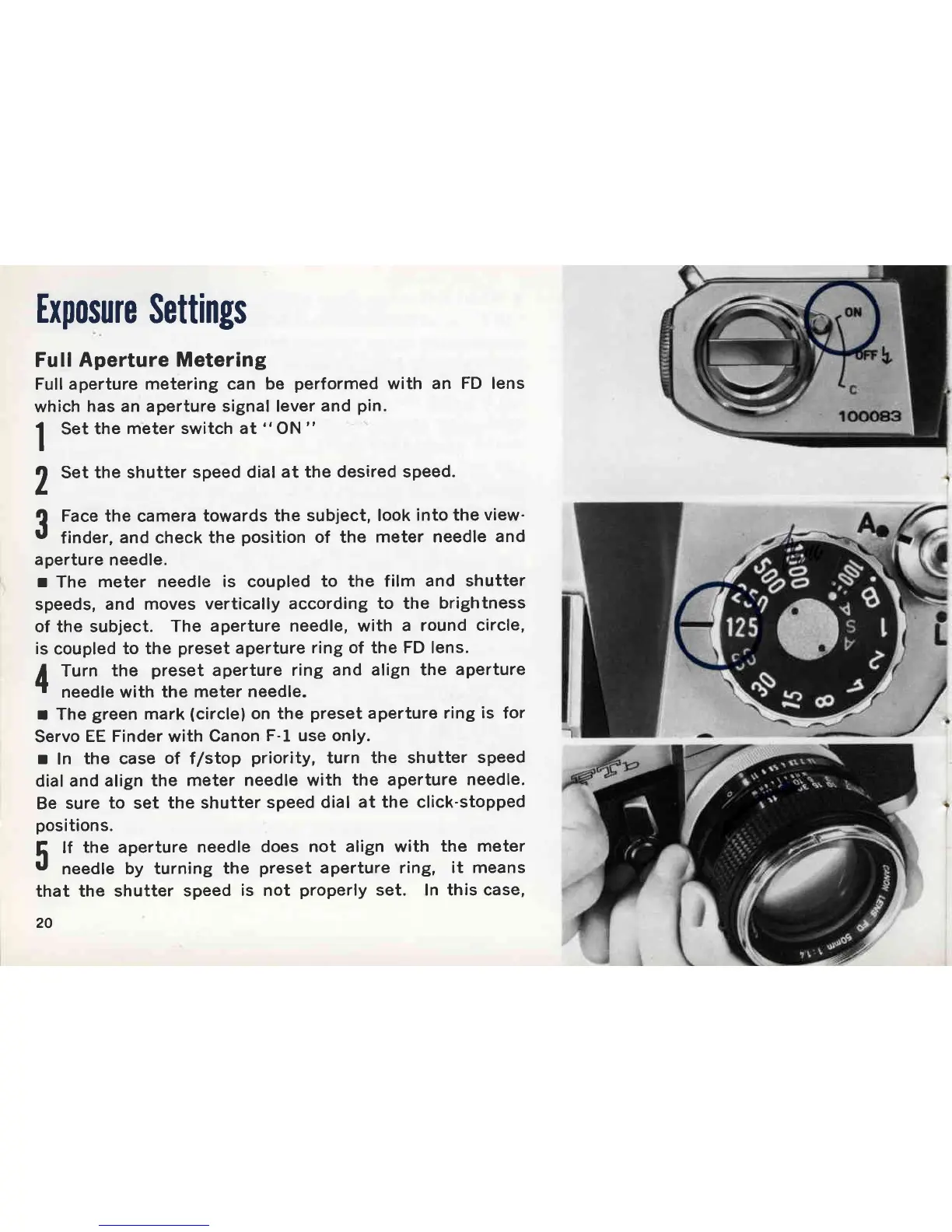
Full aperture metering can
be
performed
with an
FD
lens
which
has an aperture signal lever
and
pin.
I
Set the
meter switch
at
"
ON
"
I
7
Set the shutter
speed dial
at the desired speed.
L
?
Face the camera
towards the subject,
look
into the
view'
t
finder,
and
check
the
position
of the
meter needle
and
aperture
needle.
r
The
meter needle is coupled
to the film
and shutter
speeds,
and moves
vertically according
to the
brightness
of the subject.
The
aperture needle, with
a round
circle,
is
coupled
to the
preset
aperture
ring of the FD lens.
I
Turn
the
preset
aperture
ring
and align the
aperture
.l
needle with the meter
needle.
r The
green
mark
(circlel
on the
preset
aperture ring
is
for
Servo
EE Finder with
Canon
F-l use only.
r
In
the case
of
f/stop
priority,
turn the shutter
speed
dial and
align the
meter needle with
the aperture
needle.
Be
sure
to
set
the shutter
speed dial
at the click-stopped
positions.
5
lf
the aperture
needle
U
needle
by turning
the
that the shutter
speed
is
20
does
not align with
the meter
preset
aperture ring,
it means
not
properly
set. In this case,

Other manuals for Canon FTb

Related product manuals