Uses
of
Lenses
Ghanging Lenses
1
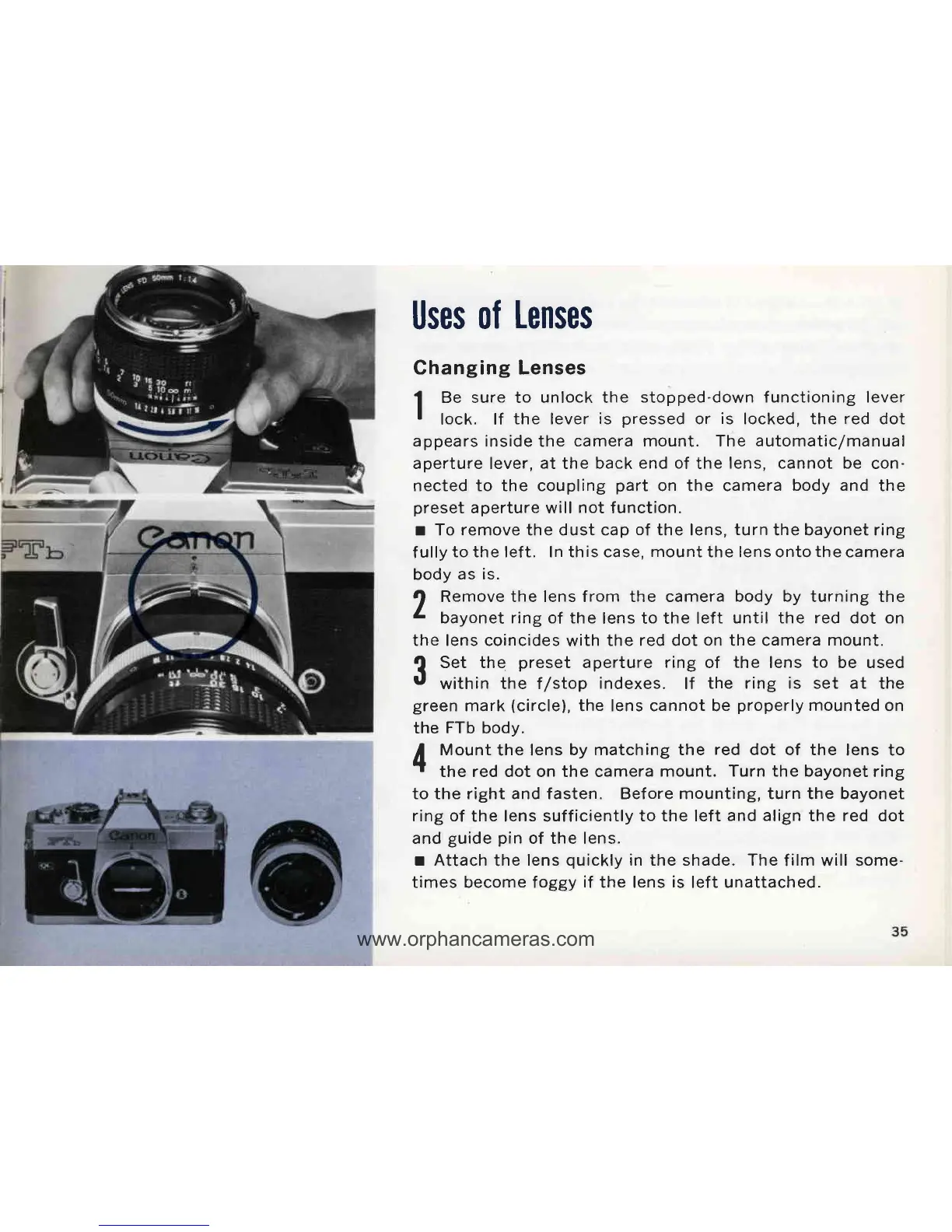
Bu sure to unlock the
stopped-down functioning lever
I
lock. lf
the lever
is
pressed
or
is
locked, the
red
dot
appears inside
the
camera mount. The automatic/manual
aperture lever,
at
the
back end of
the
lens, cannot be
con-
nected to the coupling
part
on the camera
body and
the
preset
aperture will
not
f unction.
r To remove the dust cap
of
the lens,
turn
the bayonet ring
f
ully
to the left. In this case,
mount
the lens onto
the
camera
body
as is.
J,
Remove the lens from the camera body
by
turning the
L
bayonet ring of the
lens to the left
until the red dot on
the lens coincides
with
the red dot
on
the camera
mount.
?
Set the
preset
aperture
ring
of
the lens to be used
U
within the f/stop
indexes.
lf
the ring is set at
the
green
mark
(circle),
the lens cannot be
properly
mounted on
the
FTb
body.
A
Mount
the lens
by matching the
red
dot of the
lens to
r
the red dot on the camera
mount. Turn the bayonet
ring
to the right and fasten. Before mounting, turn the bayonet
ring of
the lens sufficiently
to the left
and align
the red dot
and
guide
pin
of the lens.
r Attach
the
lens
quickly
in the shade. The
film will some-
times become foggy
if
the lens
is
left unattached.



 To Next Page