EasyManua.ls Logo

Canon FTb - Manual Aperture Control

Canon FTb
49 pages
Print Icon
To Next Page IconTo Next Page
To Previous Page IconTo Previous Page
Loading...
r The
preset
aperture
ring
can
also be set between
two
f
/sto
ps.
Presetting of
Aperture
In
the
case
of the
FD
or FL
lens,
the field'of-view
can
always
be seen through
the
viewf inder
at
f
ull
aperture
opening
even
after the f/stop
has been
set
with
the
preset
aperture
ring.
Set the desired
f/stop
on
the
preset
aperture
ring to the
index. The
diaphragm
will
close
down
to the
preset
f/stop
only for
the
instant
that
the
shutter
is released.
Except
for
that
instant,
the
diaphragm
remains fully
open.
Manual
Gontrol
of
Aperture
1
By locking
the stopped down
functioning
lever
and turn'
I
ing the
preset
aperture
ring, the diaphragm
can
be
closed down
to
any
f/stop
and
the
depth
of
field
at the time
of
shutter
release
can
be checked.
When the lever
lock
is
reset
to
its
original
position,
the
diaphragm
again returns
to
maximum
opening.
r The
aperture
is manually
stopped down
also
when
per'
forming
close-up
photography
and macrophotography.
rl
When
an accessory
is used
between
the
lens and the
L
camera
body,
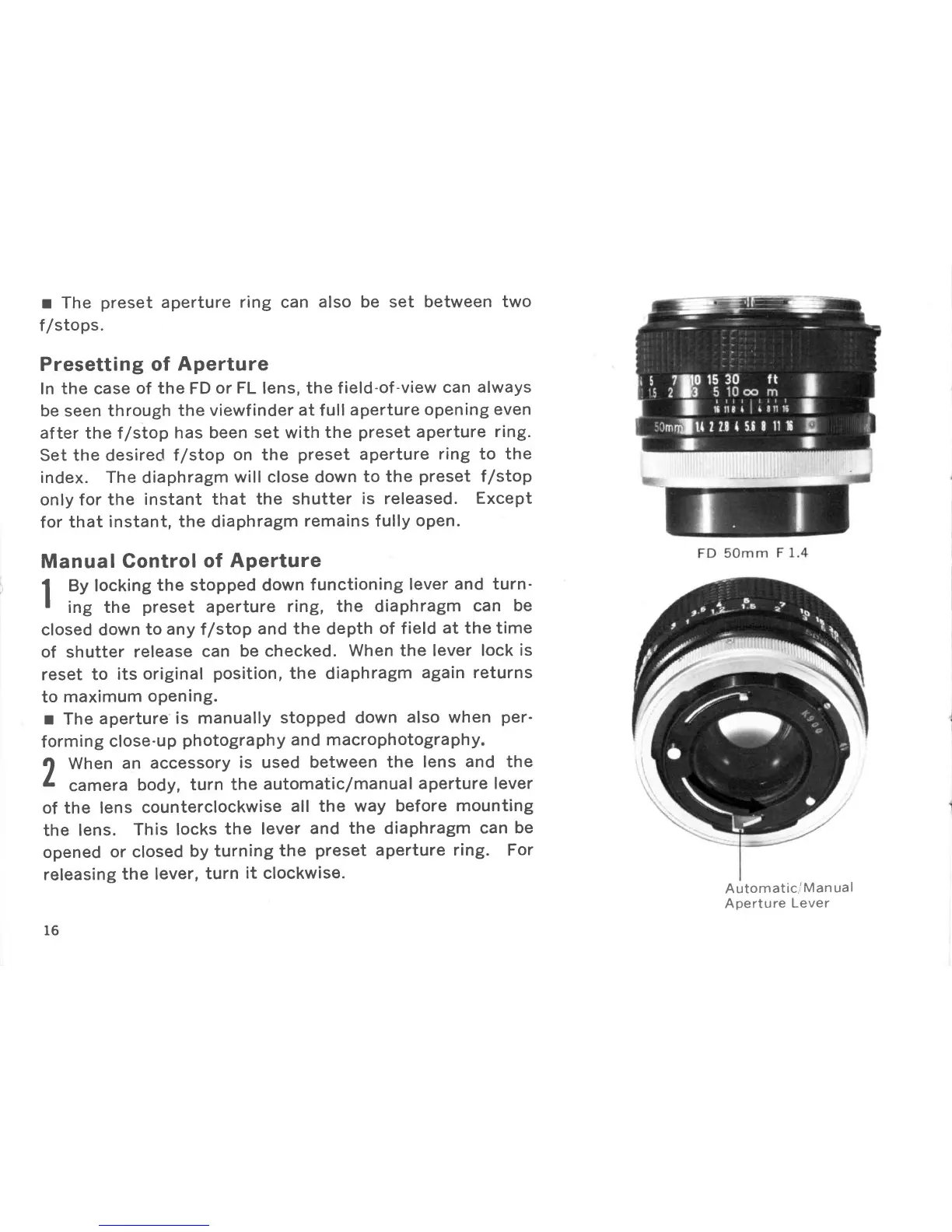
turn
the
automatic
/manual
aperture lever
of the lens
counterclockwise
all
the
way
before mounting
the
lens.
This
locks
the lever
and
the
diaphragm
can
be
opened
or closed
by
turning
the
preset
aperture
ring. For
releasing
the lever,
turn
it
clockwise.
16
Automatic,/Man
ual
Aperture
Lever

Other manuals for Canon FTb

Related product manuals