EasyManua.ls Logo

Canon FTb - Stopped-Down Metering

Canon FTb
49 pages
Print Icon
To Next Page IconTo Next Page
To Previous Page IconTo Previous Page
Loading...
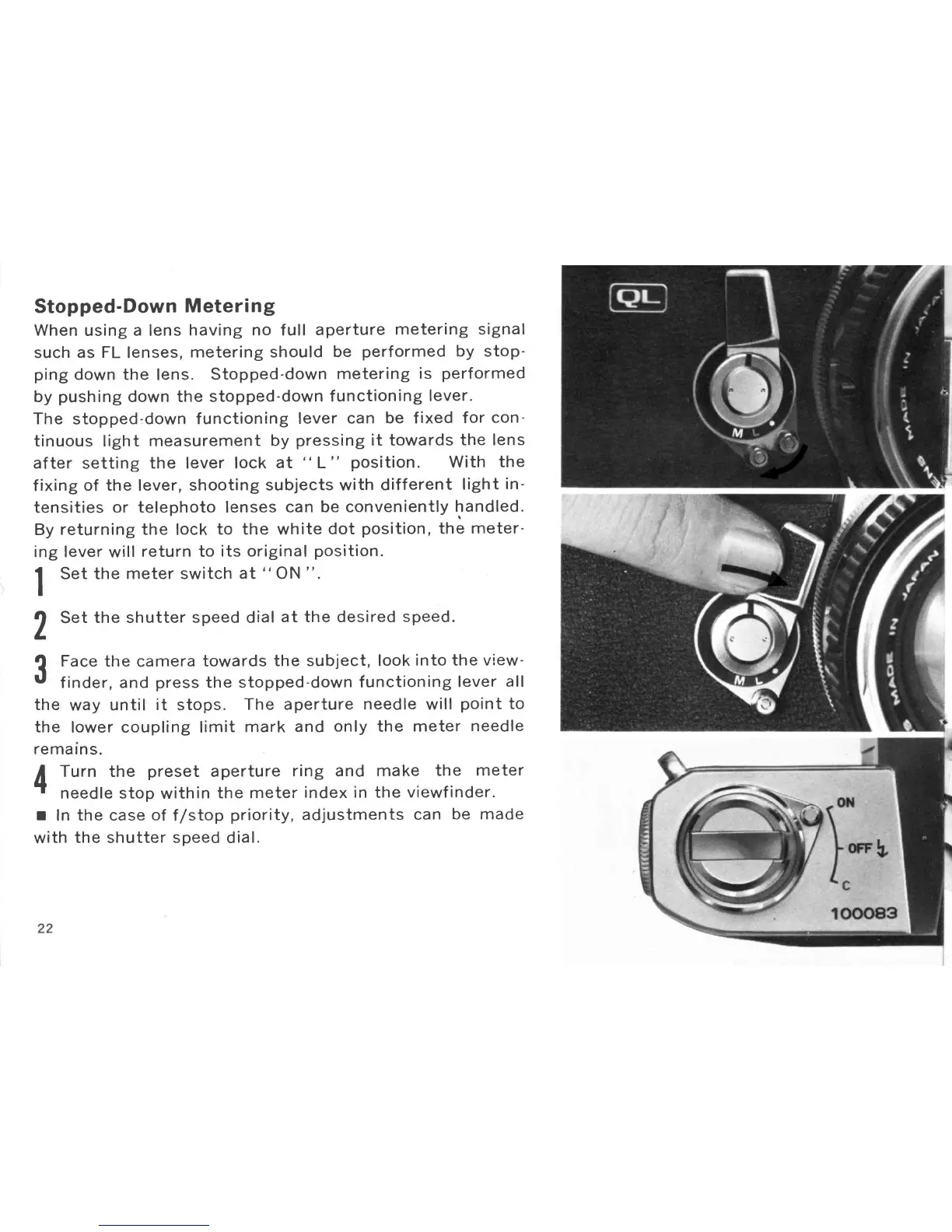
Stopped-Down
Metering
When
using
a
lens
having no full
aperture
metering
signal
such
as FL
lenses,
metering should
be
performed
by
stop-
ping
down the
lens.
Stopped-down
metering
is
performed
by
push
ing down the
stopped'down
f unctioning
lever.
The stopped-down
f unctioning
lever
can
be
f
ixed
for
con-
tinuous light
measurement
by
pressing
it towards
the lens
after
setting
the lever lock
at
"
L
"
position.
With
the
fixing
of the lever,
shooting subjects with
different
light
in'
tensities
or telephoto lenses
can
be conveniently
f
undled.
By
returning the
lock
to the white
dot
position,
the
meter-
ing lever
will
return to
its original
position.
1
Set the
meter switch
at
"
ON
".
l
,)
Set
the shutter
speed dial
at the desired
speed.
L
?
Face the
camera
towards
the
subject, look
into the view-
U
f
inde r,
and
press
the stopped-down
f
unctioning
lever
all
the
way
until
it
stops.
The aperture
needle
will
point
to
the
lower coupling limit
mark
and
only
the
meter
needle
re
ma rn
s.
t
Turn the
preset
aperture
ring
and
make
the
meter
.t
needle stop
within
the meter
index in the
viewfinder.
I
In
the case
of
f/stop
priority,
adjustments
can
be made
with
the
shutter
speed
dial.

Other manuals for Canon FTb

Related product manuals