3-10
3
Printer Properties
Custom Paper Size Settings
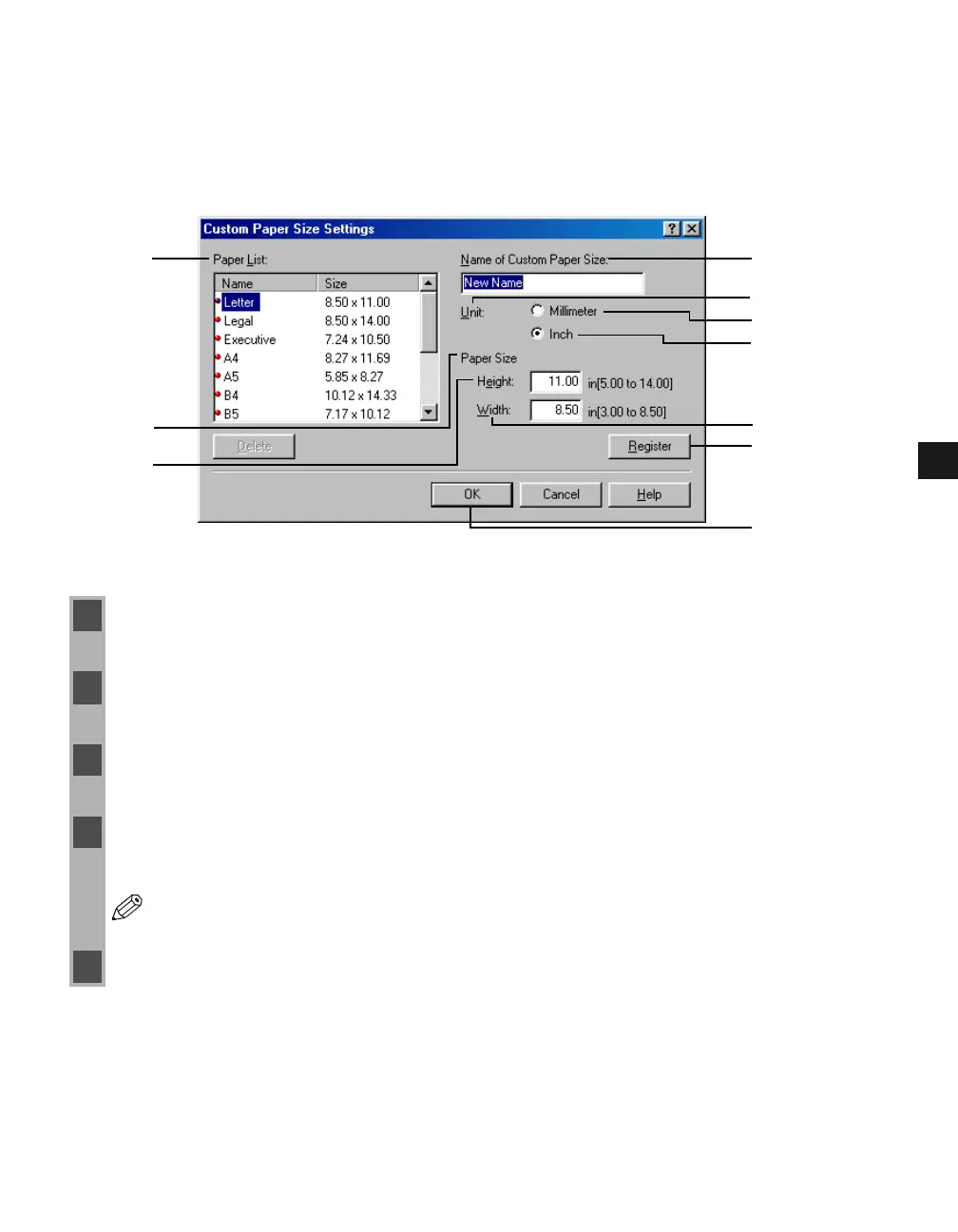
Clicking Custom Paper Size in the Page Setup tab window opens the Custom Paper Size
Settings dialog box. This dialog box allows you to define custom paper sizes for quick
selection and register new custom paper sizes to the Paper List (1) box. You can specify the
name, width, and height of each size. Up to 50 custom sizes can be defined.
Selecting a Custom Paper Size Setting
1 Select one of the predefined sizes from the Paper List (1) box.
2 If you wish, enter a unique name in the Name of Custom Paper Size (2) area.
3 Select the Millimater (4) or Inch (5) for Unit (3) of measurement.
4 Define the Paper Size (6) using the Height (7) (5.00 to 14.00 inches/127.0 to 356 mm) and
Width (8) (3.00 to 8.50 inches/76.2 to 216 mm) settings.
NOTE
Be sure to specify values such that Height (7) is equal to or greater than Width (8).
5 Click Register (9) to accept your changes click OK (10).
(2)
(5)
(8)
(4)
(3)
(1)
(7)
(10)
(9)
(6)














 To Next Page