8
En
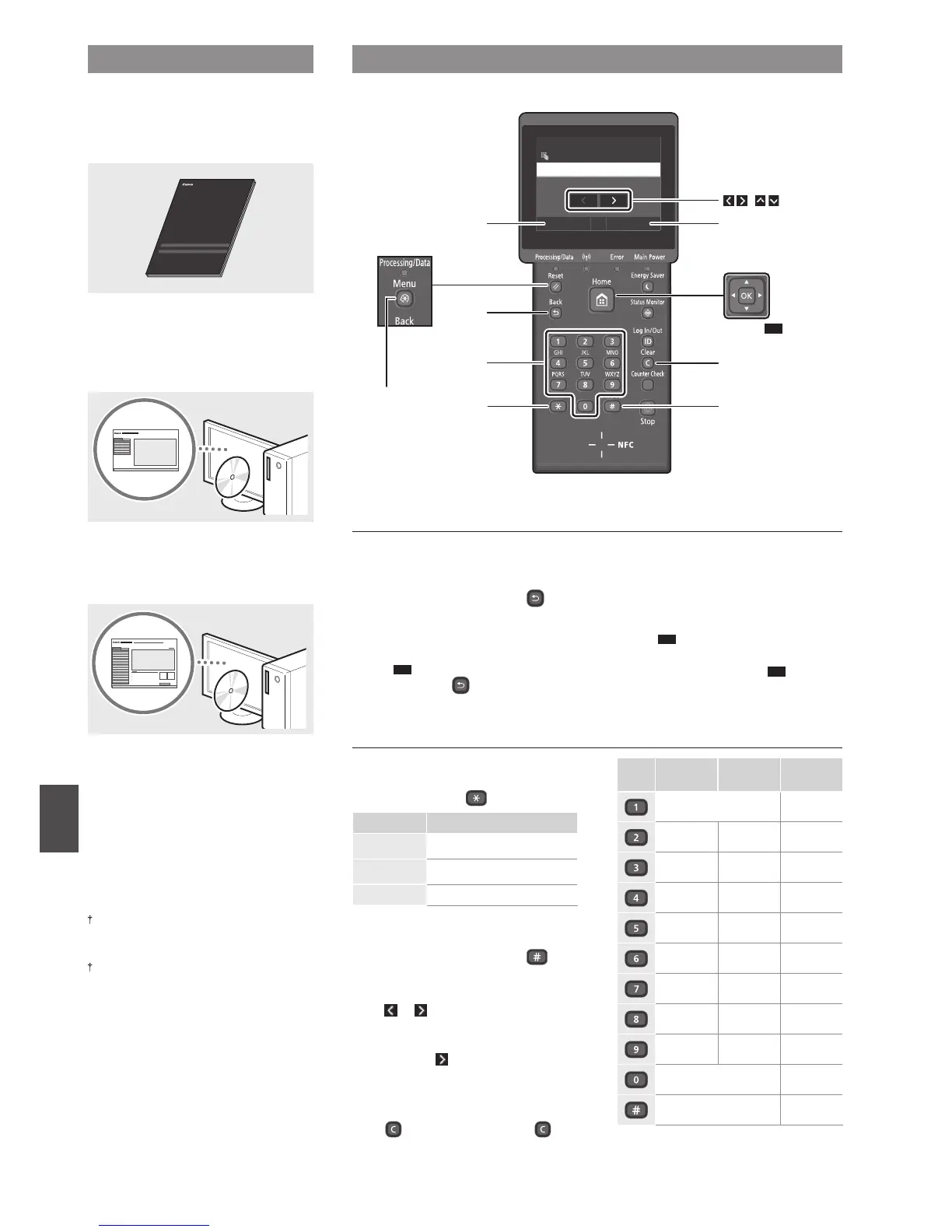
Navigating the Menu and Text Input Method
About the Supplied Manuals
Getting Started (This manual):
Read this manual rst. This manual
describes the installation of the
machine, the settings, and a caution.
Printer Driver Installation Guide
(Provided DVD-ROM):
This manual describes software
installation.
e-Manual (Provided DVD-ROM):
The e-Manual is categorized by subject to
nd desired information easily.
Viewing the e-Manual from the
DVD-ROM
1 Insert the provided DVD-ROM in your
computer*.
2 Click [Manuals].
3 Click [e-Manual].
* If [AutoPlay] is displayed, click [Run MInst.
exe].
Depending on the operating system you
are using, a security protection message
appears.
If the provided DVD-ROM has been already
inserted in your computer and [Manuals] is
not displayed, remove the DVD-ROM and
insert it again.
Navigating the Menu
Item selection or moving the cursor
among the menu items
LBP253dw
Tap an item to select it. Press
to
return to the previous screen.
LBP251dw
Select an item with [▲] or [▼].
Press
OK
or [
►
] to proceed to the next
hierarchy. Press or [
◄
] to return to
the previous hierarchy.
Setting conrmation
LBP253dw
Tap the item. However, when <Apply>
appears, tap <Apply>.
LBP251dw
Press
OK
. However, when <Apply>
appears on the display, select
<Apply>, and then press
OK
.
Text Input Method
Changing entry mode
To change the entry mode, tap
<A/a/12> or press
.
Entry mode Available text
<A>
Uppercase alphabetic letters and
symbols
<a>
Lowercase alphabetic letters and
symbols
<12> Numbers
Entering text, symbols, and numbers
Enter with the numeric keys or
.
Moving the cursor (Entering a space)
Tap
or , or press [
◄
] or [
►
], to
move the cursor. To enter a space,
move the cursor to the end of the
text, and tap or press [
►
].
Deleting characters
Press
. Pressing and holding
deletes all characters.
Entry mode:
<A>
Entry mode:
<a>
Entry mode:
<12>
@ . - _ / 1
ABC abc 2
DEF def 3
GHI ghi 4
JKL jkl 5
MNO mno 6
PQRS pqrs 7
TUV tuv 8
WXYZ wxyz 9
(Not available) 0
(space) - . * # ! ” , ; : ^ ` _ = / | ’
? $ @ % & + \ ˜ ( ) [ ] { } < >
(Not available)
Apply#
A/a/12
Administrator
A
System Manager Name
Back
<A/a/12>
*
#
Clear
<Apply>
(
)
LBP251dw
LBP251dw
▲▼
▲
▲
OK
Numeric keys
Menu













 To Next Page