Clearing Paper Jams
1648-0EA
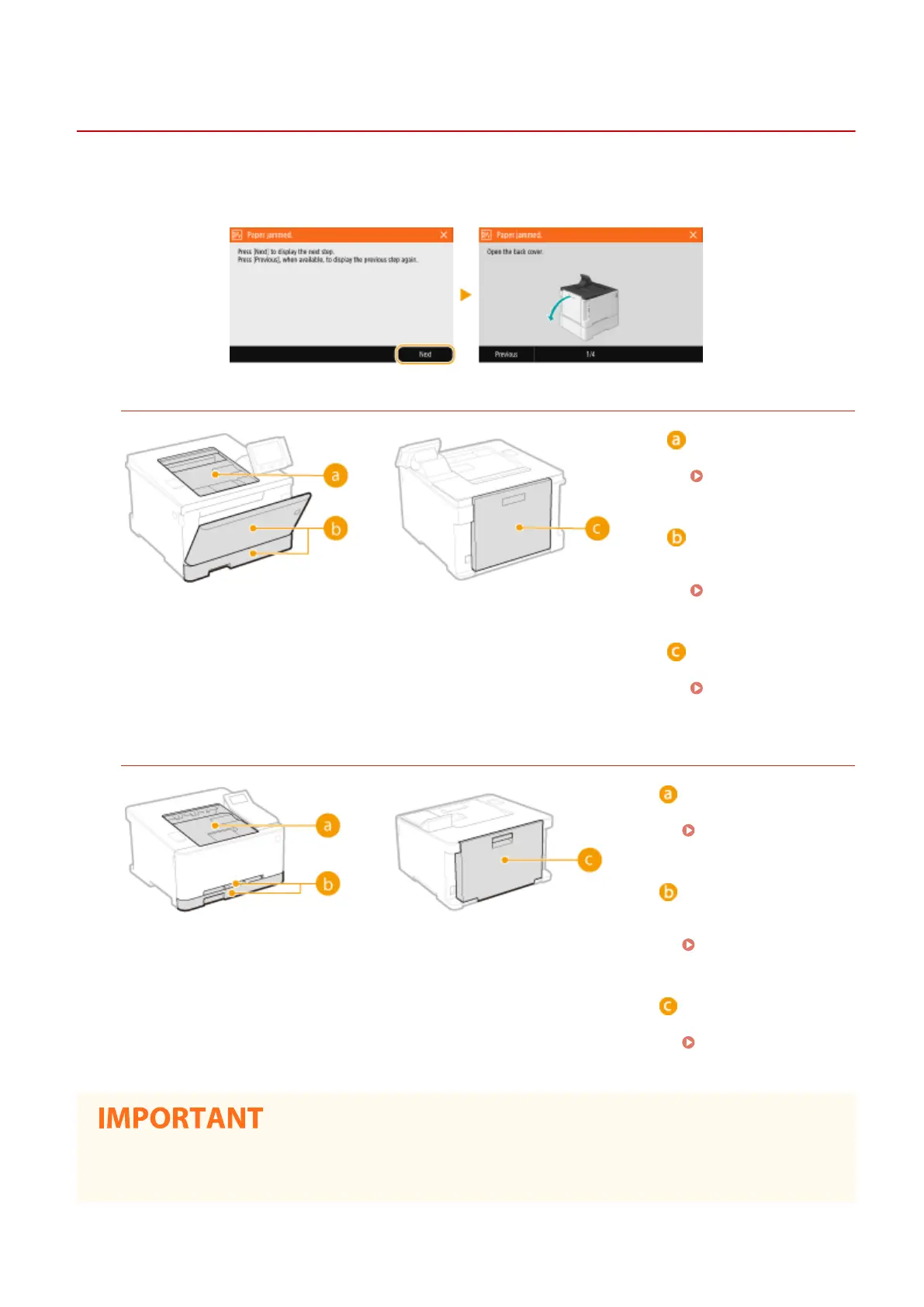
If a paper jams, <Paper jammed.> is displayed on the screen. Select <Next> to display simple solutions. If it is dicult
to understand the procedures on the display, see the following sections to clear jams.
LBP654Cdw
Output tray
Paper Jams in the
Main Unit(P. 498)
Multi-purpose tray/
Paper drawer
Paper Jams in a
Paper Source(P. 501)
Back side
Paper Jams in the
Main Unit(P. 498)
LBP612Cdw
Output tray
Paper Jams in the
Main Unit(P. 498)
Manual feed slot/Paper
drawer
Paper Jams in a Paper
Source(P. 501)
Back side
Paper Jams in the
Main Unit(P. 498)
When removing the jammed paper, do not turn OFF the machine
● Turning OFF the machine deletes the data that is being printed.
Troubleshooting
496












 To Next Page