To Use the Machine as a Local Printer (USB Connection)
IMPORTANT
• Do not connect the USB cable before installing the software. If you connect the USB cable before installing the soft-
ware and the Found New Hardware Wizard screen appears, click [Cancel] and disconnect the USB cable.
NOTE
• For Windows 2000/XP/Server 2003, log on as Administrator to install the software.
• The screenshots below are from Windows XP. However, the installation procedure is essentially the same for other versions
of Windows.
1 Turn on your computer.
2 Quit any open applications, including anti-virus software.
3 Insert the User Software CD into the CD-ROM drive.
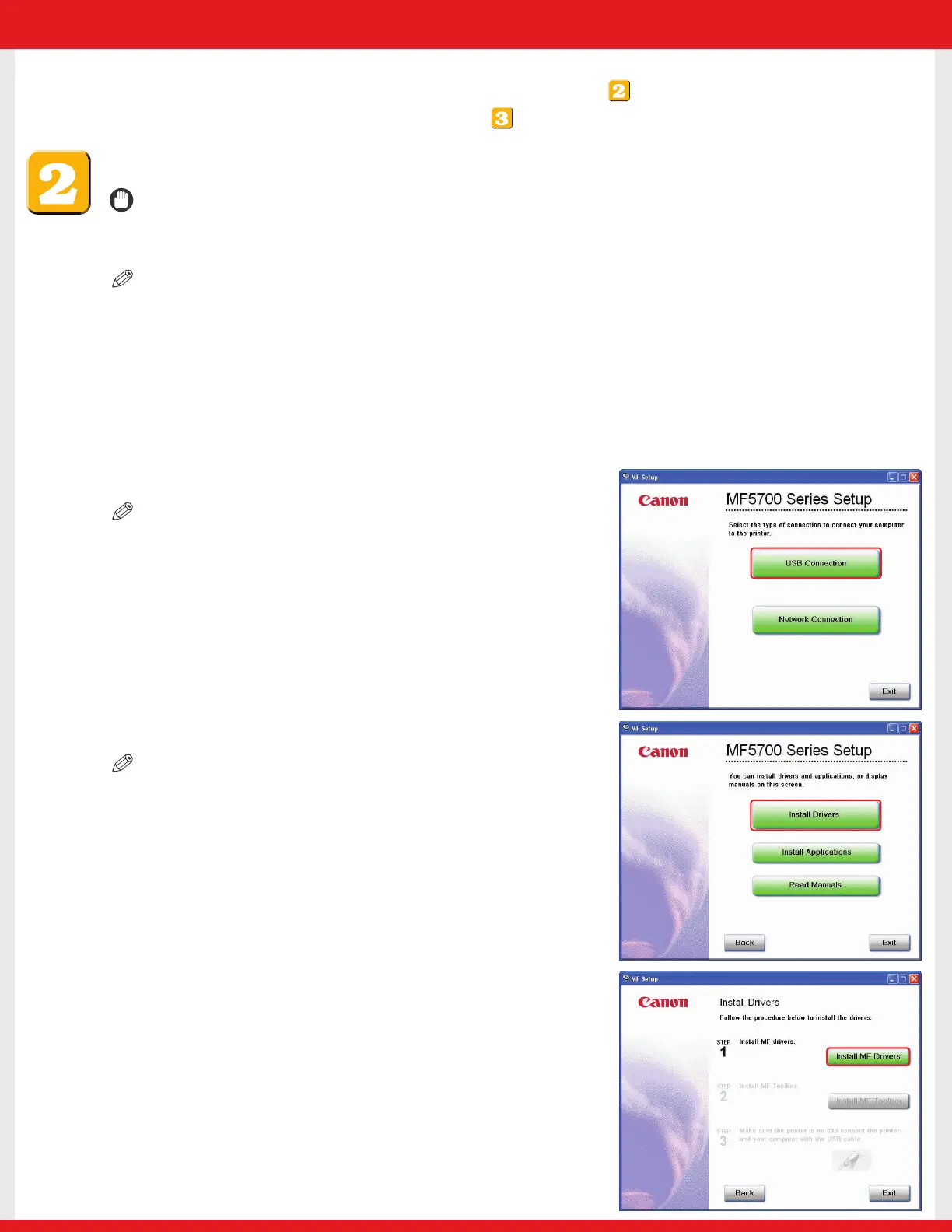
4 When the MF Setup screen appears, click [USB Connection].
NOTE
• If the MF Setup screen is not displayed, on the Windows desktop,
click [start] ➝ [My Computer]. Open the CD-ROM icon, then double-click
[Setup (Setup.exe)].
5 Click [Install Drivers].
NOTE
• If you would like to install the Presto! PageManager file management
software and/or OmniPage SE OCR software, click [Install Applications] and
follow the instructions on the screen.
• You can also click [Read Manuals] on this screen to read PDF manuals.
6 Click [Install MF Drivers].
Installation Options:
•To use the machine as a local printer via USB connection, proceed to .
•To use the machine as a network printer, proceed to .
E227ME (MF5770) US2 SI N&P.qxd 12/13/04 5:59 PM Page 2










 To Next Page