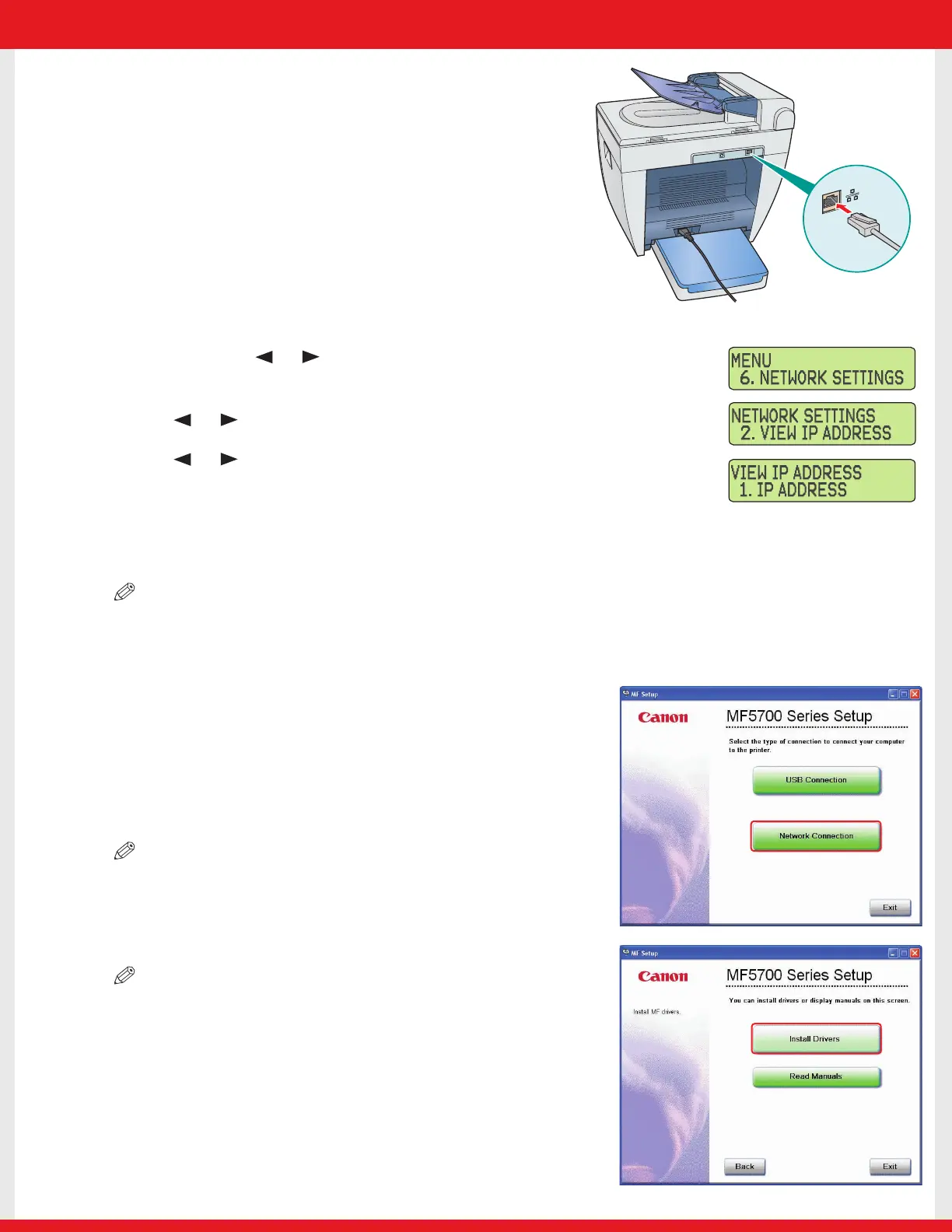
Connecting the Machine to a Network
1 Connect a Category 5 rated (Cat 5) twisted-pair LAN
cable to the 10Base-T/100Base-TX port on the back
of the machine. Connect the other end of the cable
to a network router or a hub.
Checking Network Settings
1 Press [Menu] ➝ or to select <6.NETWORK SETTINGS>
on the LCD ➝ press [Set].
2 Press or to select <2.VIEW IP ADDRESS> ➝ press [Set].
3 Press or to select the desired setting ➝ press [Set].
4 Press [Stop/Reset] to return to the standby display.
Installing Driver Software
NOTE
• For Windows 2000/XP/Server 2003, log on as Administrator to install the software.
• The screenshots below are from Windows XP. However, the installation procedure is essentially the same for other versions
of Windows.
1 Turn on your computer.
2 Quit any open applications, including anti-virus software.
3 Insert the User Software CD into the CD-ROM drive.
4 When the MF Setup screen appears, click [Network
Connection].
NOTE
• If the MF Setup screen is not displayed, on the Windows desktop, click [start]
➝ [My Computer]. Open the CD-ROM icon, then double-click [Setup
(Setup.exe)].
5 Click [Install Drivers].
NOTE
• You can click [Read Manuals] to read PDF manuals.
E227ME (MF5770) US2 SI N&P.qxd 12/13/04 5:59 PM Page 6









 To Next Page