13
Connecting the Power Cord
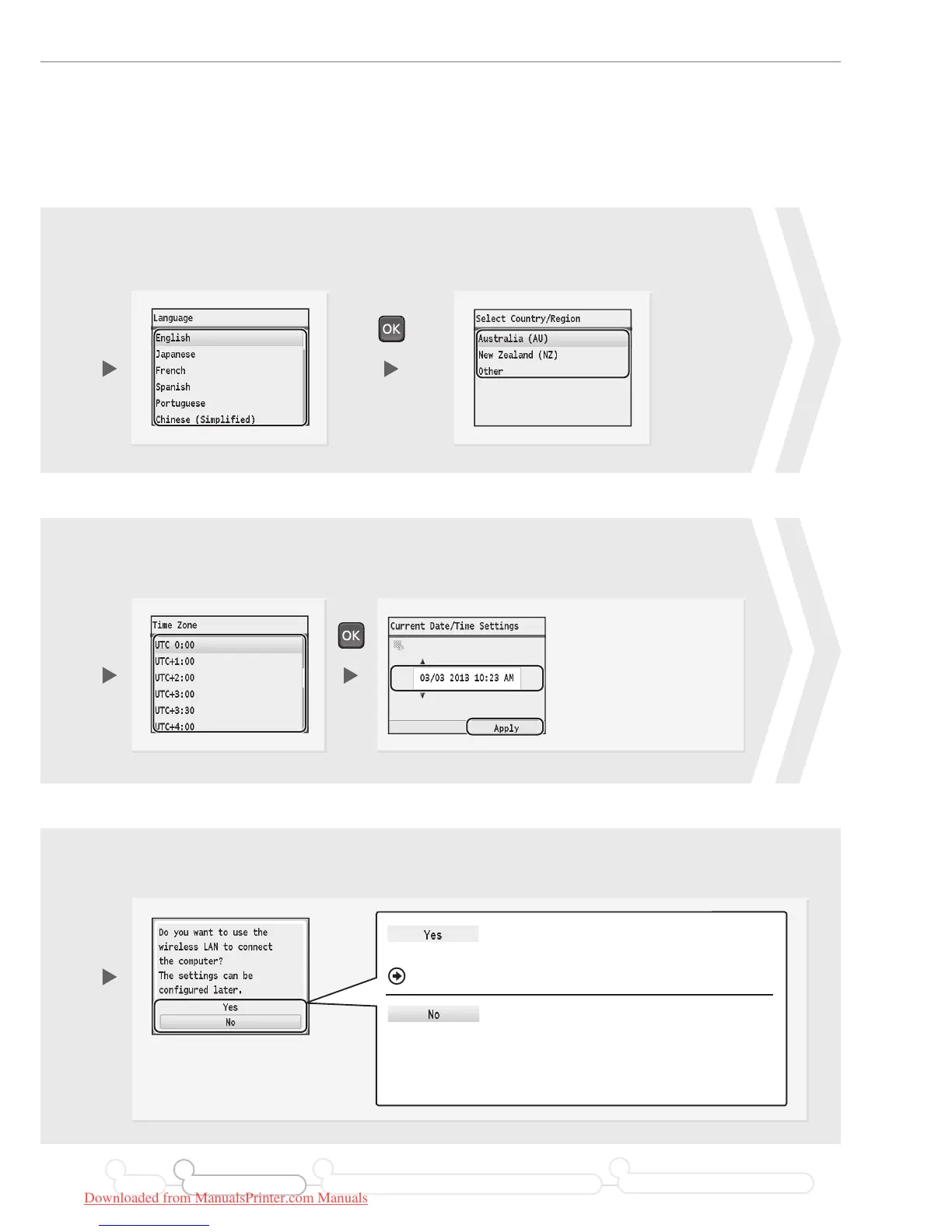
Press [▲] or [▼] to highlight a
language*, and then press [OK].
Select whether or not to connect using wireless LAN immediately.
Press [▲] or [▼] to highlight a
region*, and then press [OK].
3 4
9
•
Press [◀] or [▶] to move the
cursor to the left and right.
• Press [▲] or [▼] to
change the numeric
value, or AM/PM.
The factory default settings for
time display is set as 12-Hour.
Enter the date and time, and then press <Apply>.
Press [▲] or [▼] to
highlight your time zone**,
and then press [OK].
76
Connect to the computer via a
wireless LAN immediately.
Proceed to the next page.
• Select <No> if you want to connect the machine to a
computer via a wireless LAN later. When connecting,
refer to Wireless LAN Setting Guide.
• If you do not connect the machine to a computer,
proceed to fax conguration (P. 20).
Start from step on P. 4 in Wireless LAN Setting Guide.
Preface Installing the Machine
21
Connecting to a Computer and Installing the Drivers
3
Configuring and Connecting the Fax
4
* The screen may dier depending on the country or region where you are using the machine.
** The time zone setting indicates the time dierence between your local time zone and Coordinated Universal Time (UTC).
The correct time zone setting is required for Internet communications.
Downloaded from ManualsPrinter.com Manuals






 To Next Page