14
Connecting to the Computer
Check!
Choosing the Method to Connect the Machine to the Computer
First, you need to decide on the method you would like to connect your machine to the computer. Choose from the
following three options.
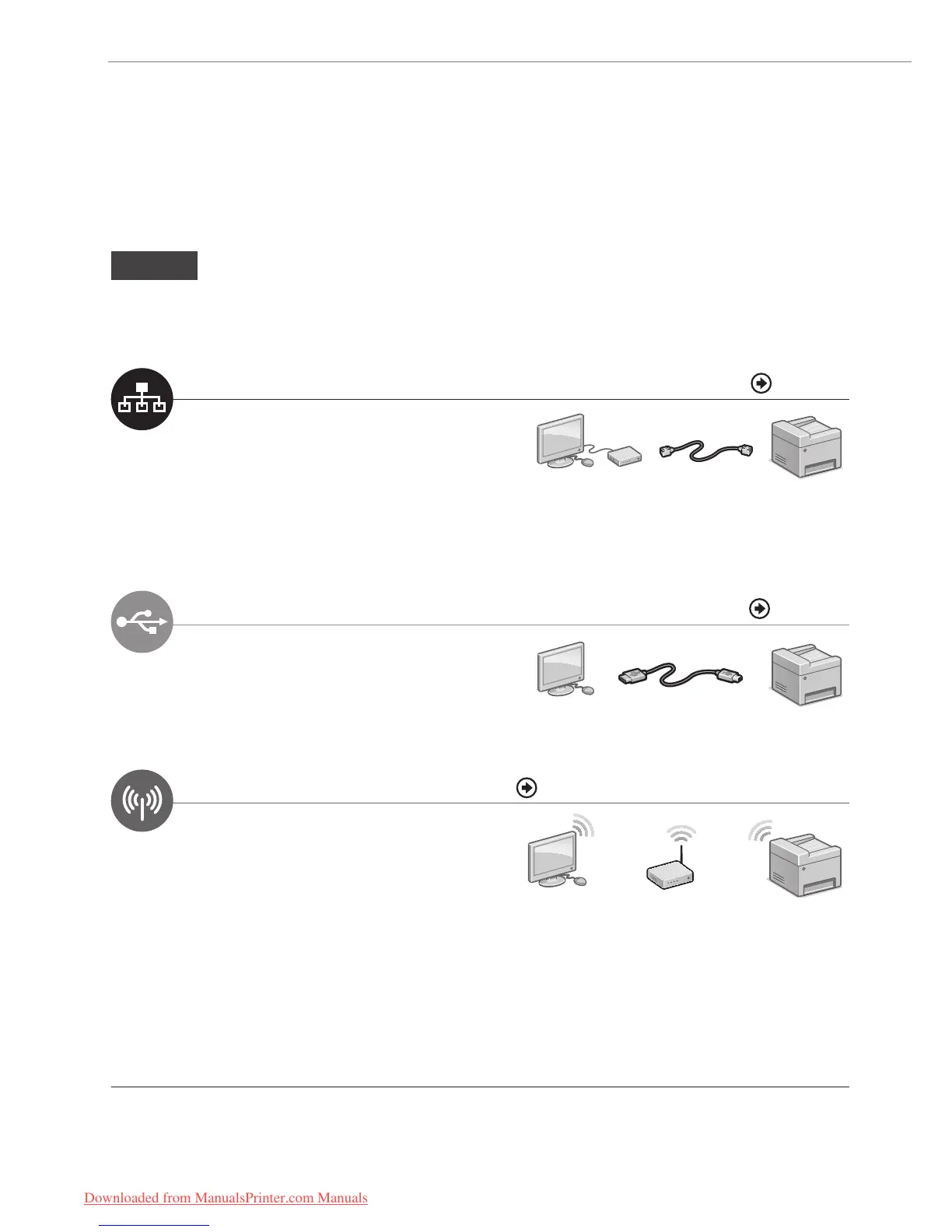
Connecting via a Wired LAN P. 15
You can connect the machine to the computer
through a wired router. Use the LAN cables to
connect the machine to the wired router.
• Make sure that there is an available port in the router to connect
the machine and the computer.
• Have a LAN Cable of Category 5 twisted-pair cable or higher
ready.
LAN Cable
Wired Router
Connecting via a USB P. 17
You can connect the machine to the computer using
a USB cable.
USB Cable
Connecting via a Wireless LAN See “Wireless LAN Setting Guide”
You can connect the machine to the computer
through a wireless router*. Since it is connected
wireless, no LAN cables are needed.
* A wireless router which supports IEEE 802.11b/g/n is required.
Wireless Router
If you are not sure whether your router is wired or wireless:
See the instruction manual provided with your network device, or contact the manufacturer.
Downloaded from ManualsPrinter.com Manuals






 To Next Page