35
Entering Text
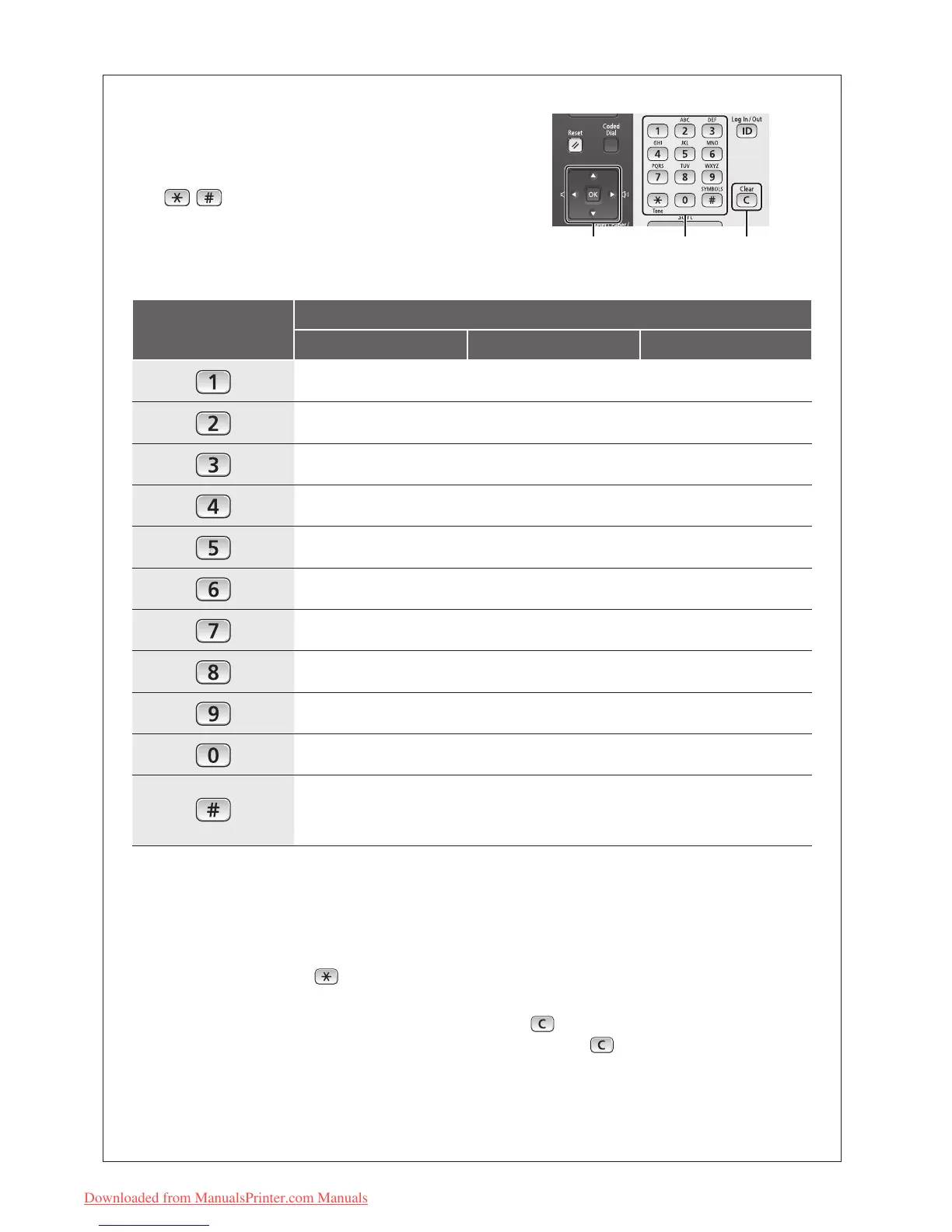
During the setup or initial conguration, you may need to
enter letters and numbers. Use [▲], [▼], [◀], [▶], numeric
keys, , , and [OK] to enter text.
Numeric Key
Entry Mode (See below on how to change the Entry mode)
<A> <a> <12>
@.-_/ 1
ABC abc 2
DEF def 3
GHI ghi 4
JKL jkl 5
MNO mno 6
PQRS pqrs 7
TUV tuv 8
WXYZ wxyz 9
(Not available)
0
(space) @ . / - _ ! ? & $ % # ( ) [ ] { } < > * + = " , ; : ' ^ ` | \
~
(Not available)
Changing the Entry Mode
The machine supports three entry modes: <A>
for uppercase, <a> for lowercase, and <12> for
numbers. Press <A/a/12> or to change the
entry mode.
Moving the Cursor
Press [◀] or [▶] to move the cursor.
Entering a Space
Move the cursor to the end of the text, and then
press [▶].
Deleting Characters
Press to delete characters.
Press and hold
to delete all characters.
OK
▼ ▲ ◀ ▶
Numeric
keys,
*
, #
Clear
Downloaded from ManualsPrinter.com Manuals






 To Next Page