20
Conguring the Fax
Check!
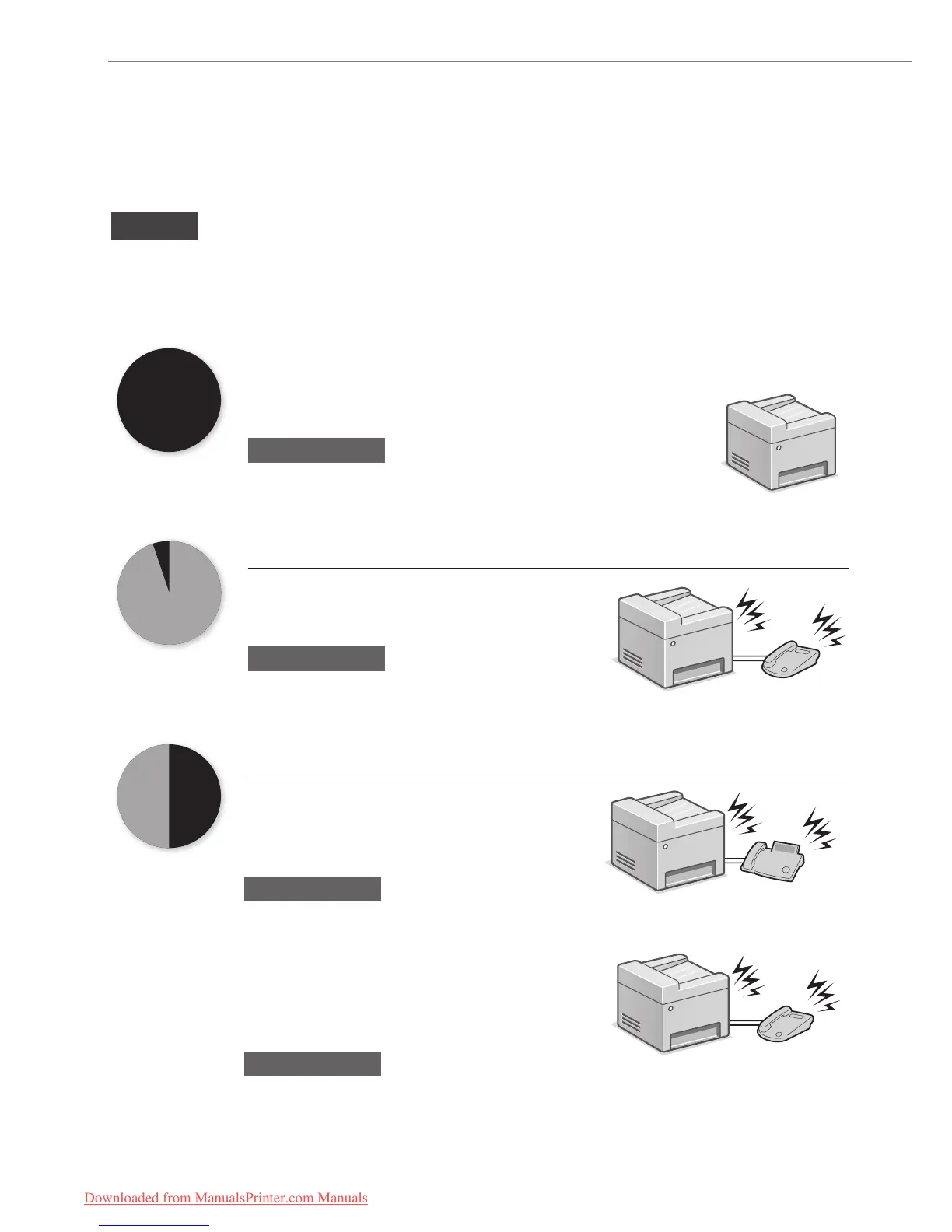
Selecting a Receive Mode That Fits Your Purpose
Choose your purpose to know the receive mode* to use. Remember the receive mode to congure the setting in
“Selecting the Fax Receive Mode” (P. 22).
* You may be able to manually set a receive mode other than those described below, depending on your country or region. See the e-Manual for
details about other receive mode.
Fax
Use for Fax Only/No Voice Calls
You can use only for fax and may not use for voice calls. You do not
need to connect the external telephone.
Receive Mode
⇒
Auto
Phone
Mainly Use for Voice Calls/Almost Not Use for Fax
Connect an external phone* to receive calls.
Press the start button to receive faxes.
* You can also use an optional handset.
Receive Mode
⇒
Manual
Telephone
Phone Fax
Use for Fax and Voice Call
Using an answering machine
Connect an external answering machine to record
voice messages when you are out, as well as
receive calls. Faxes will be automatically received.
Receive Mode
⇒
Answering Machine
Answering machine
Using a General Telephone
Connect the external telephone*. Faxes will be
automatically received and the machine will ring
when voice calls come in.
* You can also use an optional handset.
Receive Mode
⇒
Fax/Tel Auto Switch
Telephone
Downloaded from ManualsPrinter.com Manuals






 To Next Page