22
Conguring the Fax
Set Up 2
Selecting the Fax Receive Mode
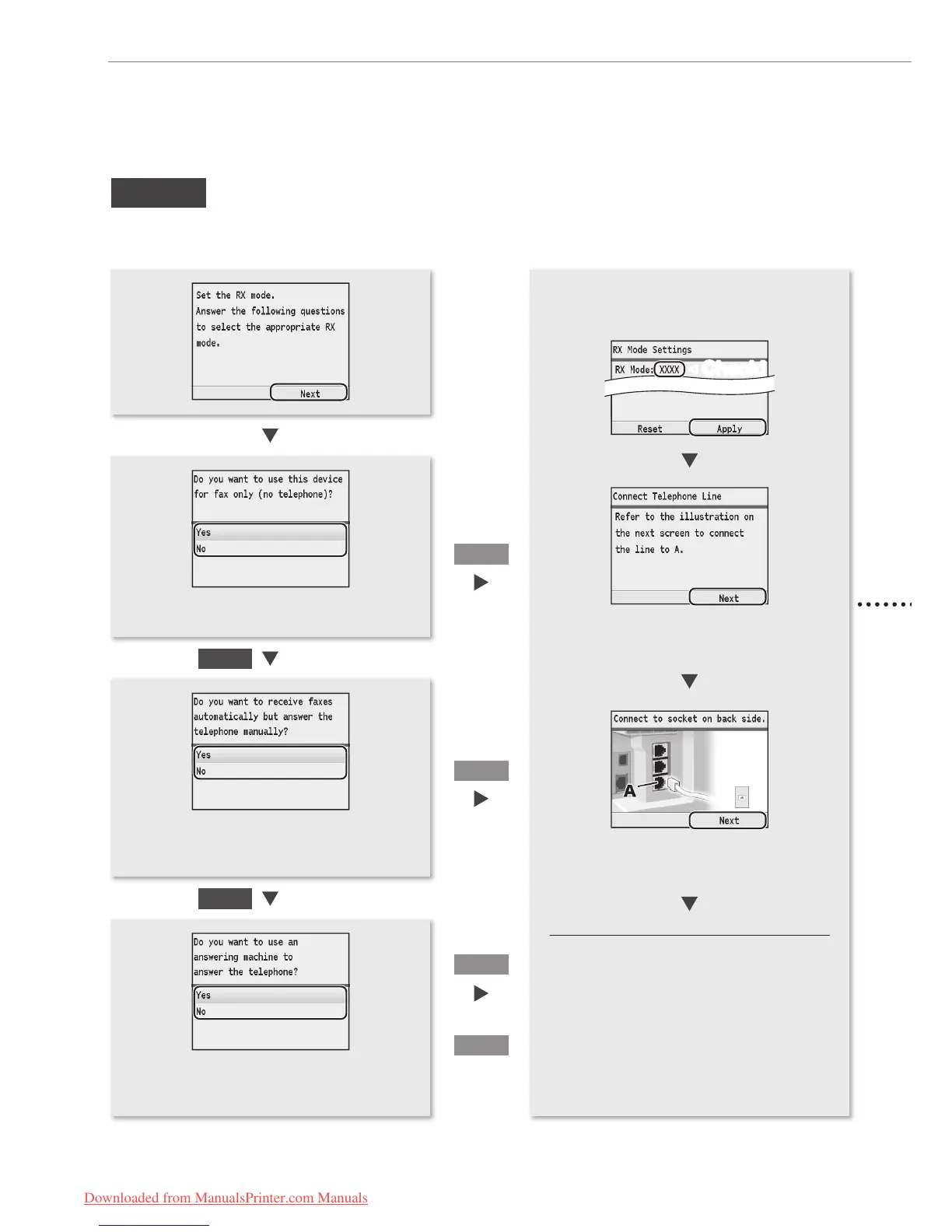
Set the receive mode that you conrmed in “Selecting a Receive Mode That Fits Your Purpose” (P. 20).
• To set to Auto mode → <Yes> → [OK]
• To set to other receive modes → <No> → [OK]
• To set to Fax/Tel Auto Switch mode → <Yes>
→ [OK]
• To set to other receive modes → <No> → [OK]
• To set to Answering Machine mode → <Yes>
→ [OK]
• To set to Manual mode → <No> → [OK]
Yes
Yes
No
No
The screen that appears varies
depending on the receive mode
selected.
The screen that appears varies
depending on the receive mode
selected.
<Auto>
<Fax/Tel>
Yes
No
<Answer>
<Manual>
When connecting a telephone with fax
functions:
Set the fax receive mode of the telephone to
“manual.”
Other receiving mode:
You may be able to manually set a receive mode
other than those described here, depending on
your country or region. See the e-Manual for
details about other receive mode.
◀
Check!
Downloaded from ManualsPrinter.com Manuals






 To Next Page