
 Need help?
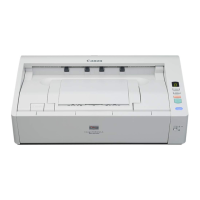
Do you have a question about the Canon imageFORMULA DR-M1060 and is the answer not in the manual?
Lists items included in the scanner package for initial setup.
Lists necessary computer specs and guides scanner connection.
Crucial safety warnings and precautions for operating the scanner.
Environmental requirements for optimal scanner performance and safety.
Instructions for safely connecting and using the scanner's AC adapter.
Guides on long document mode, double feed, skew, and error detection.
Step-by-step guide to enable and set up double feed detection features.
Setting up skew, staple, and feed error detection and clearing jams.
Offers solutions for common scanner and software problems.
 General
| Input voltage | 100 - 240 V |
|---|---|
| Power supply type | AC |
| AC input frequency | 50 - 60 Hz |
| Power consumption (off) | 0.5 W |
| Power consumption (sleep) | 2.5 W |
| Power consumption (typical) | 32.5 W |
| Color scanning | Yes |
| Grayscale levels | 256 |
| Input color depth | 24 bit |
| Maximum scan size | 300 x 432 mm |
| ADF scan speed (b/w, A3) | 60 ppm |
| ADF scan speed (b/w, A4) | - ppm |
| Optical scanning resolution | 600 x 600 DPI |
| Black/white scanning color modes | Grayscale |
| Display | LED |
| Scanner type | Sheet-fed scanner |
| Product color | White, Grey |
| Operating temperature (T-T) | 10 - 32.5 °C |
| Operating relative humidity (H-H) | 20 - 85 % |
| Sustainability certificates | RoHS, ENERGY STAR |
| Server operating systems supported | Windows Server 2008, Windows Server 2012 |
| Windows operating systems supported | Windows 10, Windows 7, Windows 8, Windows Vista, Windows XP |
| Sensor type | CMOS CIS |
| Scan drivers | ISIS, TWAIN |
| Daily duty cycle (max) | 7500 pages |
| Maximum scan width | 300 mm |
| Maximum scan length | 3000 mm |
| Card thickness (max) | 1.4 mm |
| Media thickness (min) | 0.04 mm |
| Maximum ISO A-series paper size | A3 |
| Auto Document Feeder (ADF) media weight | 27 - 128 g/m² |
| USB version | 2.0 |
| Standard interfaces | USB 2.0 |
| Auto document feeder (ADF) input capacity | 80 sheets |
 Weight and Dimensions
| Depth | 246 mm |
|---|---|
| Width | 424 mm |
| Height | 120 mm |
| Weight | 6100 g |







 To Next Page