Chapter 2
2-96
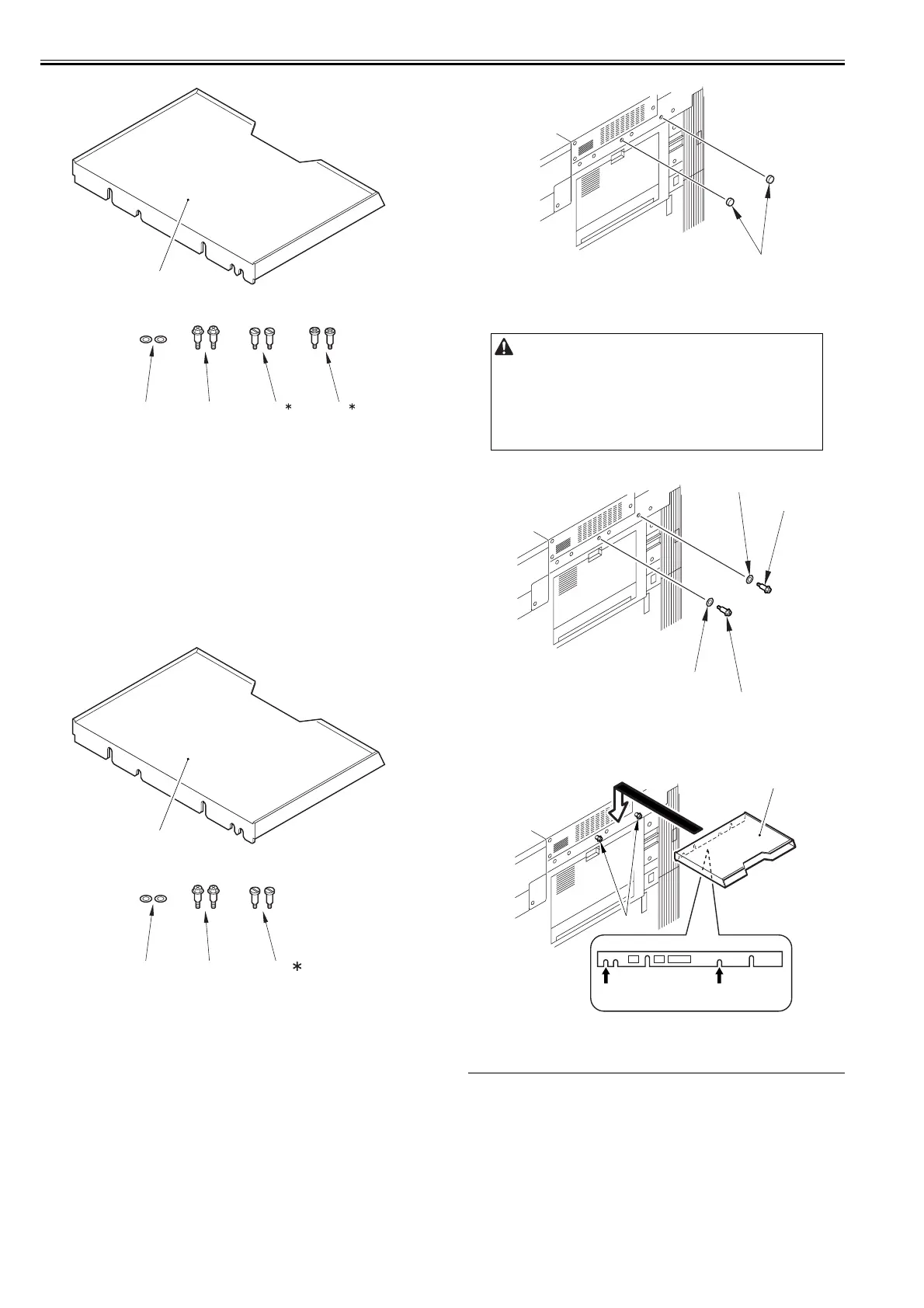
F-2-366
2.9.3 Checking the Contents
0021-2145
imagePRESS C1+ (Printer)
F-2-367
2.9.4 Installing the Document Tray
0013-7488
imagePRESS C1 P / imagePRESS C1 / imagePRESS C1+ (Printer) / image-
PRESS C1+
1) Remove the 2 rubber caps [1].
F-2-368
2) Mount the 2 washers [1] and the 2 stepped screws [2] on the upper right
cover of the host machine.
F-2-369
3) Fit the notches [2] of the reinforcement plate of the Document Tray [1]
into the stepped screws [3].
F-2-370
2.10 Installing the Platen Cover
2.10.1 Checking the Contents
0013-6441
imagePRESS C1 P / imagePRESS C1 / imagePRESS C1+ (Printer) / image-
PRESS C1+
<Platen Cover Type K>
[1] Document Tray 1 pc.
[2] Washer 2 pc.
[3] Stepped screw 2 pc.
[4]* Stepped screw (M4) 2 pc.
[5]* Stepped screw (M4X10.8) 2 pc.
* Not used in this host machine.
[1] Document Tray 1 pc.
[2] Washer 2 pc.
[3] Stepped screw 2 pc.
[4]* Stepped screw (M4) 2 pc.
* Not used in this host machine.
[1]
[3][2] [4] [5]
[1]
[3][2] [4]
When attaching the stepped screw, if the stepped screw is fully tightened,
there is no space left for the Document Tray to be attached. Be sure to secure
a certain space while maintaining the stability of the Document Tray.
[1]
[1]
[2]
[1]
[2]
[2] [2]
[1]
[3]





 To Next Page