36
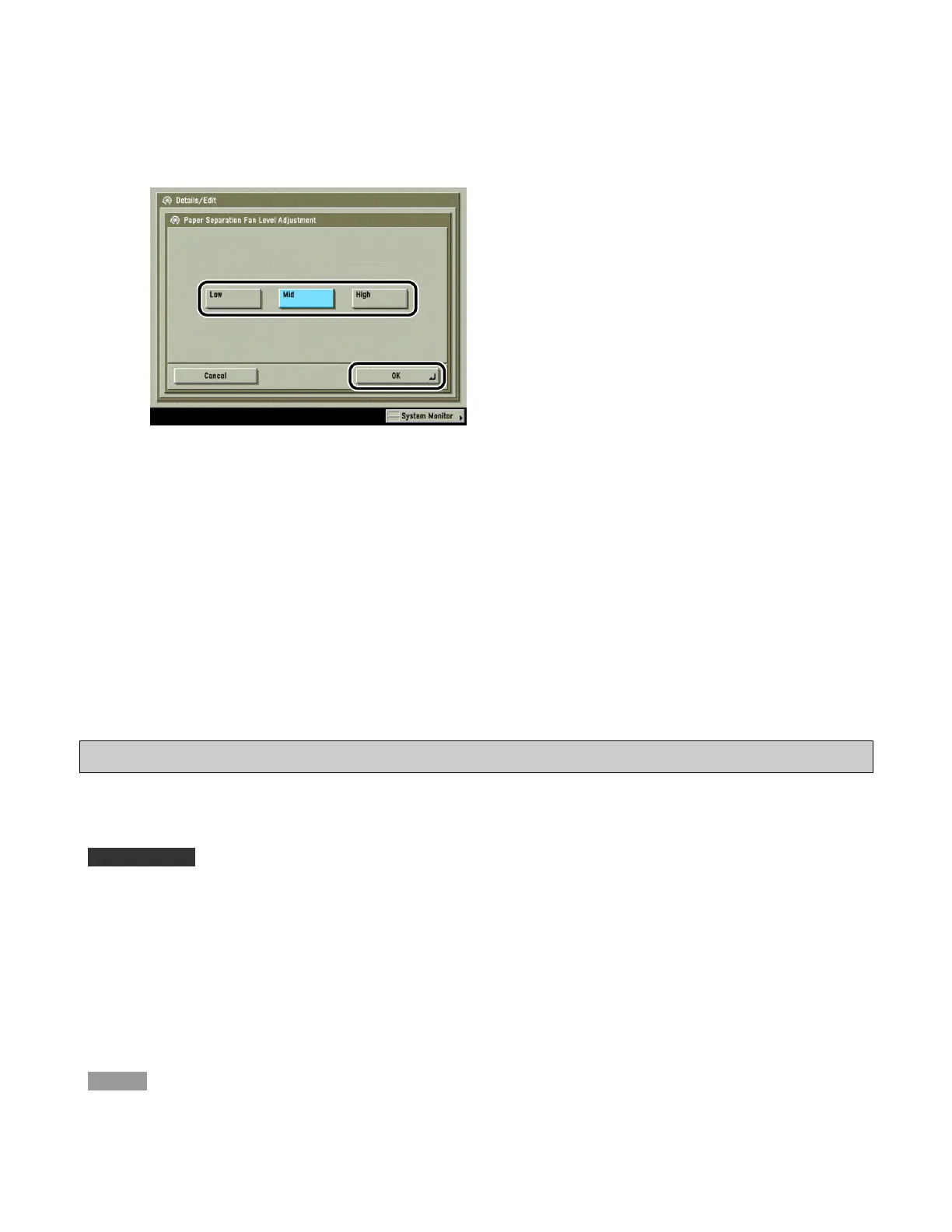
4 Select the fan level → press [OK].
Details of each item are shown below.
[Low]: Select when high-density areas are not printed evenly, or when the amount of curl is at an
unusually high level due to a lack of moisture, paper characteristics, and variable humid
conditions.
[Mid]: Default setting.
[High]: Select when paper jams occur frequently, or when the temperature and humidity are high.
5 Press [Done].
Adjusting the Image Location on a Custom Paper Type
This setting enables you to adjust the image location on a custom paper types.
IMPORTANT
· [Image Location Adjustment] is displayed only if the settings are made available by your local authorized
Canon dealer. Even if [Image Location Adjustment] is displayed, do not allow anyone to change the settings
except for the system manager. For more information on changing the settings, contact your local authorized
Canon dealer.
· Only user-registered paper can be edited.
NOTE
You cannot change the detailed information of paper being used for copying/printing jobs.









 To Next Page