Convenient Printer Driver Features
Borderless printing is possible when the Page Size setting matches the size of paper loaded in the
printer and you select XXXX-Borderless (where XXXX is the size of the original) in Paper Size in the
Page Attributes dialog box. (Mac OS X only)
•
15
Borderless Printing
Access the Page Setup sheet.•
Instructions in Windows and Mac OS
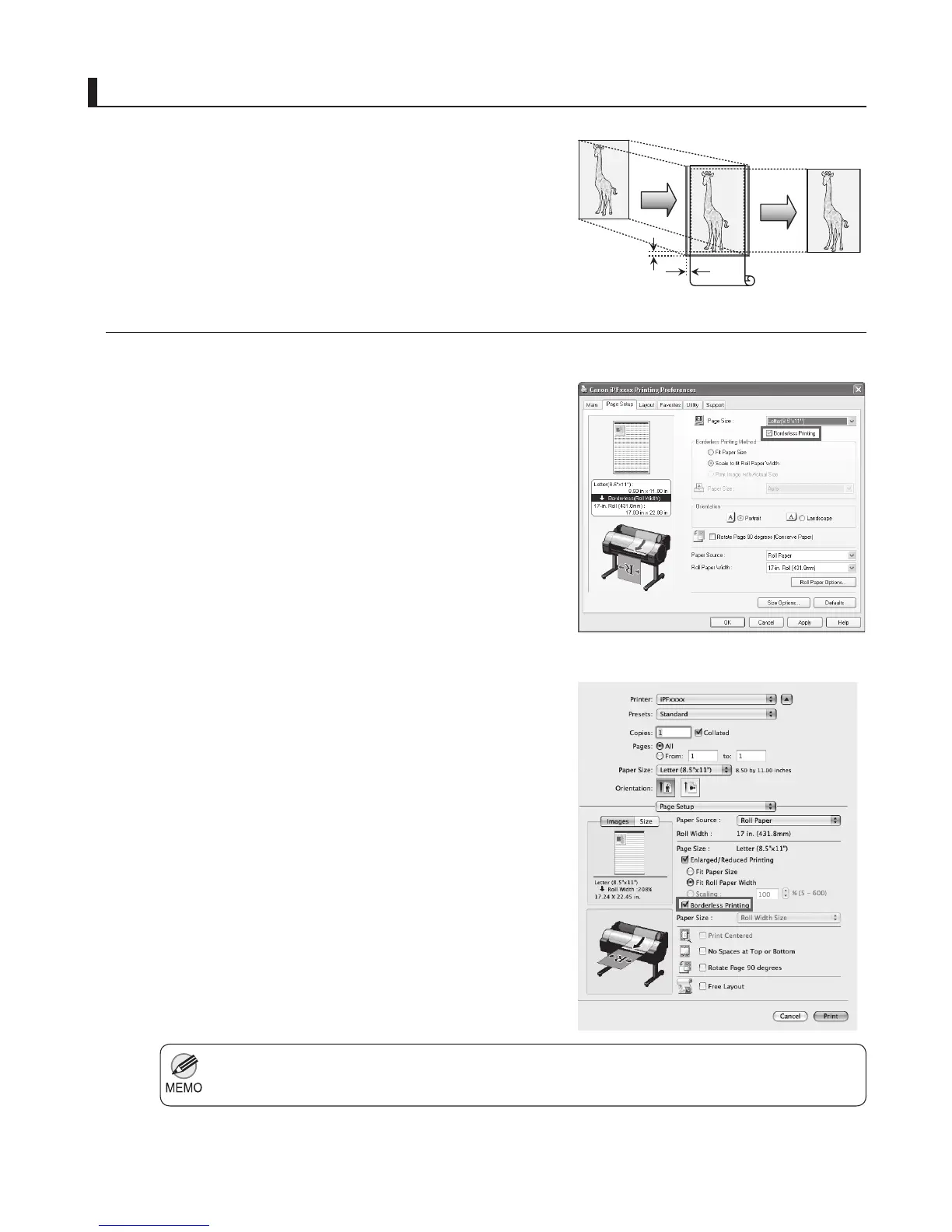
In regular printing, a margin required by the printer is added
around the original. With borderless printing, you can print
documents without the margin, so that the printed image covers
the entire surface of the paper.
Windows
Mac OS X
Click the width of the loaded roll in the Roll Paper Width
list.
•
Select the Borderless Printing check box to display the
Information dialog box.
•
Click OK to close the Information dialog box.•
Select Fit Paper Size , Scale to fi t Roll Paper Width , or
Print Image with Actual Size .
•
Access the Page Setup pane.•
Select the Enlarged/Reduced Printing check box.•
Select the Borderless Printing check box.•
Select either Fit Paper Size or Fit Roll Paper Width .•
3mm
3mm












 To Next Page