l
Output Tray
All printed documents are ejected from this slot.
m
Ejection Guide
Guides printed documents as they are ejected.
n
Top Cover
Open this cover to install the Printhead and remove any jammed paper from inside the printer, as needed.
(See "Top Cover (Inside).") →P.57
o
Width Guide
When loading the sheets , move the guide to match the paper size.
p
Stand
A stand that holds the printer. Equipped with casters to facilitate moving it. (See "Stand.")
→User's Guide
Side
Side
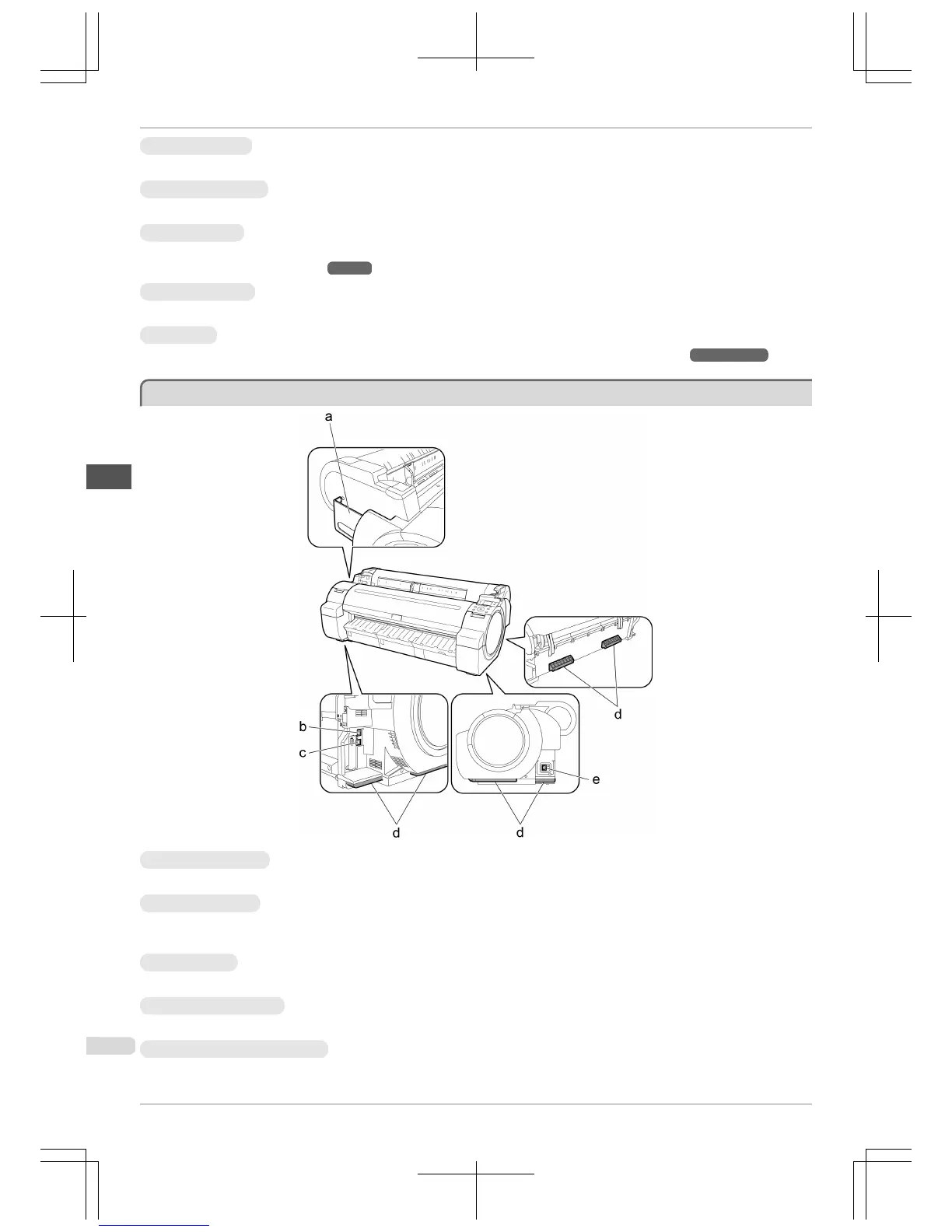
a
Manual Pocket
Store printer manuals in this pocket.
b
Ethernet Port
Connect an Ethernet cable to this port. The lamp is lit if the Ethernet cable is connected correctly and commu-
nication is possible between the computer and printer.
c
USB Port
Connect a USB cable to this port. The printer is compatible with Hi-Speed USB connections.
d
Carrying Handles
When carrying the printer, have three people hold it by these handles on the back at both ends.
e
Power Supply Connector
Connect the power cord to this connector.
Side
iPF765
Basic Guide
Printer Parts Printer parts
56


 To Next Page
 Loading...













