
 Need help?
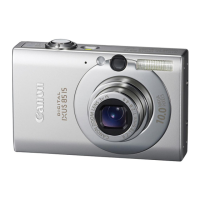
Do you have a question about the Canon IXUS 95 IS and is the answer not in the manual?
Take initial test shots to ensure correct recording and understand liability.
Information on personal use of images and copyright laws.
Details on warranty effectiveness and claiming service abroad.
Explanation of pixel behavior and its effect on image quality.
Information regarding normal warming of the camera body during use.
General reference to memory cards used in the camera.
Acknowledgement of SDHC logo as a trademark.
Information on special handling for lithium batteries in California, USA.
Covers essential safety instructions for operating the camera, handling children, and cleaning.
Guidelines for safe use and handling of the battery and charger.
Covers warnings about CD-ROM playback, impacts, lens handling, and storage conditions.
Details specific cautions regarding charger terminals, aiming at light sources, dust, flash use, and battery storage.
Details on expected shots per charge and how to interpret battery charge indicators.
Tips for optimizing battery life and using the charger correctly, including storage and abroad use.
Procedure for safely removing the battery and memory card from the camera.
Estimates the number of shots possible with different memory card sizes.
Lists the types of memory cards supported by the camera.
Explains the purpose and function of the memory card's write-protect tab.
Instructions on how to modify the date and time settings via the camera menu.
Details on achieving focus and capturing shots, including flash behavior and image recording.
Addresses common issues like the screen not turning on or sounds being disabled.
Explains common issues like dark images, close subjects, flash recharging, and red-eye reduction.
Describes the camera's automatic scene recognition icons and their meanings.
Details on initiating printing, printing multiple images, and compatible Canon printers.
Steps to start recording a movie, handle focus/exposure, and stop recording.
Provides estimates for movie recording duration based on memory card size.
Lists the OS, hardware, and software requirements for Windows and Macintosh computers.
Instructions for installing the necessary software on both Windows and Macintosh systems.
Steps for connecting the camera and launching the CameraWindow application on Windows.
Instructions for connecting the camera and transferring images on Macintosh systems.
Steps to start the transfer of untransferred images and where they are saved.
Details accessories included in the camera package, such as cables, straps, and battery charger.
Shows optional accessories like waterproof cases, flashes, and printers, and advises using genuine Canon accessories.
Describes AC adapter kits, battery chargers, and battery packs sold separately.
Details accessories like waterproof cases and external flashes available for purchase.
Details for US customer care, website support, and online product registration.
Details for Canadian customer care and online product registration.
Explains the duration, coverage, and limitations of the manufacturer's warranty.
Instructions on how to send the camera for repair under the warranty program.
 General
| Type | Compact Digital Camera |
|---|---|
| Brand | Canon |
| Model | IXUS 95 IS |
| Sensor Type | CCD |
| Sensor Size | 1/2.3 inch |
| Effective Pixels | 10.0 Megapixels |
| Optical Zoom | 3x |
| Digital Zoom | 4x |
| Aperture Range | f/2.8-f/4.9 |
| Image Processor | DIGIC 4 |
| Shutter Speed | 15 - 1/1500 sec |
| LCD Screen Resolution | 230, 000 dots |
| Storage Media | SD/SDHC/MMC/MMCplus/HC MMCplus |
| Image Stabilization | Optical |
| ISO Range | 80 - 1600 |
| LCD Screen Size | 2.5-inch |
| Max Video Resolution | 640 x 480 |
| Battery Type | Lithium-ion NB-4L |
| Lens | Canon Lens |




 To Next Page