13
51 2 3
4
USB
9
USB 포트는 기기의 오른쪽에 위치하여 있습니다.•
컴퓨터에서 기기를 인식하면 화면에 메시지가 나타납니다.
10분 후에 다음 절차로 이동할 수 없으면 도움말을 클릭하고 메시지를 확인합니다.
•
•
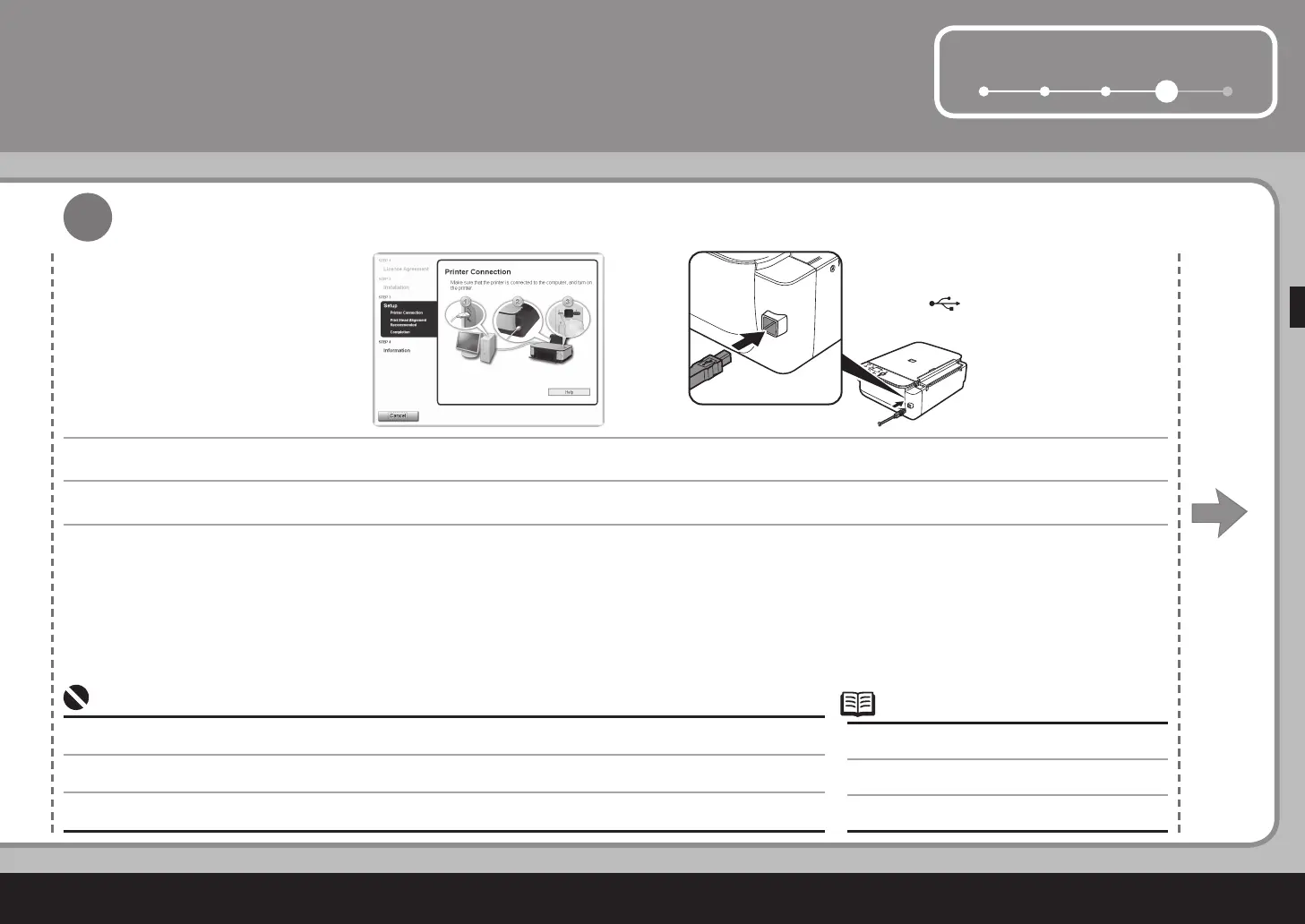
프린터 연결 화면이 나타나면 USB 케이블의 한 쪽은 컴퓨터에 연결하고 다른 한 쪽은 기기에 연결한 다음 기기를 켭니다.
USB 連接埠位於本機右側。
•
出現印表機連接螢幕時,將 USB 電纜線的一端連接到電腦,另一端連接到本機,然後開啟本機。
電腦識別出本機時,螢幕出現信息。
如果 10 分鐘後仍不能轉到下一步操作,按一下說明並確認信息。
•
•
When the Printer Connection screen appears, connect one end of the USB cable to the computer, the other to the machine, then TURN THE MACHINE
ON.
The USB port is located on the right side of the
machine.
•
When the machine is recognized by the computer, a message appears on the screen.
If you cannot go to the next procedure after 10 minutes, click Help and conrm the message.
•
•



 To Next Page