16
Windows
13 14
4
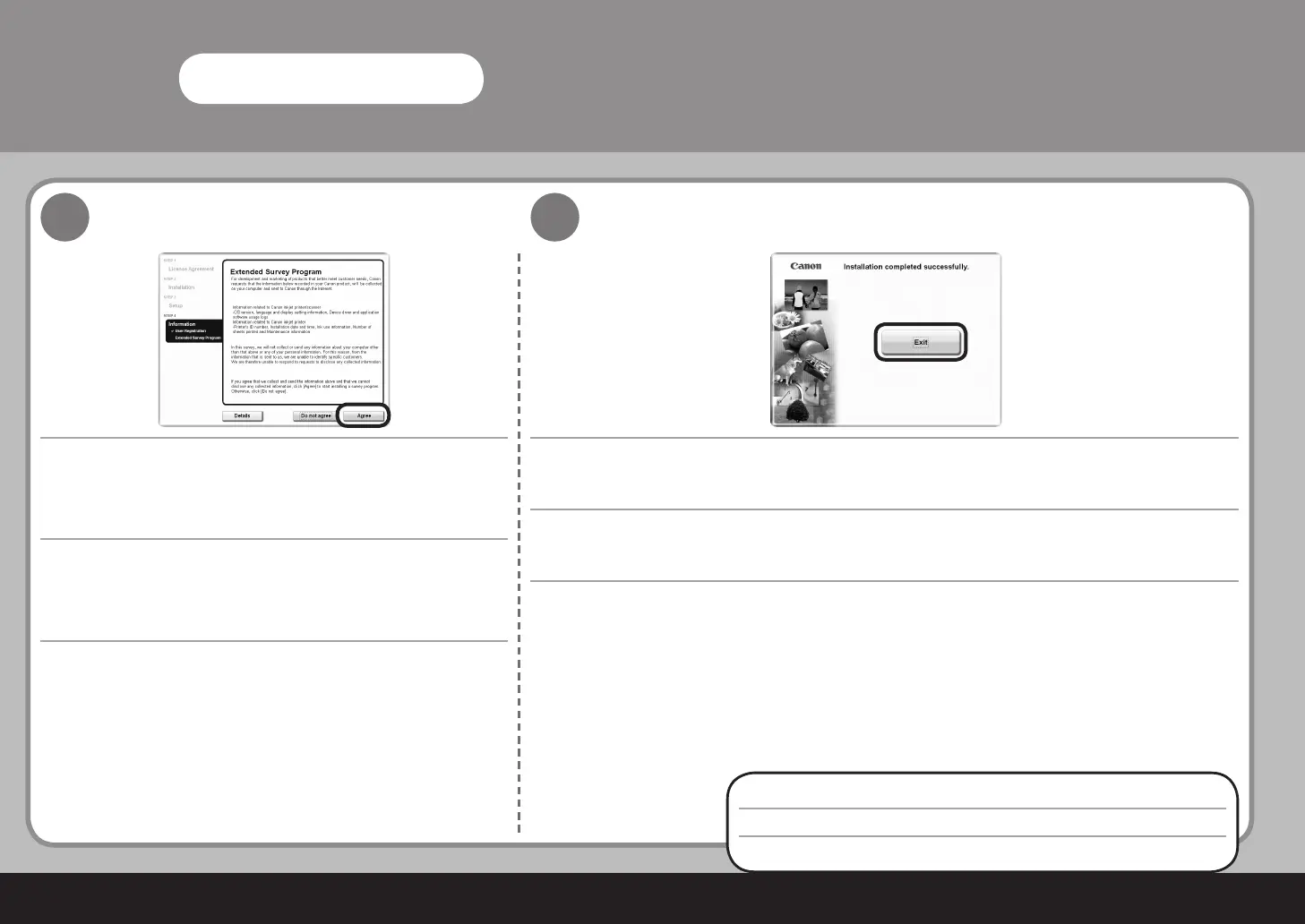
Extended Survey Program 화면이 나타나면 메시지를 확인합니다.
동의하면 동의함을 클릭합니다.
동의 안 함을 클릭하면 Extended Survey Program은 설치되지 않습니다. (이는 기기
의 기능에 아무 영향도 없습니다.)
다시 시작이 표시되면 시스템을 지금 다시 시작하십시오(권장) 선택 상자를 선택한 다음 다시 시작을 클릭합니다. 컴퓨터를 다시
시작한 후
Setup CD-ROM
을 제거하고 이를 안전한 장소에 보관해 두십시오.
종료를 클릭합니다.
다음 절차는 23페이지의 "5 용지 로드하기"를 보십시오!
出現拓展調查計劃 (Extended Survey Program) 螢幕時,確認此訊
息。
如果同意,按一下同意。
如果按一下不同意,將不安裝拓展調查計劃 (Extended Survey Program)。( 這對本
機的功能無任何影響。)
如果顯示重新啟動,確保選擇立即重新啟動系統 ( 推薦 ) 核取方塊,然後按一下重新啟動。重新啟動電腦後,取出
安裝光碟
並妥
善保管。
按一下退出。
下一步,請閱讀第 23 頁的「5 載入紙張」!
When the Extended Survey Program screen appears, confirm
the message.
If you can agree, click Agree.
If you click Do not agree, the Extended Survey Program will not be installed.
(This has no effect on the machine's functionality.)
If Restart is displayed, make sure that the Restart the system now (recommended) check box is selected, then click
Restart. After restarting the computer, remove the
Setup CD-ROM
and keep it in a safe place.
Click Exit.
Next, read "5 Loading Paper" on page 23!



 To Next Page