6
4
5
3
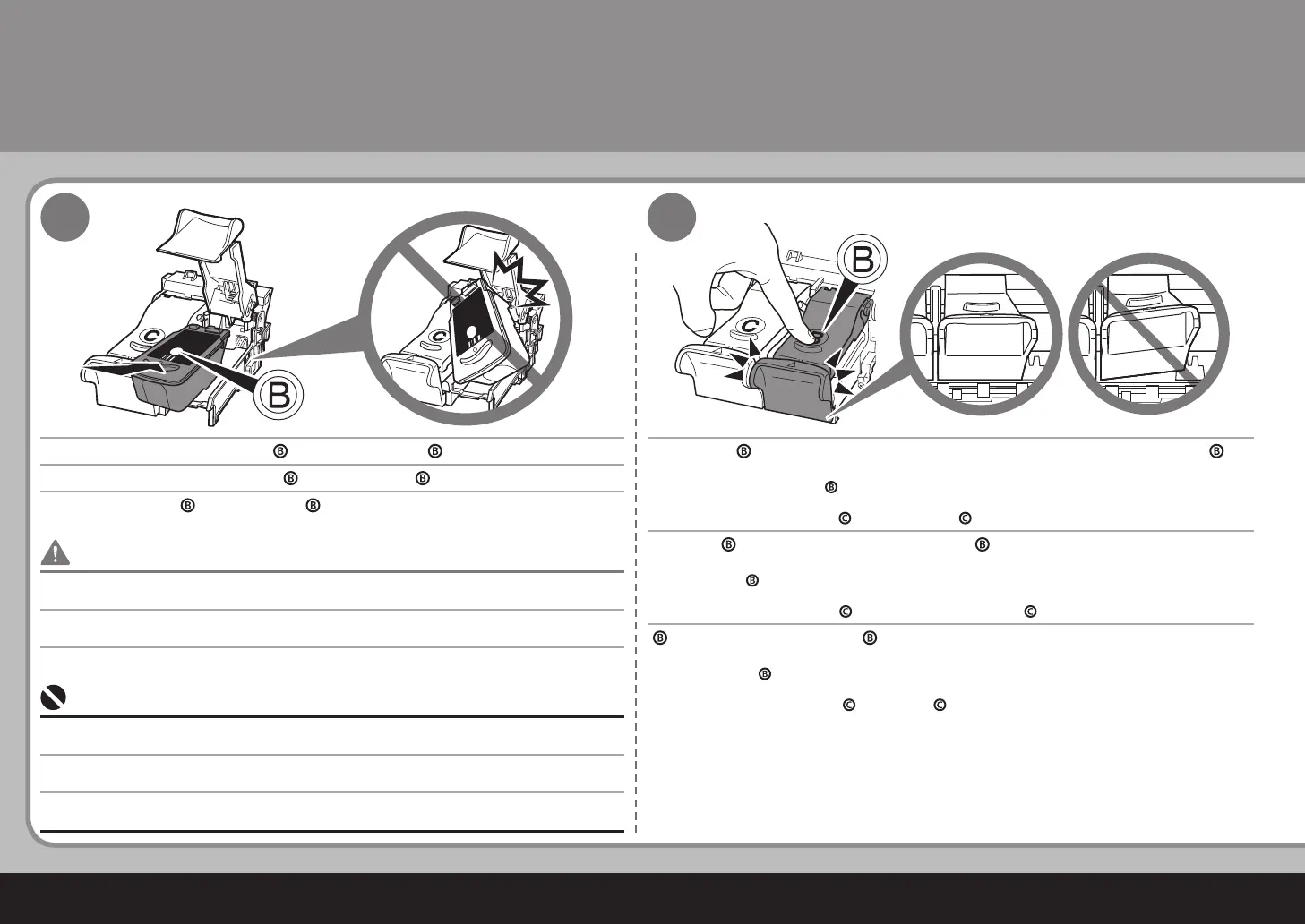
블랙 FINE 카트리지( )를 오른쪽 슬롯( )에 설치합니다.
(
)를 잉크 카트리지 잠금 커버( )가 닫히는 딸깍하는 소리가 들릴 때까지 완전히 누릅니
다.
잉크 카트리지 커버( )를 직시하여 이가 정확하게(기울지 않음) 잠기는지 확인합니다.
같은 방법으로 컬러 FINE 카트리지(
)를 왼쪽 슬롯( )에 삽입합니다.
FINE 카트리지를 홀더의 측면에 부딪히지 마십시오.
또한 이를 밝은 환경에서 설치하도록 하십시오.
•
•
블랙 카트리지는 오른쪽 홀더에 설치하고 컬러 카트리지는 왼쪽 홀더에 설치합니다.•
FINE 카트리지 설치하기
將黑色墨盒 (Black FINE Cartridge)( ) 置入右側插槽 ( )。
向下推動 (
) 直至聽到喀嗒聲以使墨盒鎖定蓋 ( ) 完全地關閉。
直視墨盒鎖定蓋 ( ) 並檢查其正確地鎖定 ( 沒有傾斜 )。
將彩色墨盒 (Color FINE Cartridge)(
) 以同樣的方法插入左側插槽 ( )。
請勿使墨盒 (FINE Cartridge)敲擊到固定座的側面。
此外確保在明亮的環境下安裝墨盒。
•
•
將黑色墨盒 (Black FINE Cartridge) 安裝到右側固定座中,並將彩色墨盒安裝到左側固定座中。
•
安裝墨盒 (FINE Cartridge)
Place the Black FINE Cartridge ( ) into the right slot ( ). Push down ( ) until you hear a click to close the Ink Cartridge Locking Cover ( )
completely.
View the Ink Cartridge Cover ( ) straight on and check that it is locked correctly (not at an angle).
Insert the Color FINE Cartridge (
) into the left slot ( ) in the same way.
Do not knock the FINE Cartridge against the sides of the holder.
Also be sure to install it in a well-lit environment.
•
•
Install the Black cartridge into the right holder, and the Color one into the left holder.•
Install the FINE Cartridges



 To Next Page