7
1 2
3
4 5
(A)
(D)
(H)
(I)
6
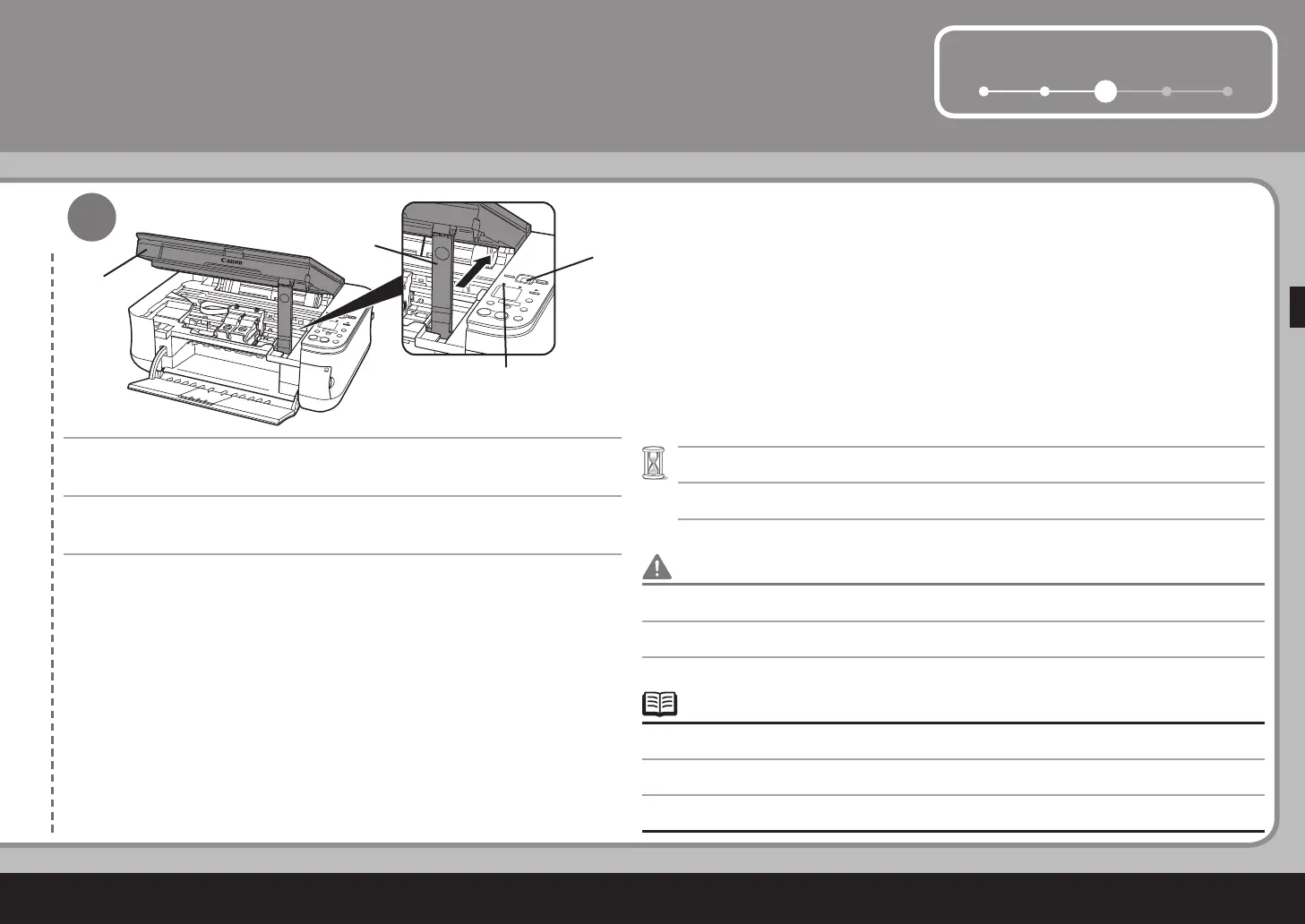
스캔 유닛(커버)(A)을 약간 들고 스캔 유닛 받침대(D)를 접은 다음 스캔 유닛(커
버)(A)을 가볍게 닫습니다.
"1"이 LED(H)에 나타날 때까지 (약 1분 내지 2분) 기다리고 다음 단계로 이동합니다.•
알람 램프(I)가 오렌지색으로 켜지면 FINE 카트리지가 정확하게 설치되었는지 확인합니다.•
FINE 카트리지가 일단 설치된 경우 불필요하게 이를 제거하지 마십시오.•
輕輕地抬起掃描單元 ( 機蓋 )(A) 並折疊掃描單元支架 (D),然後輕輕地關閉掃描單元
( 機蓋 )(A)。
等待至 LED 螢幕 (H) 出現「1」( 大約 1-2 分鐘 ) 並轉到下一步。
•
如果警告指示燈 (I) 亮起橙色,確保墨盒 (FINE Cartridge)已正確安裝。
•
一旦安裝墨盒 (FINE Cartridge),請勿將其隨意取出。
•
Lift the Scanning Unit (Cover) (A) slightly and fold the Scanning Unit Support
(D), then gently close the Scanning Unit (Cover) (A).
Wait until "1" appears on the LED (H) (about 1-2 minutes) and go to the next step.•
If the Alarm lamp (I) lights orange, make sure that the FINE Cartridges are correctly installed.•
Once you have installed the FINE Cartridges, do not remove them unnecessarily.•



 To Next Page