(22/58)
original position.
(3) Paper feed motor adjustment
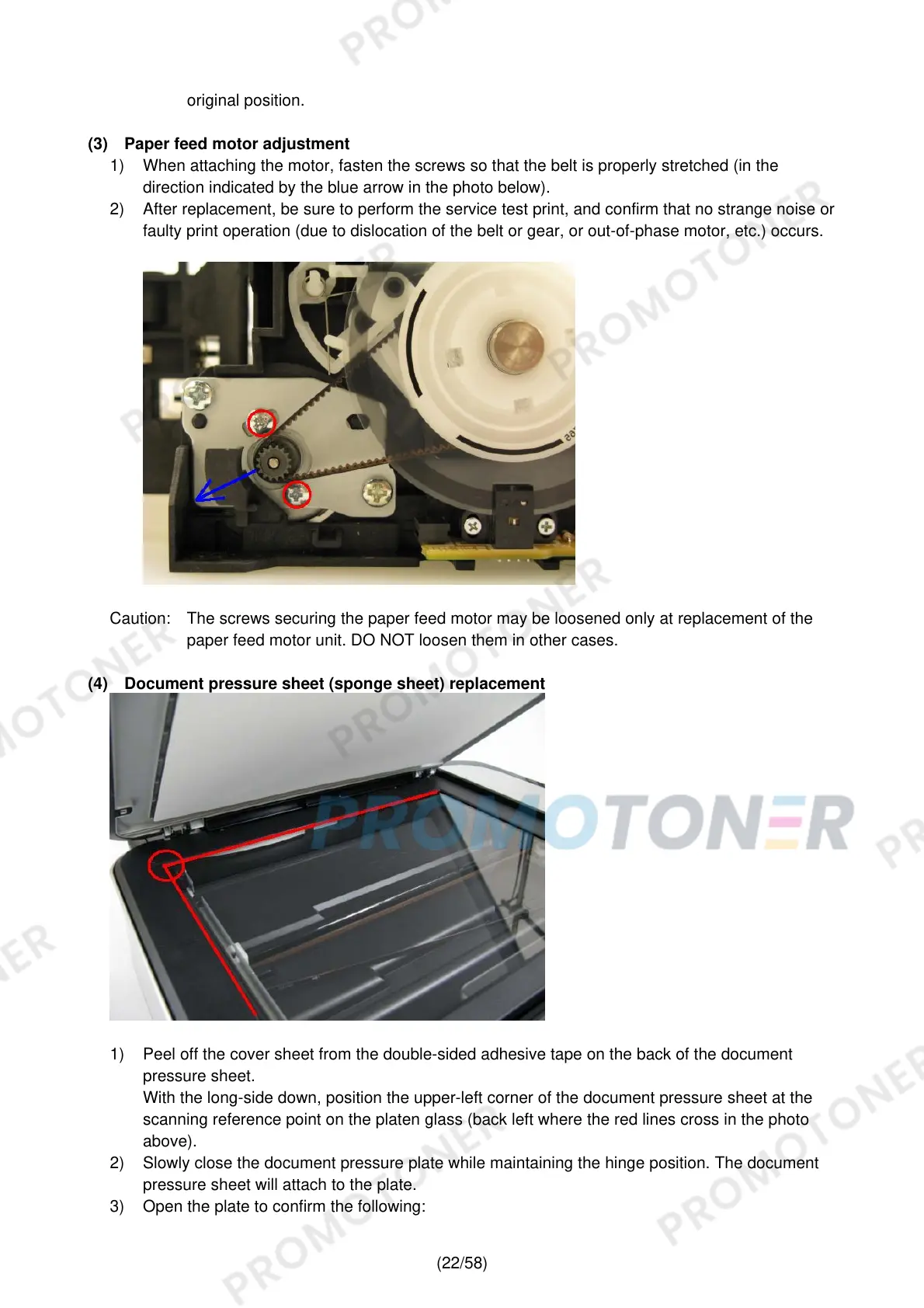
1) When attaching the motor, fasten the screws so that the belt is properly stretched (in the
direction indicated by the blue arrow in the photo below).
2) After replacement, be sure to perform the service test print, and confirm that no strange noise or
faulty print operation (due to dislocation of the belt or gear, or out-of-phase motor, etc.) occurs.
Caution: The screws securing the paper feed motor may be loosened only at replacement of the
paper feed motor unit. DO NOT loosen them in other cases.
(4) Document pressure sheet (sponge sheet) replacement
1) Peel off the cover sheet from the double-sided adhesive tape on the back of the document
pressure sheet.
With the long-side down, position the upper-left corner of the document pressure sheet at the
scanning reference point on the platen glass (back left where the red lines cross in the photo
above).
2) Slowly close the document pressure plate while maintaining the hinge position. The document
pressure sheet will attach to the plate.
3) Open the plate to confirm the following:











 To Next Page