1) In the LF / Eject correction mode, press the Stop/Reset button the specified number of time(s) according to the paper to be used in
LF / Eject correction listed in the table below, then press the ON/OFF button. (Set a sheet of selected paper in the rear tray.)
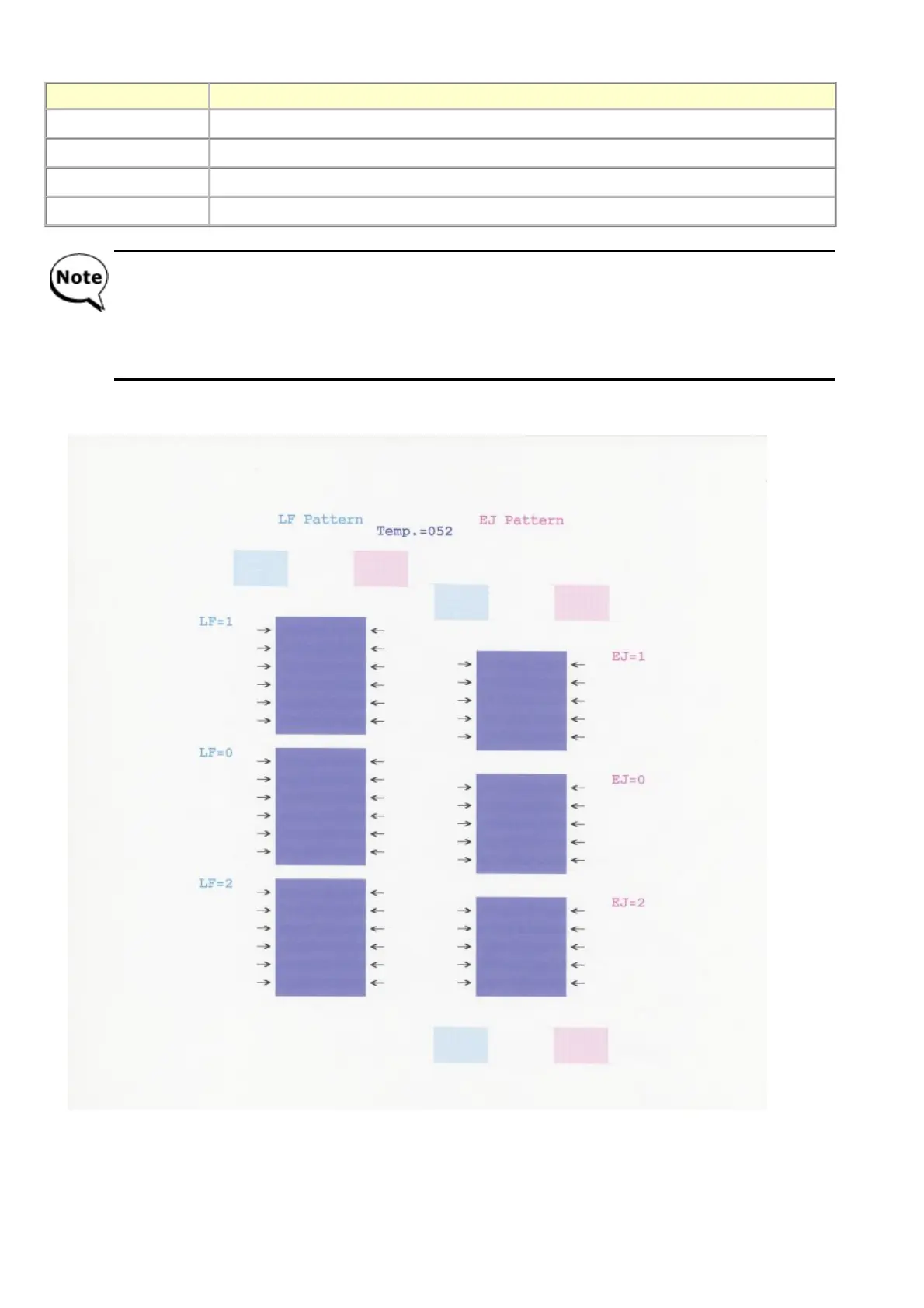
2) The LF / Eject correction pattern for the selected paper is printed. (LF correction values from 0 to 2 on the left, Eject correction
values from 0 to 2 on the right)
Time(s) (L) Paper
1 time HR-101
2 times GF-500, Office Planner
3 times HP BrightWhite
4 times Canon Extra, STEINBEIS
- Each time the Stop/Reset button is pressed, the Alarm and Power LEDs light alternately, Alarm in orange and
Power in blue.
- If the Stop/Reset button is NOT pressed, and only the ON/OFF button is pressed, the machine remains in the
LF / Eject correction mode.
- If the Stop/Reset button is pressed 5 times or more, then the ON/OFF button is pressed, the machine returns to
the service mode menu selection.


 To Next Page