
 Need help?
Do you have a question about the Canon PIXMA TR4651 and is the answer not in the manual?
Explains the meaning of symbols used in the manual for warnings, cautions, notes, and basic operations.
Step-by6y-step guide to enable Wireless Direct functionality on the printer.
Details on using the Wi-Fi Connection Assistant to diagnose and repair network status.
Provides step-by-step instructions on how to launch the Wi-Fi Connection Assistant.
Explains how the Wi-Fi Connection Assistant diagnoses and repairs network issues.
Guides on how to perform and change network settings using the Wi-Fi Connection Assistant.
Step-by-step instructions for replacing the printer's ink cartridges.
Steps to perform maintenance when print results are blurred or unsatisfactory.
Procedure to print the nozzle check pattern to determine ink ejection status.
Instructions for cleaning the print head to resolve missing lines or streaks.
Procedure for deep cleaning the print head when standard cleaning is insufficient.
Guide to adjusting print head position to correct misaligned ruled lines.
Steps to clean the paper feed rollers to resolve feeding issues.
Covers safety precautions, regulatory information, and WEEE directives.
Details on canceling print jobs, storing images, legal restrictions, and printer handling.
Important safety notices and precautions for using the printer.
Guides for modifying printer settings via the computer's printer driver for Windows.
Procedures for changing various printer settings directly from the operation panel.
Advanced fax settings including error reduction, auto redial, and dial tone detection.
Manages Wireless Direct settings like switching, changing name, password, and confirmation.
Performs the firmware update of the printer following on-screen instructions.
Lists various types of Canon and commercially available papers supported by the printer.
Instructions for printing documents from a computer.
Covers essential settings for basic printing using the printer driver.
Basic procedure for performing standard copying operations.
Guides for scanning documents from a Windows computer.
Instructions for scanning using ScanGear, including its features and modes.
Steps to connect the printer to the telephone line and set up basic fax information.
Methods for registering recipients in the printer's directory for easy faxing.
Procedure for sending faxes directly from the printer's operation panel.
Instructions for sending faxes from a Windows computer using the fax driver.
Preparation and procedures for receiving faxes, including receive modes.
Troubleshooting steps for when a fax cannot be sent.
Troubleshooting steps for when the printer cannot dial.
Troubleshooting steps for when the printer does not power on.
Addresses issues where the printer turns off automatically or unexpectedly.
Troubleshooting steps for when the printer is not recognized via USB connection.
Instructions for removing jammed paper from the paper output slot.
Steps to remove jammed paper from the front tray's feed slot.
Procedure for removing jammed paper located inside the printer.
 General
| Duplex printing | Yes |
|---|---|
| Print technology | Inkjet |
| Maximum resolution | 4800 x 1200 DPI |
| Duplex printing mode | Auto |
| Print speed (ISO/IEC 24734) mono | 8.8 ipm |
| Print speed (ISO/IEC 24734) color | 4.4 ipm |
| Time to first page (black, normal) | 11 s |
| Time to first page (color, normal) | 19 s |
| Print speed (black, normal quality, A4/US Letter) | - ppm |
| Ethernet LAN | No |
| Wi-Fi standards | 802.11b, 802.11g, Wi-Fi 4 (802.11n) |
| Security algorithms | WEP, WPA-PSK, WPA2-PSK |
| Mobile printing technologies | Apple AirPrint, Canon Easy-PhotoPrint, Mopria Print Service, PIXMA Cloud Link |
| USB connector | USB Type-B |
| Copier resize | 25 - 400 % |
| Maximum copy resolution | - DPI |
| Maximum number of copies | 99 copies |
| N-in-1 copy function (N=) | 2, 4 |
| Display | LCD |
| Control type | Buttons |
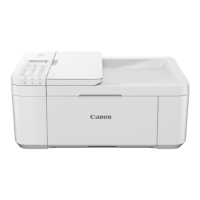
| Product color | White |
| Market positioning | Home & office |
| AC input voltage | 100 - 240 V |
| AC input frequency | 50 - 60 Hz |
| Power consumption (off) | 0.3 W |
| Power consumption (copying) | 7 W |
| Energy Star Typical Electricity Consumption (TEC) | 0.21 kWh/week |
| Operating temperature (T-T) | 5 - 35 °C |
| Operating relative humidity (H-H) | 10 - 90 % |
| Mac operating systems supported | Mac OS X 10.14 Mojave, Mac OS X 10.15 Catalina, Mac OS X 11.0 Big Sur |
| Other operating systems supported | ChromeOS |
| Mobile operating systems supported | Android, iOS, iPadOS |
| Windows operating systems supported | Windows 10, Windows 7, Windows 8 |
| Scanner type | Flatbed & ADF scanner |
| Input color depth | 16 bit |
| Output color depth | 8 bit |
| Optical scanning resolution | 600 x 1200 DPI |
| Faxing | Color faxing |
| Fax memory | 50 pages |
| Modem speed | 33.6 Kbit/s |
| Fax resolution (black) | 300 x 300 DPI |
| Fax resolution (color) | 200 x 200 DPI |
| Fax transmission speed | 3 sec/page |
| Printing colors | Black, Cyan, Magenta, Yellow |
| Duplex functions | Copy, Print, Scan |
| Maximum duty cycle | 1200 pages per month |
| Number of print cartridges | 2 |
| Cables included | AC, Phone |
| Total input capacity | 100 sheets |
| Total output capacity | - sheets |
| Total number of input trays | 1 |
| Auto document feeder (ADF) input capacity | 20 sheets |
| Envelopes sizes | Com-10, DL |
| Photo paper sizes | 10x15, 13x18, 20x25 cm |
| Custom media width | 101.6 - 215.9 mm |
| Custom media length | 152.4 - 676 mm |
| Paper tray media types | Envelopes, Glossy paper, High resolution paper, Matte paper, Photo paper, Plain paper |
| Paper tray media weight | 64 - 105 g/m² |
| Non-ISO print media sizes | Legal (media size), Letter (media size) |
| ISO A-series sizes (A0...A9) | A4, A5, A6 |
| ISO B-series sizes (B0...B9) | B5 |
| Photo paper sizes (imperial) | 4x6, 5x7, 8x10 \ |
| Multi-Purpose Tray media weight | 64 - 300 g/m² |
| Harmonized System (HS) code | 84433100 |
 Weight and Dimensions
| Depth | 295 mm |
|---|---|
| Width | 435 mm |
| Height | 189 mm |





 To Next Page