EasyManua.ls Logo

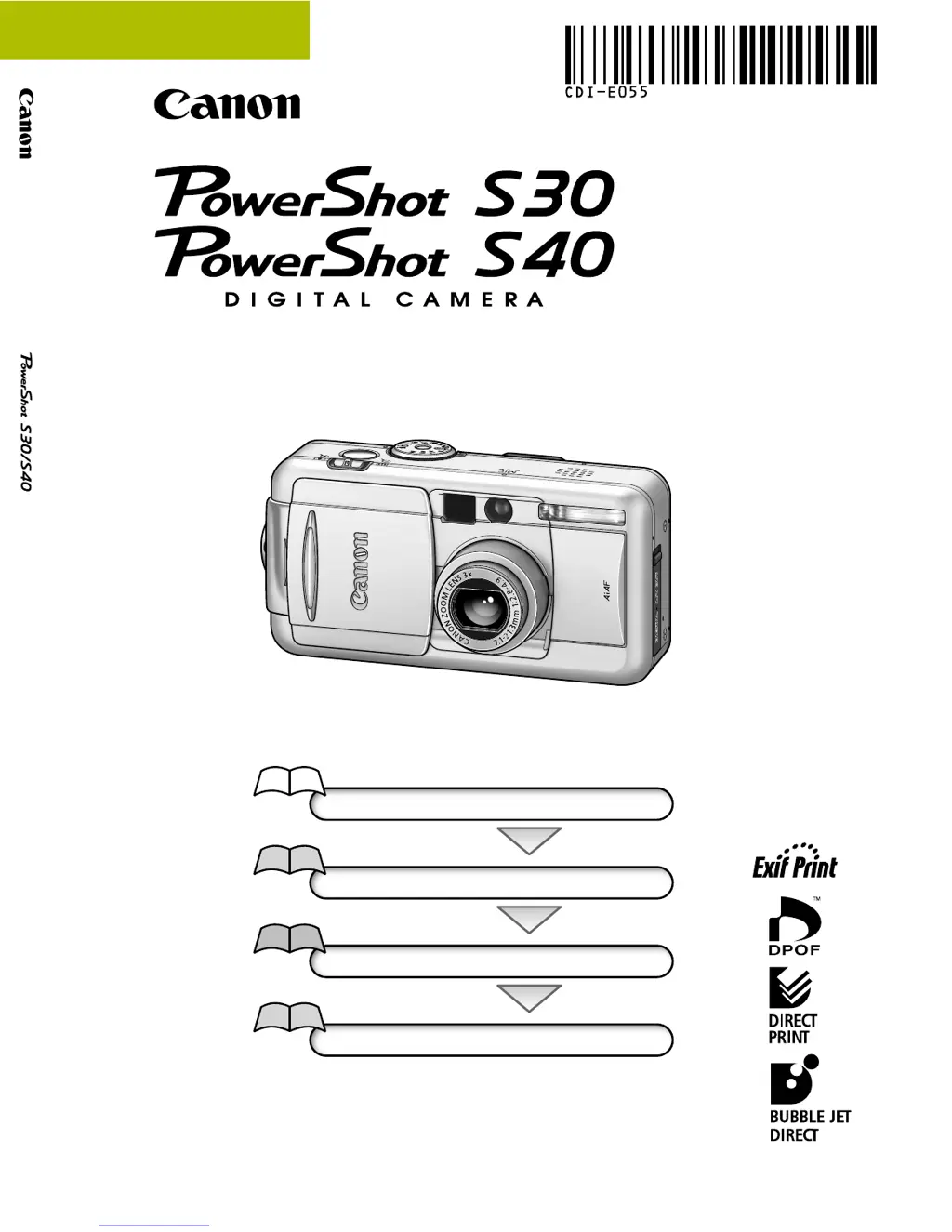
Canon PowerShot S30 - User Manual

Canon PowerShot S30
275 pages
Print Icon
To Next Page IconTo Next Page
Loading...
Flowchart and Reference Guides
This Guide
Shooting with the Camera
Software Starter Guide
Installing the Software
Software Starter Guide
Connecting the Camera to a Computer
Software Starter Guide
Downloading Images to a Computer
Camera User Guide
This guide covers both the PowerShot S30 and PowerShot S40 digital cameras.
Please start by reading the Precaution on the reverse side of this cover.
Please see the User Guide that accompanies each printer.
DIGITAL CAMERA
Camera User Guide
CDI-E055-010 XXXXXXX © 2002 CANON INC. PRINTED IN JAPAN
ENGLISH

Table of Contents

Other manuals for Canon PowerShot S30

Questions and Answers

Summary

Precaution

Camera Body Temperature

Information about camera body warming during prolonged use.

About the LCD Monitor

Details on LCD monitor pixel specifications and potential dots.

Video Format

Instruction to set video signal format for TV output.

Language Setting

Guidance on changing the camera's display language.

Read this First

Safety Precautions

General instructions for safe and correct camera operation.

Quick Start

Charge the Battery

Steps to charge the camera battery using the supplied charger.

Install the Battery

Procedure for inserting the battery pack into the camera.

Install the CF card

Steps for inserting the CF card into the camera.

Components Guide

Front View

Identification of camera controls and features on the front.

Controls

Detailed labeling and explanation of camera buttons and indicators.

Shooting Mode Dial

Explanation of different shooting modes and their functions.

Preparing the Camera

Charging the Battery Pack

Step-by-step guide to recharging the camera battery.

Installing the Battery Pack

Procedure for inserting the battery into the camera.

Installing a CF Card

Steps for inserting the CF card for storage.

Setting the Date; Time

Instructions to set the camera's date and time.

Basic Functions

Turning the Power On; Off

Procedures for powering the camera on and off in different modes.

Switching between Shooting and Replaying

Quick switching between capture and review modes.

Switching the LCD Monitor Display Mode

How to cycle through LCD display options for shooting and replaying.

Pressing the Shutter Button

Explanation of the two-stage shutter button action.

Customizing the Camera (My Camera Settings)

Changing My Camera Settings

How to customize start-up images, sounds, and operations.

Shooting - Letting the Camera Select Settings

Auto Mode

Using the camera's automatic settings for effortless shooting.

Checking an Image Right after Shooting

Ways to review captured images for longer than default display.

Using the Flash

Guide to selecting and using different flash modes.

Movie Mode

Mode for capturing video clips with sound.

Shooting - Selecting Particular Effects

Changing the Resolution and Compression

Adjusting image file size and quality settings before shooting.

Changing the File Format

Switching between JPEG and RAW file formats for image capture.

Program AE

Camera automatically sets shutter speed and aperture for scene brightness.

Av Setting the Aperture

Prioritizing aperture for depth of field control.

M Manually Setting the Shutter Speed and Aperture

Manual control over exposure settings for precise adjustments.

Adjusting the Exposure Compensation

Modifying exposure to correct brightness in challenging lighting.

WB Setting the White Balance

Adjusting white balance for accurate color reproduction under different light sources.

Replaying

Viewing Images Singly (Single Image Replay)

How to view recorded images one by one on the LCD monitor.

Magnifying Images

Zooming in on images during replay for detailed inspection.

Viewing Movies

Playing back recorded movie clips.

Automated Playback (Slide Show)

Displaying images automatically in a slideshow format.

Protecting Images

Preventing accidental deletion of important images.

Erasing

Erasing Images Singly

Deleting individual images from the CF card.

Formatting a CF Card

Initializing the CF card, erasing all data.

Print Settings (DPOF Print Settings)

Selecting Images for Printing

Choosing specific images and number of copies for printing.

Setting the Print Style

Configuring print options like date, file number, and borders.

Printing with a Direct Print Compatible Printer (Optional)

Connecting a Direct Print Compatible Printer to the Camera

Steps to connect the camera to a compatible printer.

Printing

Procedures for printing images directly from the camera.

Image Transfer Settings (DPOF Transfer Order)

Selecting Images for Transferring

Marking images for transfer or email via software.

List of Menu Options

Rec. Menu

Details of settings available in the Record menu.

Play Menu

Details of settings available in the Play menu.

Set up Menu

Details of settings available in the Setup menu.

My Camera Menu

Details of settings for customizing camera sounds and images.

Shooting; Replaying with a TV Monitor

Shooting; Replaying with a TV Monitor

Connecting the camera to a TV for viewing images and shooting.

Appendices

Camera Care and Maintenance

Procedures for cleaning and maintaining the camera body and lens.

Troubleshooting

Solutions for common camera operational problems.

List of Messages

Explanations of error and status messages displayed on the LCD.

Specifications

Specifications (continued)

Technical data and features of the camera and accessories.

Specifications (continued)

Technical data and features of the camera and accessories.

Specifications (continued)

Technical data and features of the camera and accessories.

Specifications (continued)

Technical data and features of the camera and accessories.

FCC Notice

Precautions

General advice on using Canon accessories and non-Canon accessories.

SAFETY PRECAUTIONS

Warnings

Topics that could lead to death or serious injury if ignored.

Disclaimer

Legal statement regarding liability for errors and omissions.

Read Me First (Windows; Macintosh)

A Guide to the Manuals

Overview of the manuals provided with the software.

What Can Be Accomplished with the Software

Introduction to the capabilities of the included software programs.

System Requirements

Minimum computer specifications needed to run the software.

System Requirements

Windows

Minimum system requirements for Windows OS.

Macintosh

Minimum system requirements for Macintosh OS.

Connecting the Camera to a Computer

Selecting a Downloading Method

Choosing between USB or card reader for image transfer.

Connecting to a USB Port

Step-by-step guide for connecting the camera via USB.

Connecting to a CF Card Reader or PC Card Reader

Procedure for downloading images using a card reader.

Using the Software on the Windows Platform

Installing;Uninstalling the Software

Steps to install and remove software and drivers.

Downloading Images to a Computer

Steps to transfer images from the camera to the computer.

ZoomBrowser EX Features

Overview of additional features and functions within ZoomBrowser EX.

Using the Software on the Macintosh Platform

Installing;Uninstalling the Software

Steps to install and remove software and drivers.

Downloading Images to a Computer

Steps to transfer images from the camera to the computer.

ImageBrowser Features

Overview of additional features and functions within ImageBrowser.

Troubleshooting (Windows; Macintosh)

ZoomBrowser EX displays a database file related error message (E_Fail error, etc.) (Windows only)

Troubleshooting for database corruption errors in ZoomBrowser EX.

ArcSoft Customer Support

North America

Contact information for ArcSoft customer support in North America.

Summary

Precaution

Camera Body Temperature

Information about camera body warming during prolonged use.

About the LCD Monitor

Details on LCD monitor pixel specifications and potential dots.

Video Format

Instruction to set video signal format for TV output.

Language Setting

Guidance on changing the camera's display language.

Read this First

Safety Precautions

General instructions for safe and correct camera operation.

Quick Start

Charge the Battery

Steps to charge the camera battery using the supplied charger.

Install the Battery

Procedure for inserting the battery pack into the camera.

Install the CF card

Steps for inserting the CF card into the camera.

Components Guide

Front View

Identification of camera controls and features on the front.

Controls

Detailed labeling and explanation of camera buttons and indicators.

Shooting Mode Dial

Explanation of different shooting modes and their functions.

Preparing the Camera

Charging the Battery Pack

Step-by-step guide to recharging the camera battery.

Installing the Battery Pack

Procedure for inserting the battery into the camera.

Installing a CF Card

Steps for inserting the CF card for storage.

Setting the Date; Time

Instructions to set the camera's date and time.

Basic Functions

Turning the Power On; Off

Procedures for powering the camera on and off in different modes.

Switching between Shooting and Replaying

Quick switching between capture and review modes.

Switching the LCD Monitor Display Mode

How to cycle through LCD display options for shooting and replaying.

Pressing the Shutter Button

Explanation of the two-stage shutter button action.

Customizing the Camera (My Camera Settings)

Changing My Camera Settings

How to customize start-up images, sounds, and operations.

Shooting - Letting the Camera Select Settings

Auto Mode

Using the camera's automatic settings for effortless shooting.

Checking an Image Right after Shooting

Ways to review captured images for longer than default display.

Using the Flash

Guide to selecting and using different flash modes.

Movie Mode

Mode for capturing video clips with sound.

Shooting - Selecting Particular Effects

Changing the Resolution and Compression

Adjusting image file size and quality settings before shooting.

Changing the File Format

Switching between JPEG and RAW file formats for image capture.

Program AE

Camera automatically sets shutter speed and aperture for scene brightness.

Av Setting the Aperture

Prioritizing aperture for depth of field control.

M Manually Setting the Shutter Speed and Aperture

Manual control over exposure settings for precise adjustments.

Adjusting the Exposure Compensation

Modifying exposure to correct brightness in challenging lighting.

WB Setting the White Balance

Adjusting white balance for accurate color reproduction under different light sources.

Replaying

Viewing Images Singly (Single Image Replay)

How to view recorded images one by one on the LCD monitor.

Magnifying Images

Zooming in on images during replay for detailed inspection.

Viewing Movies

Playing back recorded movie clips.

Automated Playback (Slide Show)

Displaying images automatically in a slideshow format.

Protecting Images

Preventing accidental deletion of important images.

Erasing

Erasing Images Singly

Deleting individual images from the CF card.

Formatting a CF Card

Initializing the CF card, erasing all data.

Print Settings (DPOF Print Settings)

Selecting Images for Printing

Choosing specific images and number of copies for printing.

Setting the Print Style

Configuring print options like date, file number, and borders.

Printing with a Direct Print Compatible Printer (Optional)

Connecting a Direct Print Compatible Printer to the Camera

Steps to connect the camera to a compatible printer.

Printing

Procedures for printing images directly from the camera.

Image Transfer Settings (DPOF Transfer Order)

Selecting Images for Transferring

Marking images for transfer or email via software.

List of Menu Options

Rec. Menu

Details of settings available in the Record menu.

Play Menu

Details of settings available in the Play menu.

Set up Menu

Details of settings available in the Setup menu.

My Camera Menu

Details of settings for customizing camera sounds and images.

Shooting; Replaying with a TV Monitor

Shooting; Replaying with a TV Monitor

Connecting the camera to a TV for viewing images and shooting.

Appendices

Camera Care and Maintenance

Procedures for cleaning and maintaining the camera body and lens.

Troubleshooting

Solutions for common camera operational problems.

List of Messages

Explanations of error and status messages displayed on the LCD.

Specifications

Specifications (continued)

Technical data and features of the camera and accessories.

Specifications (continued)

Technical data and features of the camera and accessories.

Specifications (continued)

Technical data and features of the camera and accessories.

Specifications (continued)

Technical data and features of the camera and accessories.

FCC Notice

Precautions

General advice on using Canon accessories and non-Canon accessories.

SAFETY PRECAUTIONS

Warnings

Topics that could lead to death or serious injury if ignored.

Disclaimer

Legal statement regarding liability for errors and omissions.

Read Me First (Windows; Macintosh)

A Guide to the Manuals

Overview of the manuals provided with the software.

What Can Be Accomplished with the Software

Introduction to the capabilities of the included software programs.

System Requirements

Minimum computer specifications needed to run the software.

System Requirements

Windows

Minimum system requirements for Windows OS.

Macintosh

Minimum system requirements for Macintosh OS.

Connecting the Camera to a Computer

Selecting a Downloading Method

Choosing between USB or card reader for image transfer.

Connecting to a USB Port

Step-by-step guide for connecting the camera via USB.

Connecting to a CF Card Reader or PC Card Reader

Procedure for downloading images using a card reader.

Using the Software on the Windows Platform

Installing;Uninstalling the Software

Steps to install and remove software and drivers.

Downloading Images to a Computer

Steps to transfer images from the camera to the computer.

ZoomBrowser EX Features

Overview of additional features and functions within ZoomBrowser EX.

Using the Software on the Macintosh Platform

Installing;Uninstalling the Software

Steps to install and remove software and drivers.

Downloading Images to a Computer

Steps to transfer images from the camera to the computer.

ImageBrowser Features

Overview of additional features and functions within ImageBrowser.

Troubleshooting (Windows; Macintosh)

ZoomBrowser EX displays a database file related error message (E_Fail error, etc.) (Windows only)

Troubleshooting for database corruption errors in ZoomBrowser EX.

ArcSoft Customer Support

North America

Contact information for ArcSoft customer support in North America.

Canon PowerShot S30 Specifications

General IconGeneral
Camera TypeCompact
Max Resolution2048 x 1536
Image Ratio w:h4:3
Effective Pixels3.2 MP
Sensor TypeCCD
ISOAuto, 50, 100, 200, 400
Optical Zoom3x
Digital Zoom3.2x
Focal Length (equiv.)35 - 105 mm
Aperture MaxF2.8 - F4.9
Screen Size1.8"
Screen Dots114, 000
Max Shutter Speed1/2000 sec
Min Shutter Speed15 sec
Weight260 g
Video Resolution320 x 240
Image StabilizationNo
Sensor Size1/1.8 inch
Storage TypesCompactFlash (Type I)
Storage MediaCF Type I

Related product manuals