EasyManua.ls Logo

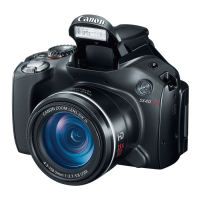
Canon POWERSHOT SX40HS - User Manual

Canon POWERSHOT SX40HS
219 pages
Print Icon
To Next Page IconTo Next Page
Loading...
Camera User Guide
ENGLISH
Make sure you read this guide, including the “Safety
Precautions” section, before using the camera.
Reading this guide will help you learn to use the camera
properly.
Store this guide safely so that you can use it in the future.

Table of Contents

Other manuals for Canon POWERSHOT SX40HS

Question and Answer IconNeed help?

Do you have a question about the Canon POWERSHOT SX40HS and is the answer not in the manual?

Summary

Read This First

Safety Precautions

Getting Started

Charging the Battery

Step-by-step instructions for charging the camera battery using the included charger.

Inserting the Battery and Memory Card

Guide on how to properly insert the battery pack and memory card into the camera.

Setting the Date and Time

Instructions for setting the camera's date, time, and home time zone for accurate image data.

Taking Pictures (Smart Auto)

Shooting Movies

Transferring Images to a Computer for Viewing

Shooting with Commonly Used Functions

Using the Self-Timer

Adding Effects and Shooting in Various Conditions

Shooting in Special Scenes

Guide to using special scene modes like Portrait, Landscape, and NightScene.

Detecting a Face and Shooting (Smart Shutter)

Detecting a Smile and Shooting

Using Smart Shutter to automatically shoot when a smile is detected.

High-Speed Continuous Shooting (High-speed Burst HQ)

Choosing Settings Yourself

Shooting in Program AE

Guidance on using Program AE mode for flexible shooting and exposure adjustments.

Adjusting the White Balance

Changing the ISO Speed

Continuous Shooting

Changing the AF Frame Mode

Choosing the Subject to Focus On (Tracking AF)

Shooting in Manual Focus Mode

Shooting with the AE Lock

Auto Exposure Bracketing (AEB Mode)

Adjusting the Flash Exposure Compensation

Getting More Out of Your Camera

Setting the Shutter Speed

Instructions for setting the shutter speed in Tv mode for creative control.

Setting the Aperture Value

Guidance on setting the aperture value in Av mode for depth of field control.

Using Various Functions for Shooting Movies

Shooting Movies in E Mode

How to shoot movies in Movie mode and change different movie settings.

Using Various Playback and Editing Functions

Checking the Focus

Magnifying Images

Protecting Images

Erasing Images

Choosing Images Individually

Guide on selecting and erasing individual images.

Correcting the Brightness (i-Contrast)

Correcting the Red-Eye Effect

Printing

Easy Print

Instructions for easily printing images by connecting the camera to a PictBridge printer.

Printing Images

Choosing Images for Printing (DPOF)

Customizing Camera Settings

Changing Camera Settings

Low Level Memory Card Formatting

Procedure for performing low-level formatting on memory cards.

Changing Camera Settings

Changing Shooting Function Settings

Changing the IS-Mode Settings

Instructions for adjusting image stabilization settings.

Changing Shooting Function Settings

Registering Commonly Used Shooting Menus (My Menu)

Viewing Images on a TV

Using an Externally Mounted Flash (Sold Separately)

Using an Eye-Fi Card

Troubleshooting

Power

Troubleshooting steps for power-related issues like the camera not turning on.

Shooting

Solutions for common shooting problems like inability to shoot or screen issues.

List of Messages That Appear on the Screen

Information Displayed on the Screen

Functions and Menu Lists

Handling Precautions

Separately Sold Accessories

Summary

Read This First

Safety Precautions

Getting Started

Charging the Battery

Step-by-step instructions for charging the camera battery using the included charger.

Inserting the Battery and Memory Card

Guide on how to properly insert the battery pack and memory card into the camera.

Setting the Date and Time

Instructions for setting the camera's date, time, and home time zone for accurate image data.

Taking Pictures (Smart Auto)

Shooting Movies

Transferring Images to a Computer for Viewing

Shooting with Commonly Used Functions

Using the Self-Timer

Adding Effects and Shooting in Various Conditions

Shooting in Special Scenes

Guide to using special scene modes like Portrait, Landscape, and NightScene.

Detecting a Face and Shooting (Smart Shutter)

Detecting a Smile and Shooting

Using Smart Shutter to automatically shoot when a smile is detected.

High-Speed Continuous Shooting (High-speed Burst HQ)

Choosing Settings Yourself

Shooting in Program AE

Guidance on using Program AE mode for flexible shooting and exposure adjustments.

Adjusting the White Balance

Changing the ISO Speed

Continuous Shooting

Changing the AF Frame Mode

Choosing the Subject to Focus On (Tracking AF)

Shooting in Manual Focus Mode

Shooting with the AE Lock

Auto Exposure Bracketing (AEB Mode)

Adjusting the Flash Exposure Compensation

Getting More Out of Your Camera

Setting the Shutter Speed

Instructions for setting the shutter speed in Tv mode for creative control.

Setting the Aperture Value

Guidance on setting the aperture value in Av mode for depth of field control.

Using Various Functions for Shooting Movies

Shooting Movies in E Mode

How to shoot movies in Movie mode and change different movie settings.

Using Various Playback and Editing Functions

Checking the Focus

Magnifying Images

Protecting Images

Erasing Images

Choosing Images Individually

Guide on selecting and erasing individual images.

Correcting the Brightness (i-Contrast)

Correcting the Red-Eye Effect

Printing

Easy Print

Instructions for easily printing images by connecting the camera to a PictBridge printer.

Printing Images

Choosing Images for Printing (DPOF)

Customizing Camera Settings

Changing Camera Settings

Low Level Memory Card Formatting

Procedure for performing low-level formatting on memory cards.

Changing Camera Settings

Changing Shooting Function Settings

Changing the IS-Mode Settings

Instructions for adjusting image stabilization settings.

Changing Shooting Function Settings

Registering Commonly Used Shooting Menus (My Menu)

Viewing Images on a TV

Using an Externally Mounted Flash (Sold Separately)

Using an Eye-Fi Card

Troubleshooting

Power

Troubleshooting steps for power-related issues like the camera not turning on.

Shooting

Solutions for common shooting problems like inability to shoot or screen issues.

List of Messages That Appear on the Screen

Information Displayed on the Screen

Functions and Menu Lists

Handling Precautions

Separately Sold Accessories

Canon POWERSHOT SX40HS Specifications

General IconGeneral
BrandCanon
ModelPOWERSHOT SX40HS
CategoryDigital Camera
LanguageEnglish

Related product manuals