
 Need help?
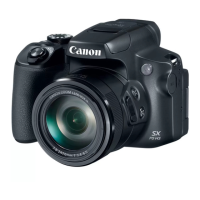
Do you have a question about the Canon PowerShot SX70 HS and is the answer not in the manual?
Initial setup steps including attaching the strap and charging the battery.
Utilizing automatic modes for simplified shooting based on scene analysis.
How to browse and display captured photos and movies.
Transferring photos and videos to a smartphone for sharing or backup.
Solutions for problems related to camera power and battery performance.
Guidance for resolving common problems encountered during shooting.
Safety guidelines and considerations when using the camera's wireless functions.
 General
| Image Processor | DIGIC 8 |
|---|---|
| Optical Zoom | 65x |
| Aperture | f/3.4 (W) - f/6.5 (T) |
| Connectivity | Wi-Fi, Bluetooth |
| Shutter Speed | 15 - 1/2000 sec |
| Built-in Flash | Yes |
| Sensor | 1/2.3-inch CMOS |
| Focal Length | 3.8-247mm (35mm equivalent: 21-1365mm) |
| Video Resolution | 4K UHD at 30p |
| Viewfinder | 0.39-type OLED Electronic Viewfinder |
| LCD Screen | 3.0-inch Vari-angle LCD |
| Battery | LP-E12 |
| Dimensions | 127.1 x 90.9 x 116.6 mm |
| Weight | Approx. 610g (including battery and memory card) |
| ISO Sensitivity | ISO 100-3200 (expandable to 6400) |
| Continuous Shooting | 10 fps |
| Ports | HDMI, USB |
| Image Stabilization | Yes (Optical) |








 To Next Page