
 Need help?
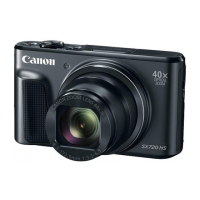
Do you have a question about the Canon PowerShot SX710 HS and is the answer not in the manual?
Overview of the Wi-Fi image transfer process, outlining four key steps.
Verify computer requirements, Wi-Fi router connection, and CameraWindow software installation.
Adjust computer settings for wireless image transfer, including OS-specific configurations for Windows.
Connect the camera to the computer wirelessly using WPS, network list, or manual settings.
Use CameraWindow software to import images from the camera to your computer.
 General
| Megapixel | 21.1 MP |
|---|---|
| Camera type | Compact camera |
| Sensor type | CMOS |
| Image stabilizer | Yes |
| Image sensor size | 1/2.3 \ |
| Image formats supported | JPG, RAW |
| Supported aspect ratios | 1:1, 3:2, 4:3, 16:9 |
| Maximum image resolution | 5184 x 3456 pixels |
| Still image resolution(s) | 5184 x 2912\\r 5184 x 3456\\r 5184 x 3888\\r 3888 x 3888\\r 2592 x 1944\\r 3648 x 2048\\r 3648 x 2432\\r 3648 x 2736\\r 2736 x 2736\\r 1920 x 1080\\r 2048 x 1368\\r 2048 x 1536\\r 1536 x 1536\\r 640 x 360\\r 640 x 424\\r 640 x 480\\r 480 x 480 |
| Digital zoom | 4 x |
| Optical zoom | 30 x |
| Combined zoom | 120 x |
| Focal length range | 4.5 - 135 mm |
| Maximum aperture number | 6.9 |
| Minimum aperture number | 3.2 |
| Maximum focal length (35mm film equiv) | 750 mm |
| Minimum focal length (35mm film equiv) | 25 mm |
| Focus | TTL |
| Focus adjustment | Auto/Manual |
| Normal focusing range | 0.05 - ∞, 1.4 - ∞ m |
| Normal focusing range (tele) | 0.4 - ∞ m |
| Normal focusing range (wide) | 0.05 - ∞ m |
| Auto Mode focusing range (tele) | 1.4 - ∞ m |
| Auto Mode focusing range (wide) | 0.01 - ∞ m |
| Light metering | Centre-weighted, Evaluative (Multi-pattern), Spot |
| ISO sensitivity | 80, 3200, Auto |
| Light exposure modes | Auto, Manual |
| ISO sensitivity (max) | 3200 |
| ISO sensitivity (min) | 80 |
| Light exposure correction | ± 2EV (1/3EV step) |
| Fastest camera shutter speed | 1/3200 s |
| Slowest camera shutter speed | 15 s |
| Flash modes | Auto, Flash off, Flash on, Red-eye reduction, Slow synchronization |
| Flash range (tele) | 1.4 - 2 m |
| Flash range (wide) | 0.5 - 3.5 m |
| Flash recharging time | 10 s |
| Flash exposure correction | ±2EV (1/3 EV step) |
| Video resolutions | 640 x 480, 1280 x 720, 1920 x 1080 pixels |
| Motion JPEG frame rate | 30 fps |
| Video formats supported | AVC, H.264, MP4, MPEG4 |
| Maximum video resolution | 1920 x 1080 pixels |
| Analog signal format system | NTSC, PAL |
| Resolution at capture speed | 1920x1080@30fps, 1920x1080@60fps |
| Audio formats supported | LC-AAC |
| Memory slots | 1 |
| Internal memory | - MB |
| Compatible memory cards | SD, SDHC, SDXC |
| Field of view | 100 % |
| Display diagonal | 3 \ |
| Display aspect ratio | 4:3 |
| Vari-angle LCD display | No |
| Display resolution (numeric) | 922000 pixels |
| USB version | - |
| Scene modes | Fireworks, Night, Portrait, Snow, Sports |
| Photo effects | Black&White, Sepia, Skin tones, Vivid |
| White balance | Auto, Cloudy, Custom modes, Daylight, Fluorescent, Fluorescent H, Tungsten |
| Camera playback | Movie, Single image, Slide show |
| Self-timer delay | 2, 10 s |
| Camera file system | DPOF 1.1, Exif 2.3 |
| Power source type | Battery |
| Battery type | NB-6LH |
| Battery life (CIPA standard) | 315 shots |
| Product color | Black |
| Operating temperature (T-T) | 0 - 40 °C |
| Operating relative humidity (H-H) | 10 - 90 % |
 Weight and Dimensions
| Depth | 34.8 mm |
|---|---|
| Width | 112.7 mm |
| Height | 65.8 mm |
| Weight | 245 g |
| Weight (including battery) | 269 g |







 To Next Page
