
 Need help?
Do you have a question about the Canon PowerShot SX740 HS and is the answer not in the manual?
Details package contents and compatible memory cards.
Covers important notes, warranty, and screen specifications.
Explains icons, button representations, and text conventions used in the guide.
Identifies and labels external and internal camera components and their functions.
Covers basic shooting, people photography, scene matching, and special effects.
Provides critical safety warnings for product operation and handling to prevent injury or damage.
Steps for preparing the camera before shooting, including strap attachment and holding.
Guides on battery charging, insertion, removal, and memory card handling.
Covers setting the date, time, time zone, and display language.
Instructions for initial camera use, viewing images, and basic deletion.
Explains basic camera functions like on/off, shutter, modes, and display settings.
Explores various shooting modes for specific scenes and effects like food or self-portraits.
Guides on using Program AE (P Mode) for customizable shooting with auto exposure.
Explains manual control over shutter speed, aperture, and exposure for advanced photography.
Details how to view, browse, protect, and erase still images and movies.
Explains connecting to smartphones, computers, and printers wirelessly.
Describes how to adjust basic camera functions, power saving, and screen settings.
Lists accessories, system map, and guides for formatting memory cards and using software.
Provides troubleshooting, error codes, specifications, handling precautions, and legal disclaimers.
 General
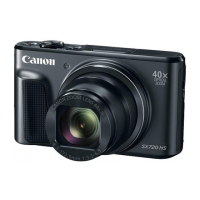
| Sensor | CMOS |
|---|---|
| Sensor Size | 1/2.3 inch |
| Image Processor | DIGIC 8 |
| Optical Zoom | 40x |
| Focal Length | 4.3 - 172.0mm (35mm equivalent: 24-960mm) |
| Digital Zoom | 4x |
| ISO Range | 100-3200 |
| LCD Screen Resolution | 922, 000 dots |
| Connectivity | Wi-Fi, Bluetooth |
| Battery | NB-13L |
| Weight | 299 g (including battery and memory card) |
| Dimensions | 110.1 x 63.8 x 39.9 mm |
| Aperture | f/3.3 (W) - f/6.9 (T) |
| Image Stabilization | Optical |
| Continuous Shooting | 10 fps |
| LCD Screen | 3.0-inch |
| Video Resolution | 4K UHD (3840 x 2160) |








 To Next Page
