Inserting and
Removing Batteries
1.
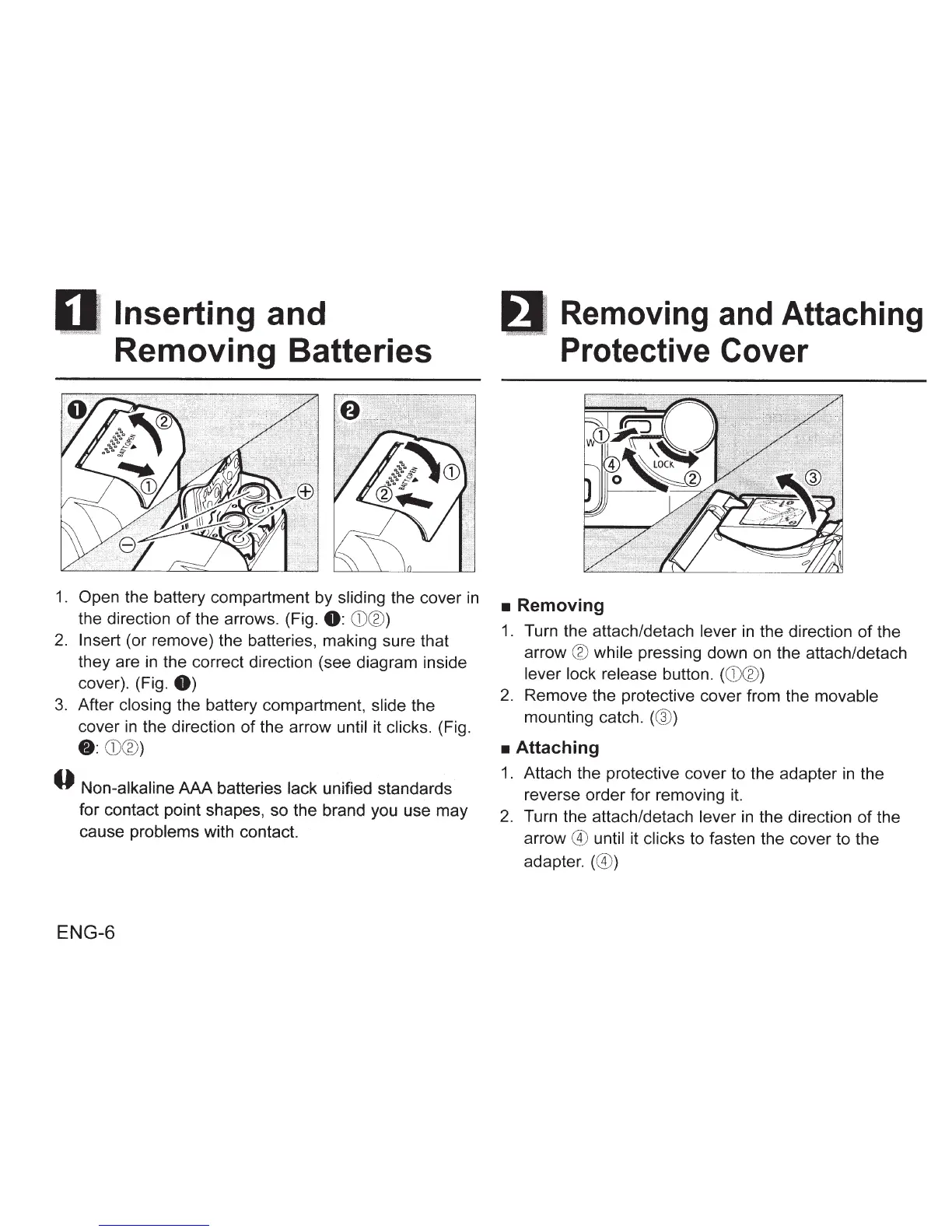
Open the battery compartment by sliding the cover
in
the direction
of
the arrows. (Fig.
0:
CD®
)
2.
Insert (or remove) the batteries, making sure that
they are
in
the correct direction (see diagram inside
cover). (Fig.
0)
3.
After
closing
the battery compartment, slide the
cover
in
the direction
of
the arrow until it clicks. (Fig.
8:
CD®
)
0 Non-alkaline
AAA
batteries lack unified standards
for contact point shapes, so the brand you use may
cause problems with contact.
ENG-6
Removing
and
Attaching
Protective Cover
•
Removing
1. Turn the attach/detach lever
in
the direction
of
the
arrow
®
while pressing down on the attach/detach
lever lock release button.
(CD®)
2. Remove the protective cover from the movable
mounting catch.
(@)
•
Attaching
1. Attach the protective cover to the adapter
in
the
reverse order for removing it.
2.
Turn the attach/detach lever
in
the direction
of
the
arrow
@
until it
clicks
to fasten the cover to the
adapter.
(@)









 To Next Page